How do I use the Modern Office Professional Portrait template?
Choose the primary action to open PicX Studio with the available template settings. Review the model and format, personalize the creative direction, and generate when ready.
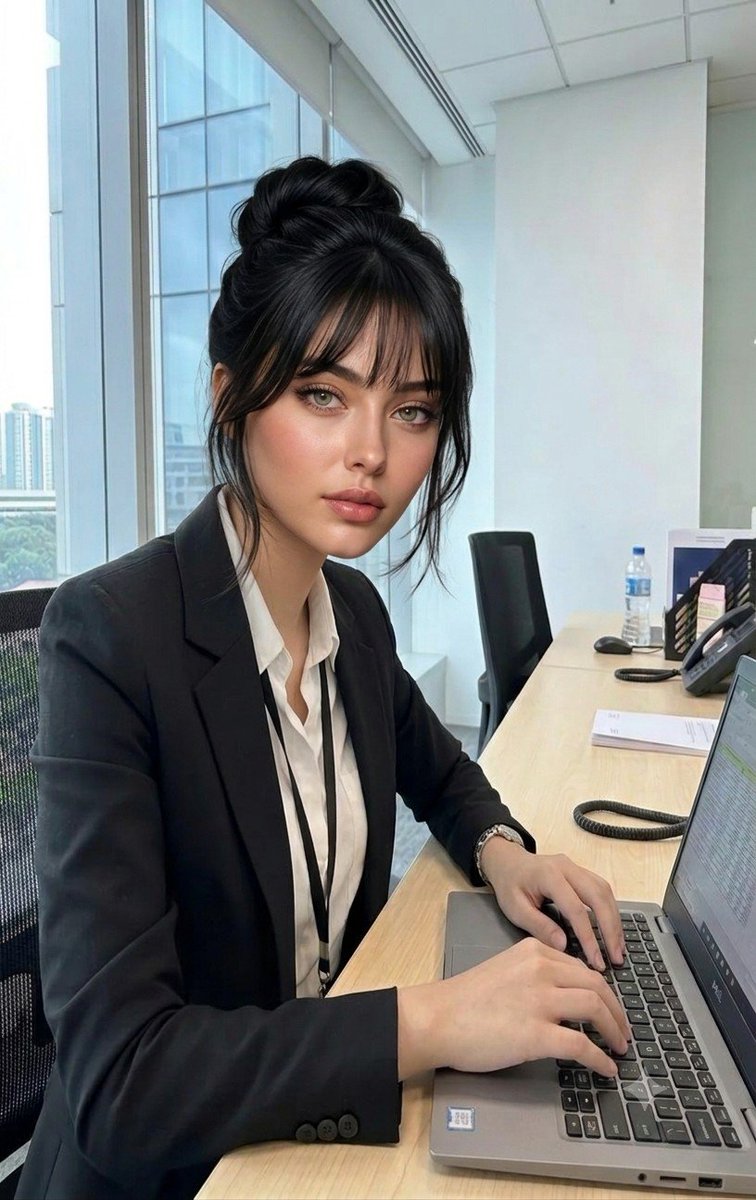
A prompt for a professional photograph of a woman in an office setting, featuring specific hair styling and composition consistent with a reference image. (free to use) — Free AI image template on PicX Studio.
A professional photograph of the woman from the {argument name="source" default="second image"}, now with a trendy {argument name="hairstyle" default="Korean-style"} featuring soft, wispy see-through bangs framing her face and her dark hair styled in an elegant high bun with loose strands. She has the same facial features, light hazel-green eyes, and subtle makeup. She is sitting in a modern office, wearing a sharp black blazer over a white shirt with an ID lanyard, typing on a laptop at a long wooden desk. The background shows a bright office with large glass windows and office chairs, maintaining the exact angle, lighting, and composition of the office scene.
Use Modern Office Professional Portrait to plan an AI image around nano-banana-2 generation. Match the preview's composition first, then personalize the subject, setting, and mood for your own project.
Use the primary action to load the template settings in PicX Studio.
Adjust the subject and creative details for your destination.
Create the image, compare the result with the preview, and refine one variable at a time.
A continuous mix — similar concepts first, woven with same-model prompts and fresh picks from the catalog.
Choose the primary action to open PicX Studio with the available template settings. Review the model and format, personalize the creative direction, and generate when ready.
Yes. You can change the subject, setting, lighting, mood, format, and available model controls before creating your image.
This template is free to open and customize. Generation usage is shown in PicX Studio before you create.
Start with nano-banana-2, which is the model associated with this template. You can compare another compatible model for a different finish.
A continuous mix — similar concepts first, woven with same-model prompts and fresh picks from the catalog.
Follow a topic to a crawlable collection of related PicX Studio templates.
32,032 public templates available. Verified via the PicX Studio public templates API; refreshed hourly.


