How do I use the BMW M5 Automotive Fashion Photography template?
Choose the primary action to open PicX Studio with the available template settings. Review the model and format, personalize the creative direction, and generate when ready.
A detailed automotive and street fashion prompt featuring a subject with a BMW M5 under moody storm clouds with professional camera settings.
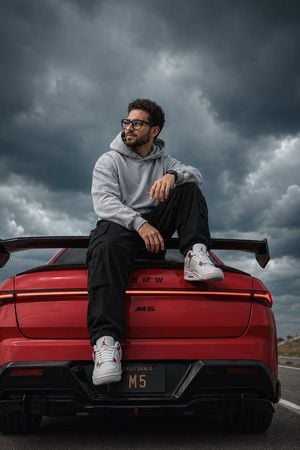
Ultra-realistic cinematic portrait of the same man from the uploaded reference image, preserving his facial identity, curly dark hair, neatly trimmed beard, warm smile, medium skin tone, and glossy black-rimmed square eyeglasses. He is sitting casually on the rear deck of a red high-performance BMW M5 with a large rear wing, parked on an open road beneath dramatic storm clouds. He wears a light gray oversized hoodie, loose black cargo pants, glossy black-rimmed round eyeglasses with smoky semi-translucent lenses that slightly obscure his eyes, and white retro basketball sneakers with red accents. One knee is raised while the other foot hangs naturally over the rear bumper. He looks confidently off into the distance with a thoughtful expression. The composition features a direct rear view of the BMW, showcasing its continuous red LED light strip, bold black 'BMW' lettering, italicized 'M5' emblem, aggressive rear diffuser, and a California license plate reading 'M5' partially obscured by shadow. Low-angle perspective near bumper height makes the subject appear powerful and larger than life. Moody overcast lighting with soft natural shadows. Massive dark blue-gray storm clouds dominate the background. Premium automotive photography blended with editorial street-fashion aesthetics. Highly detailed skin texture, realistic curly hair, premium streetwear styling, glossy red paint reflections, crisp taillights, shallow depth of field, subtle teal-and-orange cinematic color grading, dramatic contrast, ultra-sharp focus, photorealistic, HDR, 8K, professional commercial photography, magazine cover quality. negative_prompt: low quality, blurry, cartoon, anime, CGI, illustration, painting, deformed anatomy, extra limbs, duplicate body parts, bad hands, bad fingers, crossed eyes, distorted face, low resolution, watermark, logo, text, oversaturated colors, noise, artifacts, cropped subject, out of frame, unrealistic reflections, poor lighting, motion blur. style: photorealistic. camera: model: Sony A7R V, lens: 35mm, aperture: f/2.8, iso: 100, shutter_speed: 1/800. composition: orientation: vertical, aspect_ratio: 2:3, camera_angle: low-angle near bumper height, subject_position: center slightly left, car_position: fills lower half of frame, background: storm clouds dominate upper half, depth_of_field: shallow. lighting: type: natural storm light, quality: diffused sunlight through clouds, mood: cinematic, moody, shadows: soft and clean, highlights: subtle. color_palette: red, charcoal, gray, black, muted blue, white. quality: resolution: 8K, hdr: true, detail: ultra.
Choose the primary action to open PicX Studio with the available template settings. Review the model and format, personalize the creative direction, and generate when ready.
Yes. You can change the subject, setting, lighting, mood, format, and available model controls before creating your image.
This template is free to open and customize. Generation usage is shown in PicX Studio before you create.
Start with GPT Image 2, which is the model associated with this template. You can compare another compatible model for a different finish.
Follow a topic to a crawlable collection of related PicX Studio templates.