How do I use the Quiet Anime Schoolgirl Holding Tea template?
Choose the primary action to open PicX Studio with the available template settings. Review the model and format, personalize the creative direction, and generate when ready.
A soft muted anime portrait of a pensive schoolgirl in a beige cardigan holding a glass of tea, useful for character illustration prompts.
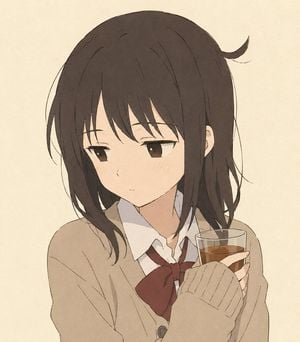
Create a soft, understated anime-style portrait of a teenage schoolgirl in a quiet candid moment. She has {argument name="hair color" default="dark brown"} medium-length slightly messy hair with long bangs falling over her forehead, a few loose strands around her face, and one small outward flick of hair near the upper right side of her head. Her eyes are half-lidded and tired-looking, colored deep brown, with a neutral, mildly pensive expression and faint blush marks on her cheeks. She is shown from the chest up, turned slightly to the viewer’s right while looking down-left, holding a clear glass tumbler of amber tea close to her chest with both hands. She wears a Japanese school uniform: a white collared shirt, a {argument name="ribbon color" default="dark red"} bow ribbon at the neck, and an oversized {argument name="cardigan color" default="warm beige"} knit cardigan with long sleeves covering part of her hands; include one visible dark button near the lower center. The composition is simple and intimate, with the character centered slightly left on a plain warm cream background. Use a delicate hand-drawn 2D anime illustration style with thin sketchy linework, muted earthy colors, soft cel shading, subtle paper-like grain texture, low contrast, and no text or decorative elements. Keep the mood calm, melancholic, and natural, avoiding glossy highlights, hyperrealism, or overly polished digital effects.
Choose the primary action to open PicX Studio with the available template settings. Review the model and format, personalize the creative direction, and generate when ready.
Yes. You can change the subject, setting, lighting, mood, format, and available model controls before creating your image.
This template is free to open and customize. Generation usage is shown in PicX Studio before you create.
Start with GPT Image 2, which is the model associated with this template. You can compare another compatible model for a different finish.
Follow a topic to a crawlable collection of related PicX Studio templates.