How do I use the Vintage Fitz Roy Travel Poster template?
Choose the primary action to open PicX Studio with the available template settings. Review the model and format, personalize the creative direction, and generate when ready.
A watercolor vintage luxury travel poster featuring Fitz Roy, Patagonia with a hiker, turquoise lake, dramatic peaks, and elegant destination typography.
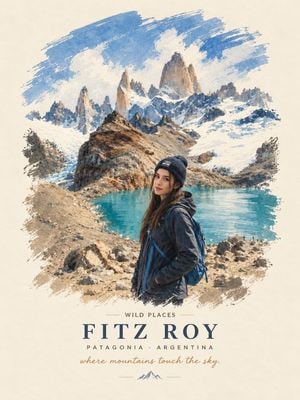
Create a premium vintage luxury travel poster in a soft hand-painted watercolor style on warm cream textured paper. The poster should feature {argument name="destination name" default="Fitz Roy"} in {argument name="region text" default="Patagonia · Argentina"}. Compose a dramatic alpine scene with jagged snow-covered Fitz Roy peaks in the background, rugged rocky terrain and scattered boulders in the foreground, and a vivid turquoise glacial lake in the middle ground. Add one female hiker in the lower right foreground, photographed/painted realistically but blended into the watercolor poster style: young woman with long brown hair, wearing a dark navy knit beanie, dark hiking jacket, and blue backpack, standing turned slightly toward the viewer with a calm expression. Use expressive dry-brush watercolor edges around the landscape, leaving the cream paper visible as an irregular border. Above the main title, include small uppercase text {argument name="top label" default="WILD PLACES"} with thin horizontal divider lines. Use a large elegant spaced serif title reading {argument name="destination name" default="FITZ ROY"}, a smaller uppercase subtitle reading {argument name="region text" default="PATAGONIA · ARGENTINA"}, and a handwritten cursive tagline reading {argument name="tagline" default="where mountains touch the sky."}. Add a small minimalist mountain icon centered at the bottom with thin decorative lines. Color palette: warm cream, deep navy typography, icy whites, slate blues, ochre browns, and bright turquoise water. Vertical poster format, centered composition, refined travel-poster typography, no extra logos, no watermark.
Choose the primary action to open PicX Studio with the available template settings. Review the model and format, personalize the creative direction, and generate when ready.
Yes. You can change the subject, setting, lighting, mood, format, and available model controls before creating your image.
This template is free to open and customize. Generation usage is shown in PicX Studio before you create.
Start with GPT Image 2, which is the model associated with this template. You can compare another compatible model for a different finish.
Follow a topic to a crawlable collection of related PicX Studio templates.