How do I use the Editorial Mixed-Media Fashion Illustration template?
Choose the primary action to open PicX Studio with the available template settings. Review the model and format, personalize the creative direction, and generate when ready.
An artistic mixed-media illustration prompt that blends realistic facial rendering with flat graphic shapes and vibrant geometric collage backgrounds.
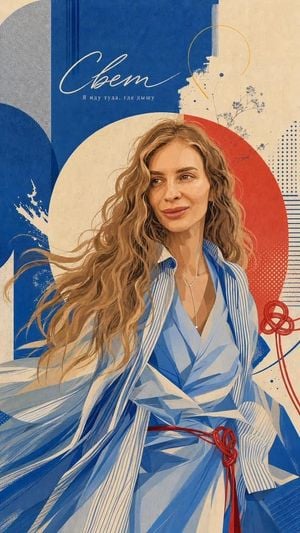
Editorial mixed-media portrait illustration of an elegant woman with long, flowing wavy light-brown hair, subtle confident smile, natural facial features, wearing a stylish blue-and-white striped layered outfit. Highly detailed hand-painted illustration with realistic facial rendering combined with flat graphic shapes. Bold cobalt blue, warm cream, and vivid coral-red geometric background, large overlapping circles, arches, abstract lines, halftone dots, paint splashes, fine botanical sketches, textured paper collage, screen-print imperfections, subtle grain, layered poster composition, sophisticated fashion editorial aesthetic, dynamic flowing fabric, strong visual contrast, refined color harmony, vintage-modern graphic design, vertical composition, premium magazine poster artwork, intricate details, 4K. Editorial mixed-media portrait illustration of a bald man wearing large black rectangular glasses and an oversized deep-blue fashion coat, resting his face gently in both hands with a calm, thoughtful expression. Realistic facial details blended with stylized hand-painted illustration, bold cobalt blue, warm cream, and coral-red geometric collage background, overlapping circles and semicircles, abstract lines, halftone patterns, textured brush strokes, subtle ink imperfections, paper grain, screen-print texture, minimalist graphic elements, sophisticated contemporary poster design, strong symmetrical composition, rich navy and royal-blue clothing with subtle fabric texture, artistic magazine-cover aesthetic, refined color palette, vertical 4:5 composition, highly detailed, 4K.
Choose the primary action to open PicX Studio with the available template settings. Review the model and format, personalize the creative direction, and generate when ready.
Yes. You can change the subject, setting, lighting, mood, format, and available model controls before creating your image.
This template is free to open and customize. Generation usage is shown in PicX Studio before you create.
Start with GPT Image 2, which is the model associated with this template. You can compare another compatible model for a different finish.
Follow a topic to a crawlable collection of related PicX Studio templates.