How do I use the Blue Rose Beauty Poster template?
Choose the primary action to open PicX Studio with the available template settings. Review the model and format, personalize the creative direction, and generate when ready.
Generates a cinematic fashion beauty poster with an elegant close-up portrait, rose hair accent, eye inset, and romantic typography.
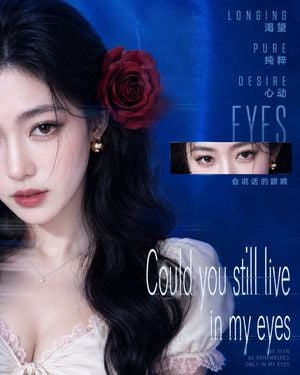
Create a vertical high-fashion cinematic beauty poster featuring {argument name="model description" default="a young East Asian woman with porcelain skin, long wavy black hair, soft glossy lips, and expressive brown eyes"}. The composition is a close-up portrait cropped so only the left half of her face and upper torso dominate the left two-thirds of the canvas, with the right side reserved for typography on a deep electric-blue studio background. She wears a white satin off-shoulder blouse with pale pink lace trim, a delicate silver pendant necklace, and one small gold rounded earring. Place exactly 1 large deep red rose tucked into her hair above her right ear. Add exactly 1 horizontal rectangular inset on the right-center showing a close crop of both eyes, aligned over the blue background. Use elegant editorial lighting, luminous skin retouching, cool blue color grading, subtle film grain, and faint horizontal light streak/glitch blur effects crossing the portrait and typography. Text layout: at the upper right, stack exactly 4 tall condensed uppercase English words, each spaced out vertically: {argument name="top English words" default="LONGING / PURE / DESIRE / EYES"}. Pair the first three with small Chinese captions and place one Chinese phrase below the eye inset: {argument name="Chinese captions" default="渴望 / 纯粹 / 心动 / 会说话的眼睛"}. At the lower right, set the main quote in very tall thin white serif lettering with slight blur and glow: {argument name="main quote" default="Could you still live in my eyes"}. Add exactly 1 tiny uppercase footer near the bottom right reading {argument name="footer text" default="BE SEEN. BE REMEMBERED. ONLY IN MY EYES."}. Keep the mood romantic, mysterious, luxurious, and melancholic, with the model looking directly at the viewer; no extra people, no logos, no watermark.
Choose the primary action to open PicX Studio with the available template settings. Review the model and format, personalize the creative direction, and generate when ready.
Yes. You can change the subject, setting, lighting, mood, format, and available model controls before creating your image.
This template is free to open and customize. Generation usage is shown in PicX Studio before you create.
Start with GPT Image 2, which is the model associated with this template. You can compare another compatible model for a different finish.
Follow a topic to a crawlable collection of related PicX Studio templates.