How do I use the Fantasy Craftswoman Cosplay Portrait template?
Choose the primary action to open PicX Studio with the available template settings. Review the model and format, personalize the creative direction, and generate when ready.
A photorealistic full-body fantasy cosplay portrait of a silver-haired craftswoman adventurer in a magical workshop village.
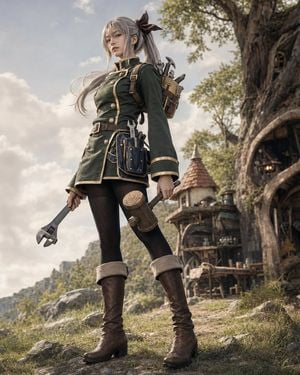
Create a cinematic photorealistic full-body cosplay portrait of {argument name="character name" default="Soara"}, a young fantasy craftswoman adventurer standing confidently in a low-angle hero pose on a grassy rocky hillside. She has long {argument name="hair color" default="silver-gray"} hair tied into a high side ponytail with a large dark brown bow, soft bangs framing her face, pale skin, and a calm serious expression. Dress her in a dark forest-green military-style tunic dress with gold piping, high collar, long sleeves with wide cuffs, double rows of brass buttons, a brown leather belt, shoulder straps, black textured tights, and tall dark brown leather boots with light shearling cuffs. Add exactly 5 visible carried/tool elements: 1 large adjustable wrench in her left hand, 1 wooden mallet in her right hand, 1 blue leather tool pouch at her hip holding metal hand tools, 1 brown backpack strapped to her back, and 1 cluster of metal tools protruding from the backpack. The setting is a whimsical medieval-fantasy artisan village beside a massive ancient tree, with a cozy workshop doorway carved into the tree trunk on the right, a small round-roofed cottage and wooden balcony structures in the midground, scattered barrels and workshop clutter, distant green mountains, rocks, grass, and a bright cloudy sky. Use natural warm daylight, soft haze, shallow depth of field, highly detailed fabric and leather textures, realistic skin, wind-tossed hair strands, muted earthy colors, epic fantasy realism, vertical 4:5 composition, no text, no watermark, no anime line art.
Choose the primary action to open PicX Studio with the available template settings. Review the model and format, personalize the creative direction, and generate when ready.
Yes. You can change the subject, setting, lighting, mood, format, and available model controls before creating your image.
This template is free to open and customize. Generation usage is shown in PicX Studio before you create.
Start with GPT Image 2, which is the model associated with this template. You can compare another compatible model for a different finish.
Follow a topic to a crawlable collection of related PicX Studio templates.