Guan Yu Historical Infographic Poster
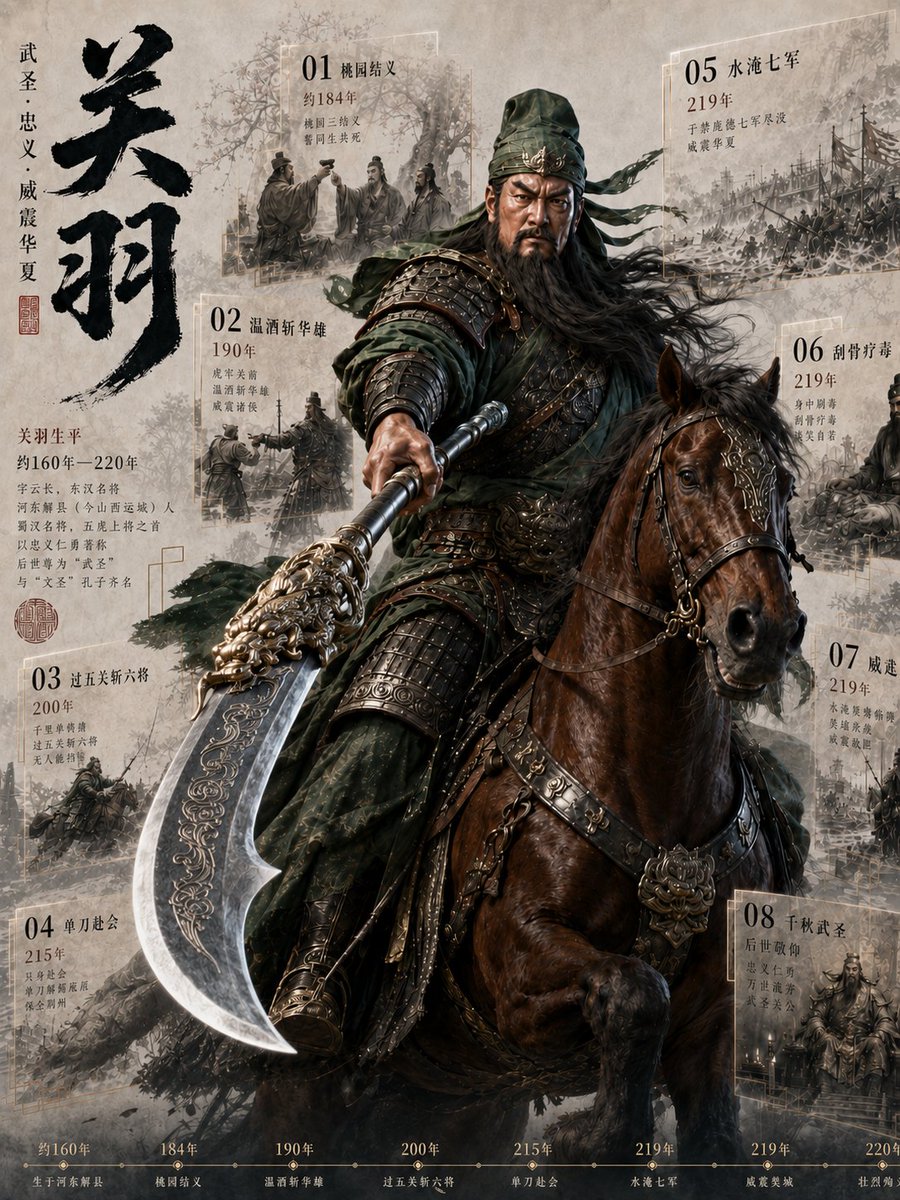
Goal: Create a vertical historical Chinese epic infographic poster about {argument name="character name" default="Guan Yu"}, combining a cinematic Three Kingdoms warrior portrait with parchment-style chronology panels.
Canvas: Tall portrait poster, 3:4 aspect ratio, aged beige rice-paper background with ink wash stains, faint mountains, smoke, battlefield silhouettes, and a museum-scroll texture. Overall palette is sepia, charcoal, dark olive green, bronze, and muted blood-brown.
Main subject: A hyper-detailed armored Chinese general, {argument name="character name" default="Guan Yu"}, dominates the center, riding a powerful dark brown war horse. He wears layered dark green robes, ornate blackened bronze lamellar armor, engraved shoulder guards, leather straps, metal studs, and a green headwrap with long ribbons streaming to the right. Long black hair and beard flow in the wind; the face area is intentionally softened/obscured like a smooth blurred mask, while the armor and clothing remain sharply detailed. He holds a massive ornate guandao polearm angled from the center toward the lower left foreground; the crescent blade is oversized, silver, engraved with gold filigree, and strongly foreshortened. The horse has glossy musculature, an alert expression, ornate bridle, bronze medallions, decorative leather tack, and one raised front leg, facing slightly right.
Left title area: Place a huge vertical black ink-brush calligraphy title reading {argument name="large calligraphy title" default="关羽"} on the upper left. Beside it, add smaller vertical text in Chinese reading “武圣·忠义·威震华夏”, with a small red seal stamp below. Under the title, include a short biographical text block: “关羽生平 / 约160年—220年 / 字云长,本字长生 / 河东解县(今山西运城)人 / 蜀汉名将,五虎上将之首 / 以忠义仁勇著称 / 后世尊为 武圣 / 与‘文圣’孔子齐名”.
Chronology panels: Use exactly 8 translucent rectangular parchment cards arranged around the main rider, each with a large two-digit number, a bold Chinese event title, a year, 2–4 lines of smaller Chinese notes, and a faded monochrome battle illustration behind the text. The cards should look like layered glass-paper frames with thin white borders and ink-wash war scenes.
1. Top center-left card: “01 桃园结义”, year “约184年”, showing three sworn brothers under trees.
2. Mid left card: “02 温酒斩华雄”, year “190年”, showing generals and soldiers near a battlefield standard.
3. Lower left card: “03 过五关斩六将”, year “200年”, showing riders passing through a gate or fortress battle.
4. Bottom left card: “04 单刀赴会”, year “215年”, showing a dramatic riverside or military meeting scene.
5. Top right card: “05 水淹七军”, year “219年”, showing flooded armies, ships, and chaos.
6. Upper-mid right card: “06 刮骨疗毒”, year “219年”, showing a medical treatment scene with soldiers nearby.
7. Mid-lower right card: “07 威震华夏”, year “219年”, showing a smoky battlefield and massed troops.
8. Bottom right card: “08 败走麦城”, year “220年”, showing a seated general and tragic final-campaign atmosphere.
Bottom timeline: Add a thin horizontal timeline along the entire bottom edge with exactly 8 labeled points matching the events: “约160年 生于河东解县”, “184年 桃园结义”, “190年 温酒斩华雄”, “200年 过五关斩六将”, “215年 单刀赴会”, “219年 水淹七军”, “219年 威震华夏”, “220年 败走麦城”. Use small gold dots connected by a fine line, with compact serif Chinese captions.
Visual style: Epic historical fantasy realism, Chinese ink-wash poster design, cinematic lighting, high-detail metal engraving, smoky atmosphere, battlefield dust, layered parchment collage, elegant typography. The central rider and horse are high-contrast and sharp; the background cards are slightly faded and desaturated.
Constraints: Keep exactly 8 chronology cards and exactly 8 bottom timeline points. Do not add modern objects, logos, watermarks, or extra characters in the foreground. Preserve the Chinese text content as visible poster typography, while all composition instructions remain in English.








![Naive doodle-style subject illustration — A doodle-style {argument name="subject" default="[subject]"}, naive lines, humorous shape exaggeration](https://pbs.twimg.com/media/G6Wl2YxbsAARB2b.jpg)














![Boudoir charcoal sketch portrait — Boudoir Portrait - Charcoal Sketch [4K Render]](https://pbs.twimg.com/media/G6PAJ3LXwAAM2si.jpg)