How do I use the Portugal World Cup Squad Poster template?
Choose the primary action to open PicX Studio with the available template settings. Review the model and format, personalize the creative direction, and generate when ready.
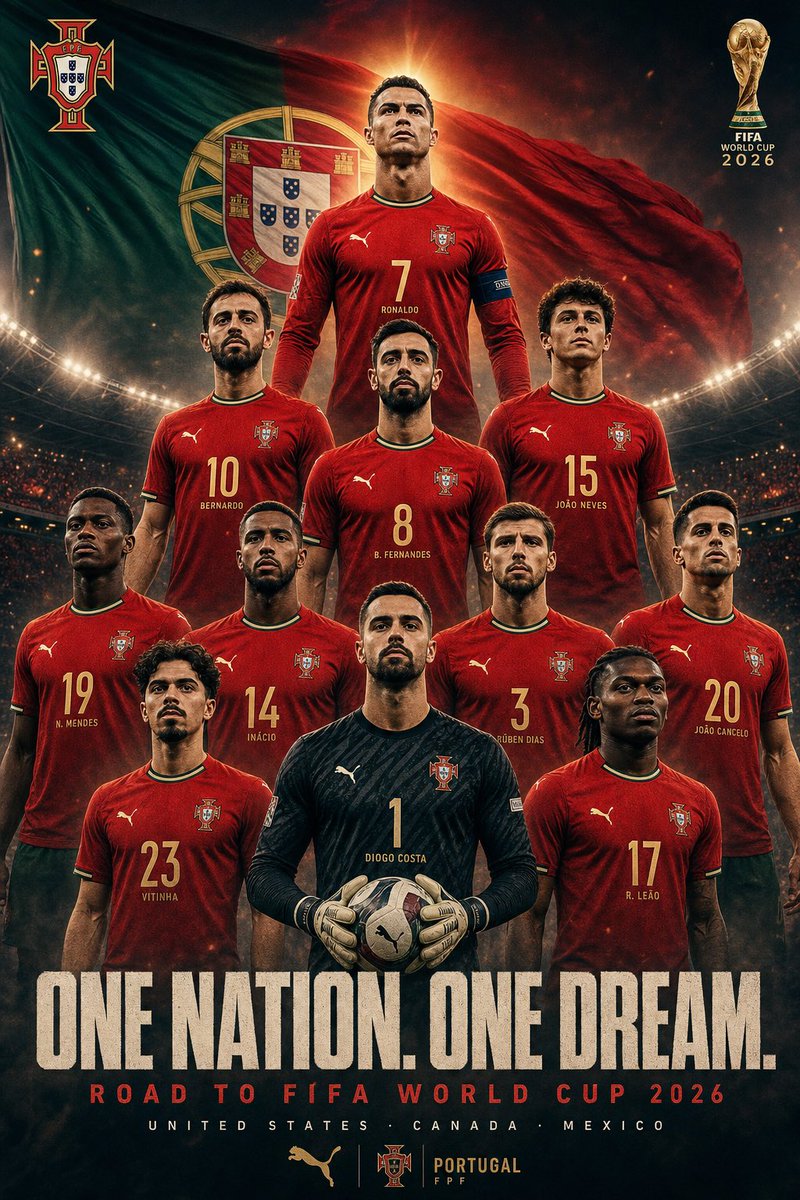
A cinematic vertical squad poster for Portugal’s 2026 World Cup campaign, useful for recreating an official-style football team promotional image. (free to use) — Free AI image template on PicX Studio.
Goal: Create an official cinematic national football team squad poster for {argument name="team name" default="Portugal"} and its FIFA World Cup 2026 campaign, using a dramatic heroic sports-poster style. Canvas: Vertical poster, 2:3 aspect ratio, dark high-contrast stadium atmosphere, smoky vignette edges, glowing floodlights, sparks, and a large waving national flag filling the background. Use Portugal’s green-and-red flag colors with a large coat-of-arms shield behind the players. Add the Portugal federation crest at the top left and a gold FIFA World Cup trophy emblem with the text “FIFA WORLD CUP 2026” at the top right. Layout: Arrange exactly 11 starting players in a commanding pyramid formation, all facing forward with serious expressions and powerful upright poses. The captain is elevated at the top center with a blazing backlight halo. The goalkeeper is front-center holding a football with both gloved hands. Build the squad in four visible tiers: 1 top captain, 3 upper attacking/midfield players, 5 middle/back-line players, and 2 front players flanking the goalkeeper, with the goalkeeper centered in front. Player count and visible kit labels: Include exactly 11 players wearing Portugal red home shirts except the goalkeeper in a dark black patterned keeper kit. Visible shirt numbers and labels should be: 7 RONALDO at the top center with captain armband; 10 BERNARDO upper left; 8 B. FERNANDES upper center; 15 JOÃO NEVES upper right; 19 N. MENDES middle far left; 14 INÁCIO middle left; 3 RÚBEN DIAS middle right; 20 JOÃO CANCELO middle far right; 23 VITINHA front left; 1 DIOGO COSTA front-center goalkeeper; 17 R. LEÃO front right. Use gold numbering and small white/gold name text beneath each number. Faces may be realistic but keep them cleanly visible and not distorted. Uniform details: Red Puma-style Portugal kit with green-and-gold collar trim, Portugal crest on the chest, Puma-style cat logo, subtle fabric texture, athletic fit, shorts mostly cropped out. Goalkeeper wears black long-sleeve jersey with subtle diagonal pattern, Portugal crest, number 1, padded gloves, and holds a modern patterned match ball. Text content: Large distressed cream headline across the lower third: “{argument name="headline text" default="ONE NATION. ONE DREAM."}”. Under it, smaller red tracking-spaced subtitle: “{argument name="campaign line" default="ROAD TO FIFA WORLD CUP 2026"}”. Below that in small white spaced letters: “UNITED STATES · CANADA · MEXICO”. Bottom center sponsor strip with a gold Puma-style logo, Portugal crest, and the text “PORTUGAL FPF”. Visual style: Hyper-realistic composite photography, epic sports marketing poster, cinematic orange rim light behind the captain, deep shadows, stadium crowd bokeh, smoke, embers, dramatic contrast, sharp jersey details, premium official-tournament feel. Constraints: Keep exactly 11 players, exactly the listed visible shirt numbers and names, no extra athletes, no extra logos beyond the football federation crest, trophy emblem, and kit/sponsor-style marks. Preserve the bold pyramid composition and the large bottom slogan.
Use Portugal World Cup Squad Poster to plan an AI image around gpt-image-2 generation, themes such as en and gpt-image-2. Match the preview's composition first, then personalize the subject, setting, and mood for your own project.
Use the primary action to load the template settings in PicX Studio.
Adjust the subject and creative details for your destination.
Create the image, compare the result with the preview, and refine one variable at a time.
A continuous mix — similar concepts first, woven with same-model prompts and fresh picks from the catalog.
Choose the primary action to open PicX Studio with the available template settings. Review the model and format, personalize the creative direction, and generate when ready.
Yes. You can change the subject, setting, lighting, mood, format, and available model controls before creating your image.
This template is free to open and customize. Generation usage is shown in PicX Studio before you create.
Start with gpt-image-2, which is the model associated with this template. You can compare another compatible model for a different finish.
Follow a topic to a crawlable collection of related PicX Studio templates.
39,157 public templates available. Verified via the PicX Studio public templates API; refreshed hourly.
A continuous mix — similar concepts first, woven with same-model prompts and fresh picks from the catalog.