How do I use the Anonymized Female Track Athlete Portrait template?
Choose the primary action to open PicX Studio with the available template settings. Review the model and format, personalize the creative direction, and generate when ready.
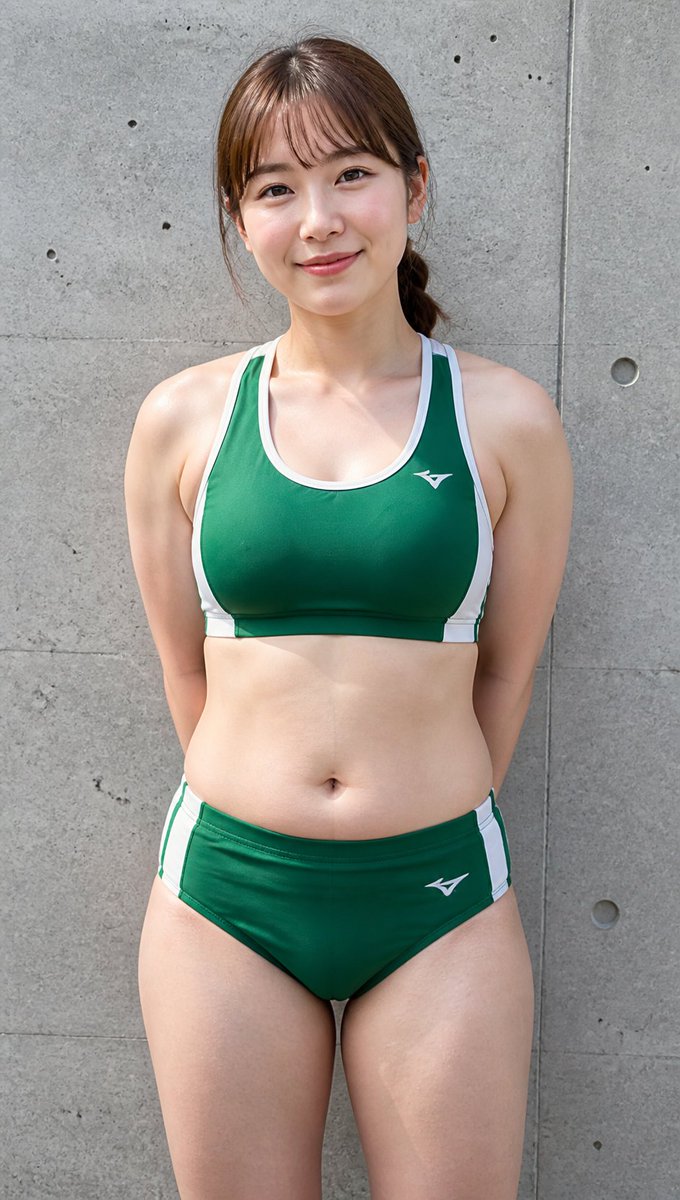
A realistic vertical portrait prompt for generating an anonymized adult female track athlete in a green two-piece uniform against a concrete wall. (free to use) — Free AI image template on PicX Studio.
Create a realistic full-body vertical outdoor sports portrait of an adult female track-and-field athlete standing front-facing against a gray concrete wall with visible seams, small holes, and subtle weathered texture. She has a sturdy, athletic-curvy build with broad shoulders, toned arms, a soft midsection, and strong thighs, posed upright with her hands clasped behind her back. Her face is intentionally anonymized by a large vertical rectangular mosaic/blur block in natural skin tones covering the entire face area, while brown hair is tied back in a low ponytail with loose side strands visible. She wears a {argument name="uniform color" default="dark green"} two-piece track uniform: a racerback sports crop top with white trim and side panels, plus matching brief-style athletic bottoms with white side stripes, both with small white athletic logos. Use natural daylight, sharp documentary photo realism, realistic skin texture, slight perspiration sheen, centered composition, portrait orientation, medium telephoto perspective, and a neutral candid sports-club look. Background should remain simple and uncluttered, emphasizing the single athlete and the concrete wall.
Use Anonymized Female Track Athlete Portrait to plan an AI image around gpt-image-2 generation, themes such as en and gpt-image-2. Match the preview's composition first, then personalize the subject, setting, and mood for your own project.
Use the primary action to load the template settings in PicX Studio.
Adjust the subject and creative details for your destination.
Create the image, compare the result with the preview, and refine one variable at a time.
A continuous mix — similar concepts first, woven with same-model prompts and fresh picks from the catalog.
Choose the primary action to open PicX Studio with the available template settings. Review the model and format, personalize the creative direction, and generate when ready.
Yes. You can change the subject, setting, lighting, mood, format, and available model controls before creating your image.
This template is free to open and customize. Generation usage is shown in PicX Studio before you create.
Start with gpt-image-2, which is the model associated with this template. You can compare another compatible model for a different finish.
Follow a topic to a crawlable collection of related PicX Studio templates.
39,157 public templates available. Verified via the PicX Studio public templates API; refreshed hourly.
A continuous mix — similar concepts first, woven with same-model prompts and fresh picks from the catalog.