How do I use the 2008 Chinese Family Park Snapshot template?
Choose the primary action to open PicX Studio with the available template settings. Review the model and format, personalize the creative direction, and generate when ready.
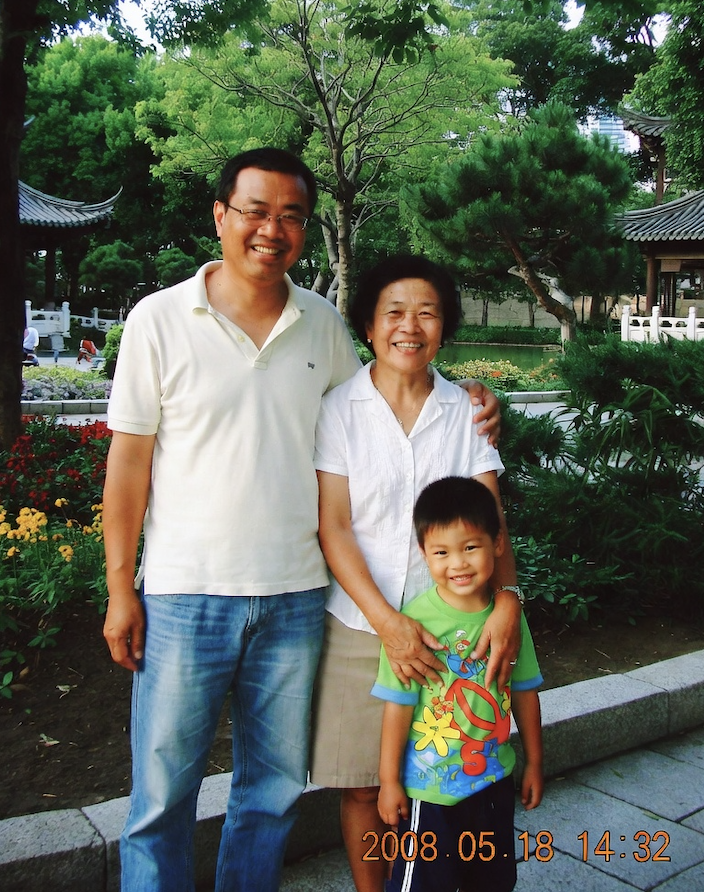
This prompt generates a nostalgic late-2000s point-and-shoot style photo of a Chinese family of three posing in a leafy traditional park, useful for recreating everyday memory-like images. (free to use) — Free AI image template on PicX Studio.
A candid family snapshot styled like a consumer digital camera photo from around 2008 in China, showing a three-person family standing together in a traditional Chinese park garden. Vertical composition, slightly casual framing, realistic and unpolished. The family consists of 3 people: a father on the left, a mother in the center-right, and a young son standing in front of the mother on the right. The father is tall and broad-shouldered, wearing a white short-sleeve polo shirt and light blue jeans, with one arm resting around the mother’s shoulder. The mother wears a simple white short-sleeve blouse and a light beige knee-length skirt, standing close to the father with a relaxed posture. The child wears a bright lime green T-shirt with large colorful cartoon-style graphics in red, yellow, and blue, and dark shorts with a white side stripe. Their expressions are neutral, posed for a casual park photo. Background filled with lush green trees, trimmed bushes, flowerbeds with yellow and red flowers, stone borders, and 2 visible traditional Chinese pavilion roofs at the left and right edges. Daytime lighting, slightly harsh but natural summer afternoon light, strong greenery, mild point-and-shoot camera softness, saturated colors, slight flash-photo feel, subtle digital noise, authentic early digital photography look. Add an orange digital camera timestamp in the bottom right corner reading {argument name="timestamp" default="2008.05.18 14:32"}. Include a faint sense of everyday family nostalgia from late-2000s China. Faces should be generic and non-celebrity, ordinary Chinese family appearance.
Use 2008 Chinese Family Park Snapshot to plan an AI image around gpt-image-2 generation, themes such as en and gpt-image-2. Match the preview's composition first, then personalize the subject, setting, and mood for your own project.
Use the primary action to load the template settings in PicX Studio.
Adjust the subject and creative details for your destination.
Create the image, compare the result with the preview, and refine one variable at a time.
A continuous mix — similar concepts first, woven with same-model prompts and fresh picks from the catalog.
Choose the primary action to open PicX Studio with the available template settings. Review the model and format, personalize the creative direction, and generate when ready.
Yes. You can change the subject, setting, lighting, mood, format, and available model controls before creating your image.
This template is free to open and customize. Generation usage is shown in PicX Studio before you create.
Start with gpt-image-2, which is the model associated with this template. You can compare another compatible model for a different finish.
Follow a topic to a crawlable collection of related PicX Studio templates.
39,157 public templates available. Verified via the PicX Studio public templates API; refreshed hourly.
A continuous mix — similar concepts first, woven with same-model prompts and fresh picks from the catalog.