
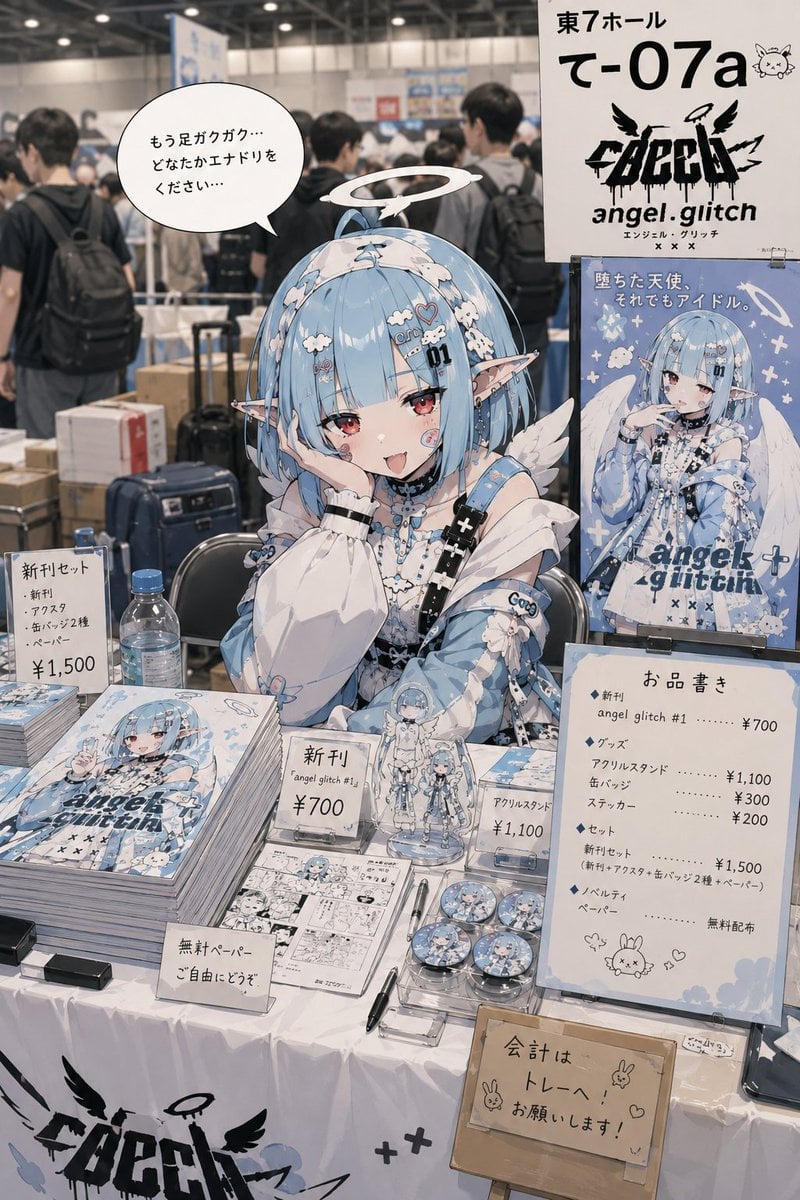
Realistic Comic Market Circle Illustration
A sophisticated image-to-image prompt for creating a realistic and atmospheric illustration of a character selling doujinshi at a convention booth, emphasizing authentic details and lighting.
- Prompt included
- Model and format preset
- Free template
The prompt behind this image
Copy the exact prompt behind Realistic Comic Market Circle Illustration, or open it in the studio and make it yours.
Using this character, create a story-driven illustration themed around {argument name="event" default="participating as a doujin circle at Comic Market"}. Use the reference image only as a character reference; do not carry over the original image's composition, background, pose, or framing. The character is working as a seller at their own circle space. On the table are arranged original doujinshi, posters, acrylic goods, can badges, freebie papers, price tags, a price list, and other items suited to the character. The content and setting of the items being distributed should be naturally conceived by the AI itself based on the character's personality. Emphasize the atmosphere of a doujin circle that feels like it could really exist. The character is wearing {argument name="outfit" default="an arranged cosplay-style outfit themed on their new release"}. Create the atmosphere of "selling as if she has become the character from her own book." In the circle space, place a moderate amount of cardboard boxes, packing tape, a partially drunk plastic bottle, luggage, a chair, small items, and the like, to give it the lived-in feel of an actual event venue. Give the situation and atmosphere randomness each time. Naturally express a different event atmosphere each time, such as: a huge success, subtly slow, right after opening, just before closing, exhaustion, a sense of accomplishment, a feeling of emptiness, chaos, a quiet moment, unexpected popularity, or a stretch when no one comes by. Add a speech bubble to the character and have her say a short comment that fits the situation. For the line in the speech bubble, emphasize a realistically otaku-ish energy, a slightly surreal air, and the lived-in feel of an actual event attendee. Keep the line fairly short, with natural content that gets an unintentional chuckle. Avoid excessive effects, harsh glaring lighting, and unnatural "Instagrammable" staging. Emphasize a realistic atmosphere that feels like "a doujin circle that could really exist somewhere."
How to use Realistic Comic Market Circle Illustration in 3 steps
- 1Upload ImagePNG, JPG or paste
Add your photo
Upload the photo the template builds on. The prompt, model and format are already set.
- 2…a portrait of your subject in softgolden-hour light, 85mm…
Personalize
Edit the subject and creative details for your destination.
- 3Generate
Generate
Press Generate — your image is created in PicX Studio, so you can compare it with the original and refine one variable at a time.
More like this
Templates with the same subject, style or setup. Open one to see its prompt.

Hero Portrait Comic Multi-Panel Poster
Multi-Panel Comic Illustration

Quiet Minimalist Anime Style Guide

Real Illustration Split Portrait Transition
Quiet Minimalist Anime Style Guide

Watercolor Café Cheesecake Editorial Illustration
Real Illustration Split Portrait Transition

Bold Side Profile Superhero Poster

Pop Art Superhero Explosion Poster

Spider-Verse Painterly Portrait Poster

Spider-Man Noir Detective Rain Alley

Captain Tsubasa Anime World Cup Poster
Make it yours
Realistic Comic Market Circle Illustration works as-is. These are the safest ways to change it without losing the look.
Change one field
Copy a single group, rewrite it, and generate again so you can see what that field is doing.
Keep the frame, change the subject
Hold the composition and light of Realistic Comic Market Circle Illustration, then swap wardrobe, props or the person for a new take.
| If the result… | Why | Fix |
|---|---|---|
| The result drifts from the preview | Too many fields changed at once. | Reuse Realistic Comic Market Circle Illustration as-is first, then change one group — subject, light, or setting. |
| The model over-stylizes the scene | The prose prompt leaves finish and camera underspecified. | Add one camera or lighting sentence and stay on GPT Image 2. |
More GPT Image 2 templates
Other prompts made for GPT Image 2.

Six VTuber Japanese Logo Sheet

Realistic Portrait of Woman and Deer

The Vista Modular Condo Poster

AI Model Routing Comparison Infographic

2.5D Anime Art Board

Isometric Productivity Desk Scene

New York Double Exposure Poster

Four-Panel AI Landscape Comparison

Japanese Tatami Lifestyle Magazine Cover

NESCAFÉ Coffee Map Poster
More image prompts
Fresh picks from across the catalog.
Luxury Fashion Editorial Collage on Modern Staircase
Klimt-Inspired Fine Art Editorial Portrait (JSON)
Cozy Living Room Afternoon Scene
Anime VTuber Reaction Thumbnail
Women's Summer Big Sale Banner
Cherry Soda Commercial Splash Macro Shot
3D CG Oriental Fantasy Goddess Portrait
Street Dancer Concept Sheet
Dual-Orientation Optical Illusion Portrait
Editorial Fashion Photography with Structural Mimicry Prompt
Browse template categories
Realistic Comic Market Circle Illustration questions
How do I use the Realistic Comic Market Circle Illustration template?
Add your photo if the template asks for one, edit the prompt if you like — the template's model and format are already selected — and press Generate. Your version opens in PicX Studio.
Can I customize the Realistic Comic Market Circle Illustration template?
Yes. You can change the subject, setting, lighting, mood, format, and available model controls before creating your image.
Is the Realistic Comic Market Circle Illustration template free?
Opening and editing this template is free. Generating uses credits, shown on the Generate button when you are signed in.
Which AI model should I use?
Start with GPT Image 2, which is the model associated with this template. You can compare another compatible model for a different finish.
Looking for something else? Browse all templates.

Your photo, any look
Thousands of ready templates for every top image and video model, from one credit balance.