
Japanese Golf Fashion Magazine Cover
Generates a polished 2026 spring-summer Japanese golf fashion magazine cover with a photorealistic model, elegant golfwear, and editorial feature typography.
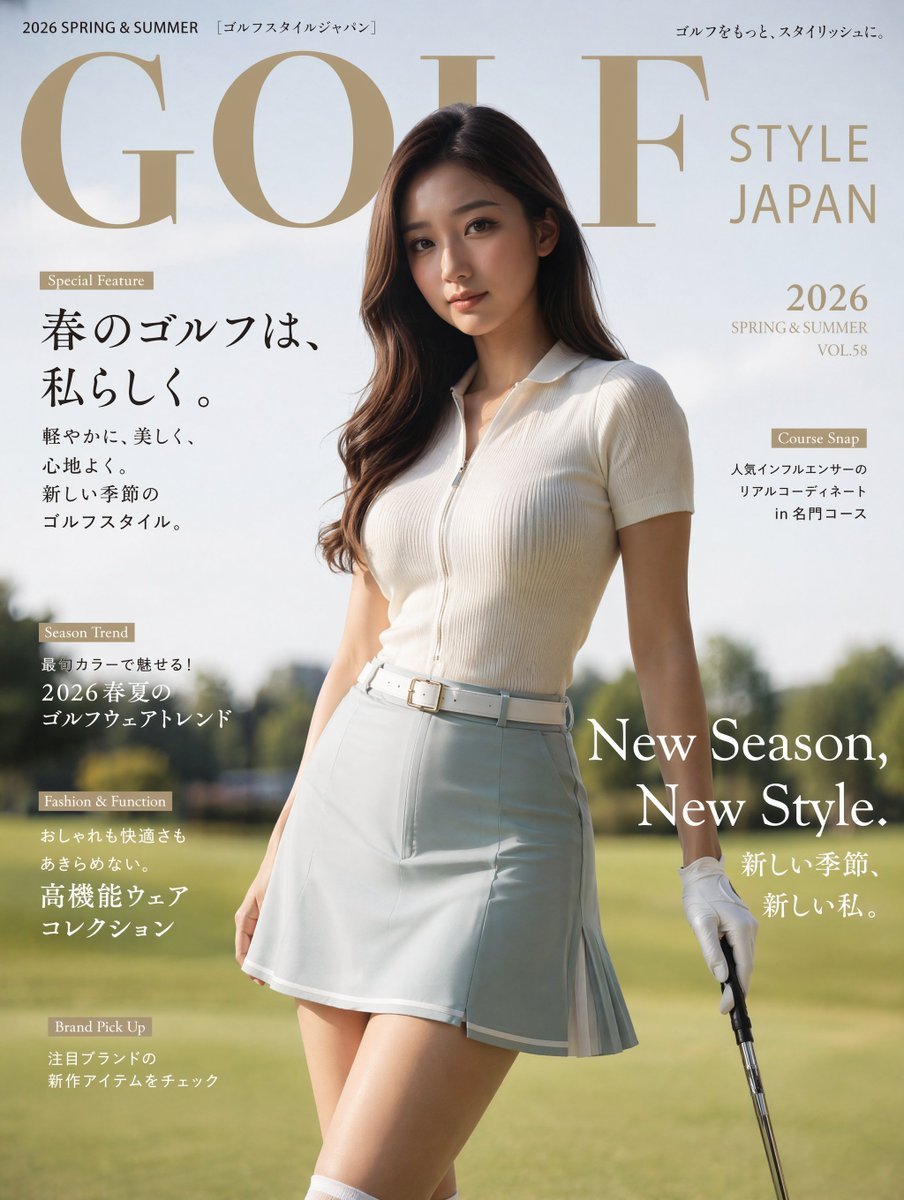
- Prompt included
- Model and format preset
- Free template
The prompt behind this image
Copy the exact prompt behind Japanese Golf Fashion Magazine Cover, or open it in the studio and make it yours.
- Type
- photorealistic luxury Japanese golf fashion magazine cover
- Format
- vertical print cover, 3:4 aspect ratio
- Subject › Description
- one young adult female golf model standing on a sunny golf course fairway, three-quarter body crop from head to mid-thigh, relaxed confident pose, holding a golf club vertically in her right hand, wearing one white golf glove
- Subject › Face
- face intentionally obscured by a soft-edged dark brown rectangular privacy block centered over the face
- Subject › Hair
- long wavy dark brown hair, side part, glossy, falling over shoulders
- Subject › Outfit › Count
- 4
- Subject › Outfit › Items
- cream-white ribbed short-sleeve zip polo shirt with collar, pale white-beige high-waisted golf skort with pleated side panel, white belt with square gold buckle, white golf glove
- Subject › Outfit › Dominant Color
- {argument name="outfit color" default="soft white and pale beige"}
- Setting › Location
- golf course fairway
- Setting › Background
- blurred green grass, distant trees, bright spring sunlight, shallow depth of field
- Setting › Mood
- elegant, fresh, sporty, refined, aspirational
- Typography › Style
- high-end fashion magazine layout, large refined serif masthead, gold beige and black Japanese editorial text, clean white overlay text, generous spacing
- Typography › Masthead
- {argument name="magazine title" default="GOLF"}
- Typography › Right Masthead Text
- STYLE JAPAN
- Layout › Top › Count
- 3
- Layout › Top › Elements
- top-left small text: 2026 SPRING & SUMMER [ゴルフスタイルジャパン], huge gold serif masthead across the upper half: {argument name="magazine title" default="GOLF"}, top-right tagline: ゴルフをもっと、スタイリッシュに。
- Layout › Right Side › Count
- 3
- Layout › Right Side › Elements
- large stacked title: STYLE JAPAN, issue block: {argument name="season and issue" default="2026 SPRING & SUMMER VOL.58"}, small feature badge and text: Course Snap / 人気インフルエンサーのリアルコーディネート in 名門コース
- Layout › Left Side Feature Column › Count
- 4
- Layout › Left Side Feature Column › Elements
- Special Feature badge with main Japanese headline: {argument name="main Japanese headline" default="春のゴルフは、私らしく。"} and subcopy: 軽やかに、美しく、心地よく。新しい季節のゴルフスタイル。, Season Trend badge with text: 最旬カラーで魅せる!2026 春夏のゴルフウェアトレンド, Fashion & Function badge with text: おしゃれも快適さもあきらめない。高機能ウェアコレクション, Brand Pick Up badge with text: 注目ブランドの新作アイテムをチェック
- Layout › Lower Right › Count
- 2
- Layout › Lower Right › Elements
- large white English slogan: {argument name="English slogan" default="New Season, New Style."}, smaller Japanese line below: 新しい季節、新しい私。
- Visual Details › Lighting
- warm natural daylight, subtle rim light on hair and shoulders
- Visual Details › Camera
- fashion editorial photography, 85mm lens look, shallow depth of field, crisp subject and softly blurred golf course
Raw JSON
{"type":"photorealistic luxury Japanese golf fashion magazine cover","format":"vertical print cover, 3:4 aspect ratio","subject":{"description":"one young adult female golf model standing on a sunny golf course fairway, three-quarter body crop from head to mid-thigh, relaxed confident pose, holding a golf club vertically in her right hand, wearing one white golf glove","face":"face intentionally obscured by a soft-edged dark brown rectangular privacy block centered over the face","hair":"long wavy dark brown hair, side part, glossy, falling over shoulders","outfit":{"count":4,"items":["cream-white ribbed short-sleeve zip polo shirt with collar","pale white-beige high-waisted golf skort with pleated side panel","white belt with square gold buckle","white golf glove"],"dominant color":"{argument name=\"outfit color\" default=\"soft white and pale beige\"}"}},"setting":{"location":"golf course fairway","background":"blurred green grass, distant trees, bright spring sunlight, shallow depth of field","mood":"elegant, fresh, sporty, refined, aspirational"},"typography":{"style":"high-end fashion magazine layout, large refined serif masthead, gold beige and black Japanese editorial text, clean white overlay text, generous spacing","masthead":"{argument name=\"magazine title\" default=\"GOLF\"}","right masthead text":"STYLE JAPAN"},"layout":{"top":{"count":3,"elements":["top-left small text: 2026 SPRING & SUMMER [ゴルフスタイルジャパン]","huge gold serif masthead across the upper half: {argument name=\"magazine title\" default=\"GOLF\"}","top-right tagline: ゴルフをもっと、スタイリッシュに。"]},"right side":{"count":3,"elements":["large stacked title: STYLE JAPAN","issue block: {argument name=\"season and issue\" default=\"2026 SPRING & SUMMER VOL.58\"}","small feature badge and text: Course Snap / 人気インフルエンサーのリアルコーディネート in 名門コース"]},"left side feature column":{"count":4,"elements":["Special Feature badge with main Japanese headline: {argument name=\"main Japanese headline\" default=\"春のゴルフは、私らしく。\"} and subcopy: 軽やかに、美しく、心地よく。新しい季節のゴルフスタイル。","Season Trend badge with text: 最旬カラーで魅せる!2026 春夏のゴルフウェアトレンド","Fashion & Function badge with text: おしゃれも快適さもあきらめない。高機能ウェアコレクション","Brand Pick Up badge with text: 注目ブランドの新作アイテムをチェック"]},"lower right":{"count":2,"elements":["large white English slogan: {argument name=\"English slogan\" default=\"New Season, New Style.\"}","smaller Japanese line below: 新しい季節、新しい私。"]}},"visual details":{"lighting":"warm natural daylight, subtle rim light on hair and shoulders","camera":"fashion editorial photography, 85mm lens look, shallow depth of field, crisp subject and softly blurred golf course","color palette":"cream, beige, pale gold, soft green, white","composition":"model centered slightly right, masthead behind head and shoulders, editorial text arranged around body without covering outfit, premium Japanese golf lifestyle cover","quality":"ultra realistic, high-resolution print design, polished magazine cover, no extra people, no logos except designed cover typography"}}How to use Japanese Golf Fashion Magazine Cover in 3 steps
- 1Upload ImagePNG, JPG or paste
Add your photo
Upload the photo the template builds on. The prompt, model and format are already set.
- 2…a portrait of your subject in softgolden-hour light, 85mm…
Personalize
Edit the subject and creative details for your destination.
- 3Generate
Generate
Press Generate — your image is created in PicX Studio, so you can compare it with the original and refine one variable at a time.
More like this
Templates with the same subject, style or setup. Open one to see its prompt.

High-Fashion Editorial Magazine Cover ICON

Korean Model Floating Magazine Pages Campaign

Blue Backdrop Luxury Fashion Portrait Campaign
Japanese Koinobori Fashion Magazine Cover
Japanese Fashion Magazine Anime Cover
Luxury Golf Fashion Magazine Cover

Off Duty Fashion Magazine Cover

Japanese Tatami Lifestyle Magazine Cover

High-Fashion Magazine Cover Portrait

Blue Hour Editorial Fashion Portrait
Japanese Fashion Cover with Koinobori Dresses
Cyberpunk Fashion Magazine Cover
Make it yours
Japanese Golf Fashion Magazine Cover works as-is. These are the safest ways to change it without losing the look.
Swap the setting
Keep the rest of the prompt and replace the location block. The current setting is “golf course fairway”.
Swap the light
One lighting change is enough to compare takes. Current light: “warm natural daylight, subtle rim light on hair and shoulders”.
Change one field
Copy a single group, rewrite it, and generate again so you can see what that field is doing.
| If the result… | Why | Fix |
|---|---|---|
| The result drifts from the preview | Too many fields changed at once. | Reuse Japanese Golf Fashion Magazine Cover as-is first, then change one group — subject, light, or setting. |
| GPT Image 2 ignores part of the JSON | Some models flatten or skip nested keys. | Keep the same values and paste them as a short paragraph instead. |
More GPT Image 2 templates
Other prompts made for GPT Image 2.

Six VTuber Japanese Logo Sheet

Realistic Portrait of Woman and Deer

The Vista Modular Condo Poster

AI Model Routing Comparison Infographic

2.5D Anime Art Board

Isometric Productivity Desk Scene

New York Double Exposure Poster

Four-Panel AI Landscape Comparison

NESCAFÉ Coffee Map Poster

Brutalist Cogito Chinese Typography Poster
More image prompts
Fresh picks from across the catalog.

Red Studio Fashion Editorial with Motion Echo Effect
Streetwear Brand Drop Collage Poster
Studio Portrait with Digital UI Overlay
Kaleidoscopic Food Diorama in Acrylic Box
Candid Identity Reference Portrait
Anime Chalkboard Character Formula
Cinematic Luxury Editorial Portrait on a Stone Staircase
Kawaii Comfy Bed Portrait
Ultra-Wide Vending Machine Portrait

Cinematic Mafia Boss Portrait
Browse template categories
Japanese Golf Fashion Magazine Cover questions
How do I use the Japanese Golf Fashion Magazine Cover template?
Add your photo if the template asks for one, edit the prompt if you like — the template's model and format are already selected — and press Generate. Your version opens in PicX Studio.
Can I customize the Japanese Golf Fashion Magazine Cover template?
Yes. You can change the subject, setting, lighting, mood, format, and available model controls before creating your image.
Is the Japanese Golf Fashion Magazine Cover template free?
Opening and editing this template is free. Generating uses credits, shown on the Generate button when you are signed in.
Which AI model should I use?
Start with GPT Image 2, which is the model associated with this template. You can compare another compatible model for a different finish.
Looking for something else? Browse all templates.

Your photo, any look
Thousands of ready templates for every top image and video model, from one credit balance.