How do I use the Luxury Apartment Mirror Selfie template?
Choose the primary action to open PicX Studio with the available template settings. Review the model and format, personalize the creative direction, and generate when ready.
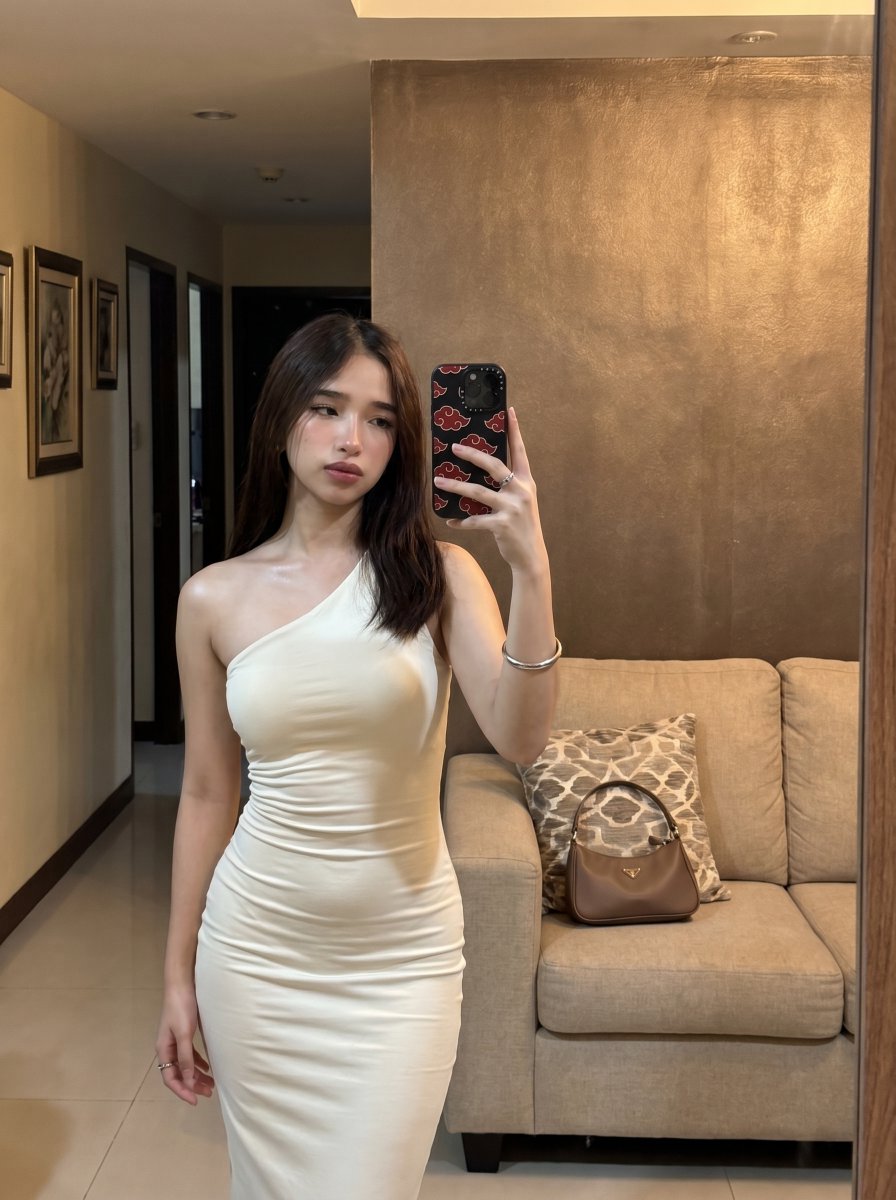
A photorealistic mirror-selfie scene showing a woman in an elegant white one-shoulder dress, ideal for fashion, dating-profile, or lifestyle AI photo generation. (free to use) — Free AI image template on PicX Studio.
A photorealistic full-length mirror selfie of a slim young woman standing indoors in a warm, upscale apartment living room hallway. She is wearing a fitted ivory-white one-shoulder bodycon midi dress with soft ruched gathering through the waist and hips, elegant minimal styling, and a sleek date-night look. Her hair is straight, dark brown, shoulder length, parted near the center, falling naturally over both sides. She holds a smartphone up in her right hand, partially covering her face, with a black phone case decorated with red cloud motifs. Her left arm rests naturally at her side, with a silver bangle bracelet and delicate rings visible. The composition is vertical, realistic, and casually luxurious, like a genuine personal outfit selfie taken in a wall mirror. The setting includes 1 beige fabric sofa on the right, 1 patterned throw pillow in taupe and cream on the sofa, and 1 small brown leather top-handle handbag placed on the seat cushion. Behind her is a textured bronze-brown accent wall; on the left is a dim hallway with 3 framed wall artworks, dark doorways, cream walls, and polished light tile floors. Use warm indoor ambient lighting, soft shadows, subtle phone-camera realism, natural skin texture, realistic reflections, clean apartment styling, centered subject with the upper body and dress as the focus, and an understated luxury aesthetic.
Use Luxury Apartment Mirror Selfie to plan an AI image around gpt-image-2 generation, themes such as en and gpt-image-2. Match the preview's composition first, then personalize the subject, setting, and mood for your own project.
Use the primary action to load the template settings in PicX Studio.
Adjust the subject and creative details for your destination.
Create the image, compare the result with the preview, and refine one variable at a time.
A continuous mix — similar concepts first, woven with same-model prompts and fresh picks from the catalog.
Choose the primary action to open PicX Studio with the available template settings. Review the model and format, personalize the creative direction, and generate when ready.
Yes. You can change the subject, setting, lighting, mood, format, and available model controls before creating your image.
This template is free to open and customize. Generation usage is shown in PicX Studio before you create.
Start with gpt-image-2, which is the model associated with this template. You can compare another compatible model for a different finish.
Follow a topic to a crawlable collection of related PicX Studio templates.
39,157 public templates available. Verified via the PicX Studio public templates API; refreshed hourly.
A continuous mix — similar concepts first, woven with same-model prompts and fresh picks from the catalog.