How do I use the Golden Plaza Dance Storyboard template?
Choose the primary action to open PicX Studio with the available template settings. Review the model and format, personalize the creative direction, and generate when ready.
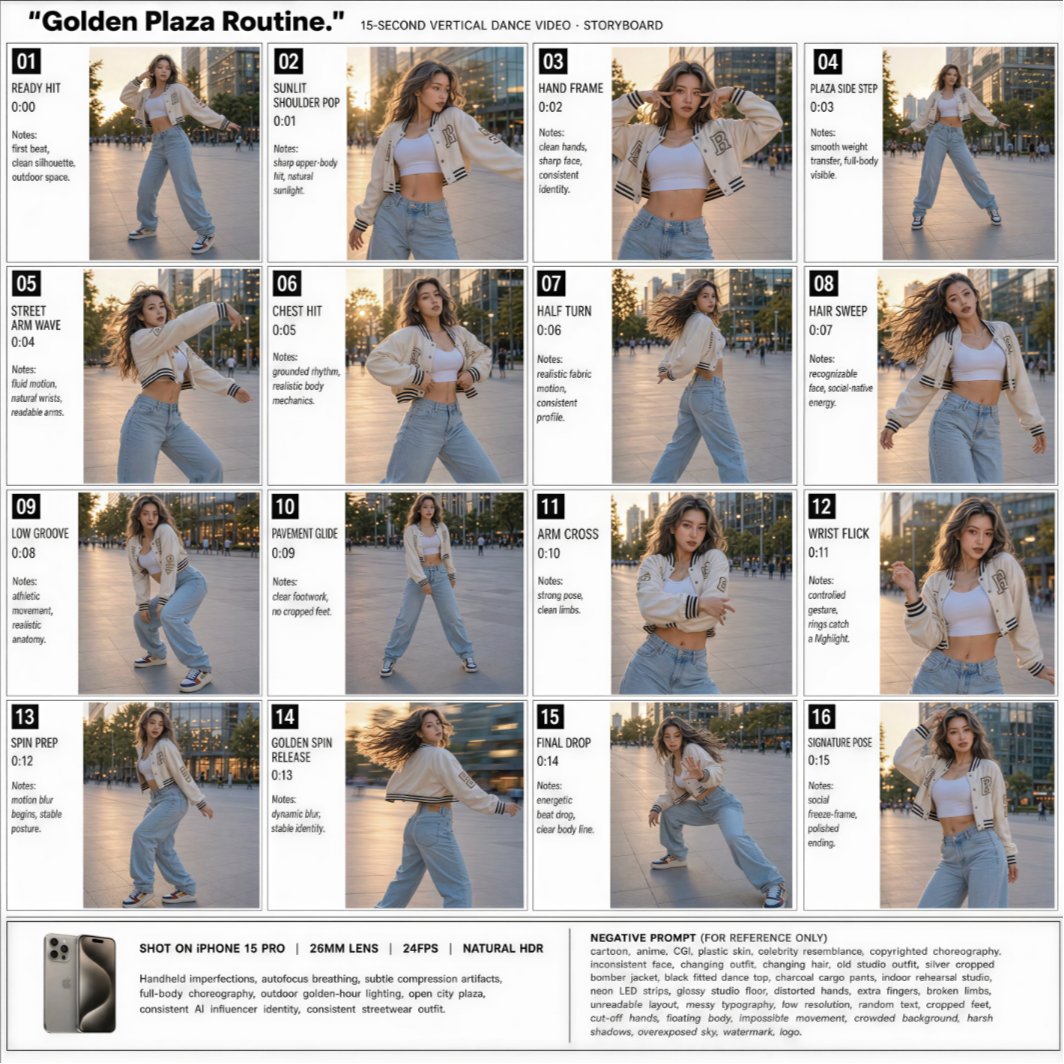
Generates a 16-panel vertical dance video storyboard sheet for planning a realistic AI influencer routine in a golden-hour city plaza. (free to use) — Free AI image template on PicX Studio.
Goal: Create a clean production storyboard sheet for a vertical AI influencer dance video titled {argument name="video title" default="Golden Plaza Routine."}, showing a 15-second routine as a 4-by-4 grid of exactly 16 numbered shot cards. Canvas: Square white storyboard layout, thin gray borders, editorial production-board style. Top header reads: “Golden Plaza Routine.” followed by “15-SECOND VERTICAL DANCE VIDEO · STORYBOARD”. Use black bold sans-serif typography, compact labels, and a polished creator-workflow aesthetic. Main subject: A fashionable female AI influencer dancer, {argument name="character identity" default="young woman with long wavy brown hair and confident street-dance energy"}, wearing {argument name="outfit" default="cream varsity jacket, white crop top, loose light-blue jeans, and sneakers"}. She dances outdoors in a modern city plaza during golden hour, with warm sunlight, urban buildings, trees, and pavement in the background. Keep her identity and outfit consistent across all panels. Layout: Use exactly 16 discrete storyboard panels arranged in 4 rows and 4 columns. Each panel has a small black number box at top left, a shot title, a timestamp, short notes, and a vertical-photo frame showing the dancer. The photos should look like realistic smartphone captures with natural HDR, warm sunlight, shallow motion blur where appropriate, and consistent lens perspective. Panel content: Include exactly these 16 shot cards: 01 — “READY HIT” — 0:00 — Notes: first blast, clean silhouette, outdoor space. Full-body stance, dancer preparing to start. 02 — “SUNLIT SHOULDER POP” — 0:01 — Notes: sharp upper-body hit, natural sunlight. Medium shot with hair and jacket catching light. 03 — “HAND FRAME” — 0:02 — Notes: clean hands, sharp face, consistent identity. Dancer frames her face with both hands. 04 — “PLAZA SIDE STEP” — 0:03 — Notes: smooth weight transfer, full-body visible. Wide full-body step pose. 05 — “STREET ARM WAVE” — 0:04 — Notes: fluid motion, natural wrist, readable arms. Dynamic arm wave pose. 06 — “CHEST HIT” — 0:05 — Notes: grounded rhythm, realistic body mechanics. Strong torso accent, one hand near hip. 07 — “HALF TURN” — 0:06 — Notes: realistic fabric motion, consistent profile. Dancer turning with hair and jacket movement. 08 — “HAIR SWEEP” — 0:07 — Notes: recognizable face, social-native energy. Hair-sweep movement with body angled. 09 — “LOW GROOVE” — 0:08 — Notes: athletic movement, realistic anatomy. Low crouched dance groove. 10 — “PAVEMENT GLIDE” — 0:09 — Notes: clear footwork, no cropped feet. Full-body footwork stance. 11 — “ARM CROSS” — 0:10 — Notes: strong pose, clean limbs. Medium shot with crossed arms. 12 — “WRIST FLICK” — 0:11 — Notes: controlled gesture, rings catch a highlight. Close-medium hand gesture pose. 13 — “SPIN PREP” — 0:12 — Notes: motion blur begins, stable posture. Full-body preparation for spin. 14 — “GOLDEN SPIN RELEASE” — 0:13 — Notes: dynamic blur, stable identity. Spinning pose with motion-blurred background and hair. 15 — “FINAL DROP” — 0:14 — Notes: energetic beat drop, clear body line. Low dramatic final-move pose. 16 — “SIGNATURE POSE” — 0:15 — Notes: social freeze-frame, polished ending. Confident final pose with hand near hair. Bottom production strip: Add a horizontal footer with a small smartphone product-style image on the left and camera specs reading: “SHOT ON IPHONE 15 PRO | 26MM LENS | 24FPS | NATURAL HDR”. Add notes below: “Handheld imperfections, autofocus breathing, subtle compression artifacts, full-body choreography, outdoor golden-hour lighting, open city plaza, consistent AI influencer identity, consistent streetwear outfit.” On the right, add a boxed section titled “NEGATIVE PROMPT (FOR REFERENCE ONLY)” containing compact text about avoiding cartoon/anime/CGI, plastic skin, celebrity resemblance, copyrighted choreography, inconsistent face, changing outfit, bad anatomy, extra fingers, broken limbs, warped hands, cluttered background, harsh shadows, watermark, and logo. Visual style: Realistic photo storyboard, creator production-document aesthetic, crisp thin-line grid, white margins, black text, warm golden-hour color grading, smartphone realism. Use {argument name="setting" default="modern golden-hour city plaza"} and maintain a cohesive AI influencer dance-video workflow look. Constraints: Keep all 16 panels visible and numbered correctly, preserve the exact timestamps and shot titles, do not add extra panels, do not crop off feet in full-body shots, keep the same dancer and outfit throughout, and avoid logos or watermarks.
Use Golden Plaza Dance Storyboard to plan an AI image around gpt-image-2 generation, themes such as en and gpt-image-2. Match the preview's composition first, then personalize the subject, setting, and mood for your own project.
Use the primary action to load the template settings in PicX Studio.
Adjust the subject and creative details for your destination.
Create the image, compare the result with the preview, and refine one variable at a time.
A continuous mix — similar concepts first, woven with same-model prompts and fresh picks from the catalog.
Choose the primary action to open PicX Studio with the available template settings. Review the model and format, personalize the creative direction, and generate when ready.
Yes. You can change the subject, setting, lighting, mood, format, and available model controls before creating your image.
This template is free to open and customize. Generation usage is shown in PicX Studio before you create.
Start with gpt-image-2, which is the model associated with this template. You can compare another compatible model for a different finish.
Follow a topic to a crawlable collection of related PicX Studio templates.
39,157 public templates available. Verified via the PicX Studio public templates API; refreshed hourly.
A continuous mix — similar concepts first, woven with same-model prompts and fresh picks from the catalog.