How do I use the Fiery Fairy Movie Poster template?
Choose the primary action to open PicX Studio with the available template settings. Review the model and format, personalize the creative direction, and generate when ready.
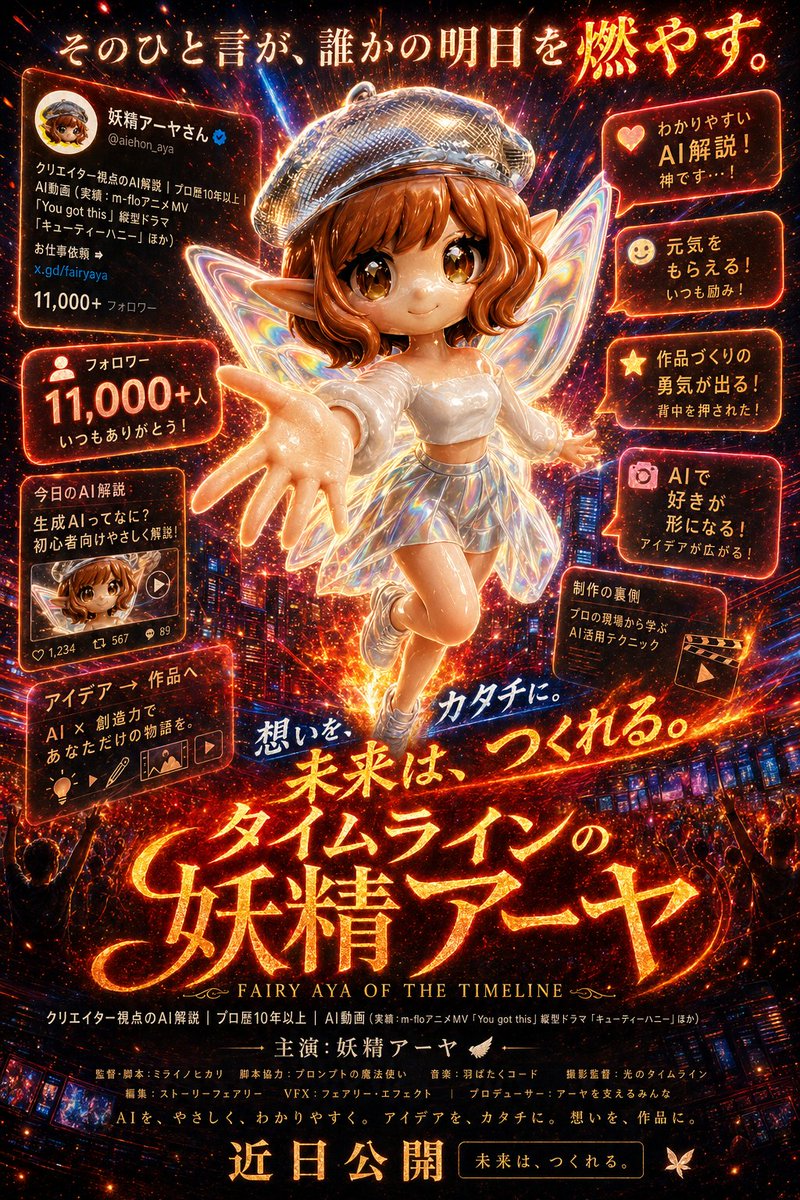
A high-impact Japanese fantasy film poster featuring a social-media fairy heroine, ideal for recreating viral cinematic poster transformations. (free to use) — Free AI image template on PicX Studio.
A dramatic vertical Japanese movie poster in a hyper-detailed cinematic fantasy style, glowing with fiery orange, red, gold, and neon magenta light over a nighttime city skyline. In the center, a single chibi-like fairy woman is the star, floating toward the viewer in a dynamic forward-reaching pose with one oversized hand extended in forced perspective. She has short wavy auburn-brown hair, pointed elf ears, large iridescent translucent butterfly wings, a sparkling silver beret, a fitted white shimmering top, a short holographic metallic skirt, and glowing white shoes. Her face area is deliberately obscured by a centered square censor block in warm brown. Behind her, explosions of particles, sparks, comet streaks, and radiant lens-flare energy create a sense of destiny and impact. The composition is packed like a blockbuster teaser poster, with glowing Japanese typography and social-media-style callout panels arranged around the character. At the very top, large luminous Japanese text reads: 「そのひと言が、誰かの明日を燃やす。」. Across the upper left is 1 profile card panel showing a circular avatar, a Japanese display name with blue verification badge, handle, bio text, link, and follower count, styled like an X profile screenshot. On the left side there are 3 additional stacked callout panels: panel 1 says 「フォロワー 11,000+人 いつもありがとう!」 with a follower icon; panel 2 says 「今日のAI解説 生成AIってなに? 初心者向けやさしく解説」 and includes a thumbnail card with small engagement counts; panel 3 says 「アイデア → 作品へ AI × 創造力で あなただけの物語を。」 with small creative tool icons. On the right side there are 5 glowing speech-bubble panels with icons, each angled slightly and rim-lit in orange: 1 「わかりやすい AI解説! 神です…!」 with a heart icon, 2 「元気をもらえる! いつも励み!」 with a smiley icon, 3 「作品づくりの勇気が出る! 背中を押された!」 with a star icon, 4 「AIで好きが形になる! アイデアが広がる!」 with a camera icon, 5 「制作の真価 プロの現場から学ぶ AI活用テクニック」 with a clapperboard icon. Across the lower middle, add a handwritten glowing phrase in blue-white: 「想いを カタチに。」. Below it, the giant main title in blazing molten brush-style Japanese lettering reads: 「未来は、つくれる。 タイムラインの 妖精アーヤ」, with an English subtitle underneath in small serif capitals: “FAIRY AYA OF THE TIMELINE”. Beneath the title, add dense film-credit style lines in Japanese, including creator/AI/video references, then a centered starring line: 「主演:妖精アーヤ」 with small wings. At the very bottom, place a huge release notice in bold glowing Japanese text: 「近日公開」, and to its right a rounded dark plaque with gold border that says: 「未来は、つくれる。」. Add a small butterfly emblem near the lower right. The whole image should feel like a magical viral social-media celebrity transformed into the lead of an epic fantasy film, with explosive contrast, richly textured particles, neon embers, glossy poster finish, and premium theatrical key art for {argument name="character name" default="妖精アーヤ"}.
Use Fiery Fairy Movie Poster to plan an AI image around gpt-image-2 generation, themes such as en and gpt-image-2. Match the preview's composition first, then personalize the subject, setting, and mood for your own project.
Use the primary action to load the template settings in PicX Studio.
Adjust the subject and creative details for your destination.
Create the image, compare the result with the preview, and refine one variable at a time.
A continuous mix — similar concepts first, woven with same-model prompts and fresh picks from the catalog.
Choose the primary action to open PicX Studio with the available template settings. Review the model and format, personalize the creative direction, and generate when ready.
Yes. You can change the subject, setting, lighting, mood, format, and available model controls before creating your image.
This template is free to open and customize. Generation usage is shown in PicX Studio before you create.
Start with gpt-image-2, which is the model associated with this template. You can compare another compatible model for a different finish.
Follow a topic to a crawlable collection of related PicX Studio templates.
39,157 public templates available. Verified via the PicX Studio public templates API; refreshed hourly.
A continuous mix — similar concepts first, woven with same-model prompts and fresh picks from the catalog.