How do I use the Cristiano Ronaldo 3D Toy Caricature template?
Choose the primary action to open PicX Studio with the available template settings. Review the model and format, personalize the creative direction, and generate when ready.
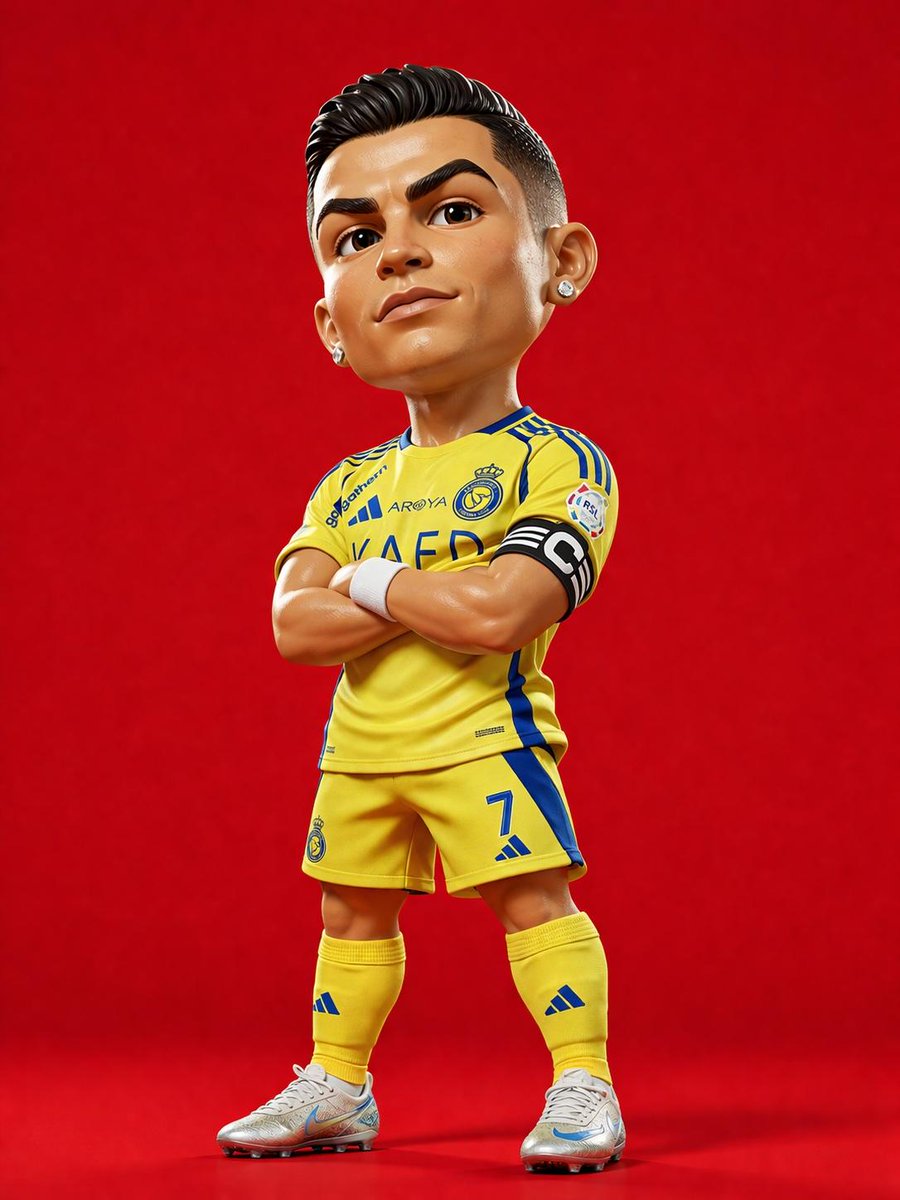
A detailed prompt for creating a stylized 3D collectible figure of Cristiano Ronaldo in his football kit with Pixar-style rendering. (free to use) — Free AI image template on PicX Studio.
Ultra-detailed 3D caricature toy-style portrait of {argument name="subject" default="Cristiano Ronaldo"} standing confidently with arms crossed, oversized head and compact athletic body proportions, stylized collectible figure aesthetic, highly polished skin texture, sharp jawline, thick eyebrows, short slicked-back black hair with clean fade haircut, diamond stud earrings, confident smirk expression. Full-body pose, wearing a bright {argument name="team colors" default="yellow Al Nassr"} football kit with blue accents, captain armband, detailed jersey fabric texture, matching yellow shorts and socks, silver football boots with realistic reflections. Character standing centered against a clean solid vibrant {argument name="background color" default="red"} studio background, dramatic studio lighting with soft shadows under feet, glossy high-end render quality, Pixar-style realism mixed with premium collectible vinyl figure design, ultra-sharp details, realistic materials, cinematic rendering, vibrant colors, symmetrical composition, toy photography aesthetic, 8k. Style references: stylized sports mascot figure, premium football collectible statue, exaggerated proportions, cute but realistic facial rendering, ultra-clean commercial render. Camera: full-body front low-angle shot, 85mm lens look, shallow depth of field, centered composition. Negative prompt: blurry, low quality, extra limbs, distorted anatomy, realistic human proportions, messy background, text, watermark, duplicate body parts, bad hands, flat lighting.
Use Cristiano Ronaldo 3D Toy Caricature to plan an AI image around gpt-image-2 generation, themes such as en and gpt-image-2. Match the preview's composition first, then personalize the subject, setting, and mood for your own project.
Use the primary action to load the template settings in PicX Studio.
Adjust the subject and creative details for your destination.
Create the image, compare the result with the preview, and refine one variable at a time.
A continuous mix — similar concepts first, woven with same-model prompts and fresh picks from the catalog.
Choose the primary action to open PicX Studio with the available template settings. Review the model and format, personalize the creative direction, and generate when ready.
Yes. You can change the subject, setting, lighting, mood, format, and available model controls before creating your image.
This template is free to open and customize. Generation usage is shown in PicX Studio before you create.
Start with gpt-image-2, which is the model associated with this template. You can compare another compatible model for a different finish.
Follow a topic to a crawlable collection of related PicX Studio templates.
39,157 public templates available. Verified via the PicX Studio public templates API; refreshed hourly.
A continuous mix — similar concepts first, woven with same-model prompts and fresh picks from the catalog.