How do I use the Magical Steampunk Idol Above Neon City template?
Choose the primary action to open PicX Studio with the available template settings. Review the model and format, personalize the creative direction, and generate when ready.
A vertical anime-realism prompt for creating a dramatic purple magician avatar flying over a futuristic night city with glowing magic circles. Change the subject, setting, or lighting one variable at a time.
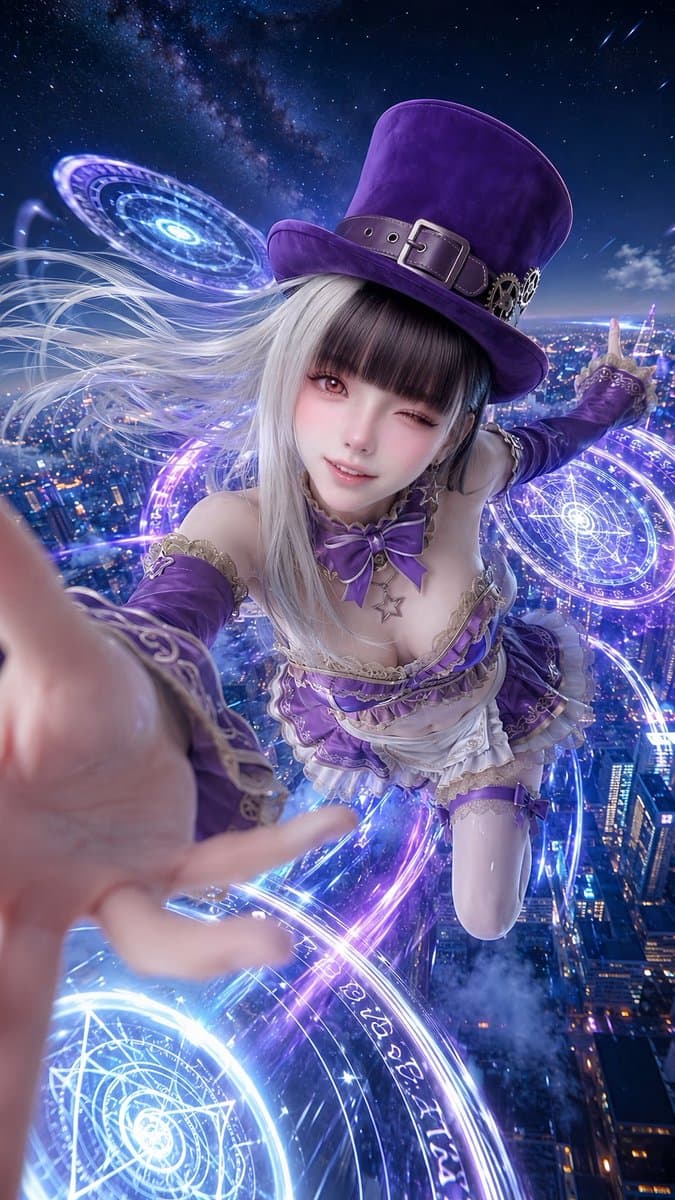
Create a vertical 9:16 ultra-detailed cinematic anime cosplay illustration of {argument name="character name" default="a magical steampunk idol avatar"} flying high above a futuristic city at night, seen from an extreme wide-angle selfie perspective as if she is reaching toward the viewer with one hand in the foreground. She wears an ornate purple and white magician costume inspired by a stage-show ringmaster: a very tall deep-purple top hat with a leather belt, metal buckle, gears, and brass ornaments; long flowing {argument name="hair color" default="silver-white"} hair blown dramatically by wind; purple detached sleeves with gold filigree trim; a frilly low-cut bodice with lace, ribbons, a large purple bow at the neck, star charm necklace, layered white ruffled skirt, garters, and glossy thigh-high stockings. Add exactly three glowing magical circle sigils: one large blue-white sigil near the bottom foreground, one purple-blue sigil to the right behind her, and one smaller floating portal-like sigil at the upper left, all filled with concentric rings, runes, pentagram geometry, and radiant neon light trails spiraling around her body. The background is a vast aerial cityscape full of blue and violet skyscraper lights, clouds far below, a starry sky and visible Milky Way, with a few meteor streaks. Use dramatic motion blur on the closest hand, dynamic foreshortening, luminous rim lighting, glossy fabric highlights, particles, sparks, and a high-fantasy sci-fi atmosphere. Place a flat opaque muted gray-purple square directly over the character’s face, centered and covering the entire face area, while leaving hair, hat, neck bow, and outfit visible. Color palette: {argument name="main color palette" default="deep purple, electric blue, white, silver, and gold"}. Render in polished gpt-image-2 anime-realism style, highly detailed, sharp subject, magical glow, no watermark, no readable text except abstract runes.
Choose the primary action to open PicX Studio with the available template settings. Review the model and format, personalize the creative direction, and generate when ready.
Yes. You can change the subject, setting, lighting, mood, format, and available model controls before creating your image.
This template is free to open and customize. Generation usage is shown in PicX Studio before you create.
Start with GPT Image 2, which is the model associated with this template. You can compare another compatible model for a different finish.
© 2026 PicX Studio. All rights reserved.

Follow a topic to a crawlable collection of related PicX Studio templates.
43,474 public templates available. Verified via the PicX Studio public templates API; refreshed hourly.







![Cartoon TV Show Poster Pack — A bold Cartoon Network-style promotional poster for [SHOW], featuring the main characters in a flat 2D illustrated style with thic](/_next/image?url=https%3A%2F%2Fcdn.picxstudio.com%2Fuploads%2Fimg0_107064d3-b797-488a-a32e-d75dea9d3b4c.jpg&w=828&q=100)




![Minimalist Flat Vector Travel Poster — Premium minimalist flat-vector travel poster for {argument name="city name" default="[CITY_NAME]"}, 3:4 vertical format.](https://cms-assets.youmind.com/media/1787917359711_3ug846_HQX205cbMAA6F6S-300x400.jpg)
























![Ultra-Wide Candid Mirror Documentation Portrait Prompt — (Vertical 9:16 smartphone aspect ratio). A raw, high-contrast [Candid Mirror Documentation] captured wi](https://pbs.twimg.com/media/G-ti4QmbQAAc5E7.jpg)




![Cinematic 3x3 Storyboard Grid — create a 3x3 grid storyboard showing a cinematic sequence of [your chosen subject] set the location on the street and night time](https://cms-assets.youmind.com/media/1777625672968_o9tvln_HHI66cmXEAAbIqJ.jpg)

![Manga Page: Dragon Ball Z Fusion Technique — make a manga page with {argument name="character 1" default="[your character]"} and {argument name="…](https://pbs.twimg.com/media/G9JntV5aoAAKcHa.jpg)