
Japanese Educational Promo Banner
Generates a highly detailed, text-heavy promotional banner or YouTube thumbnail featuring a spokesperson, main titles, and multiple feature lists.
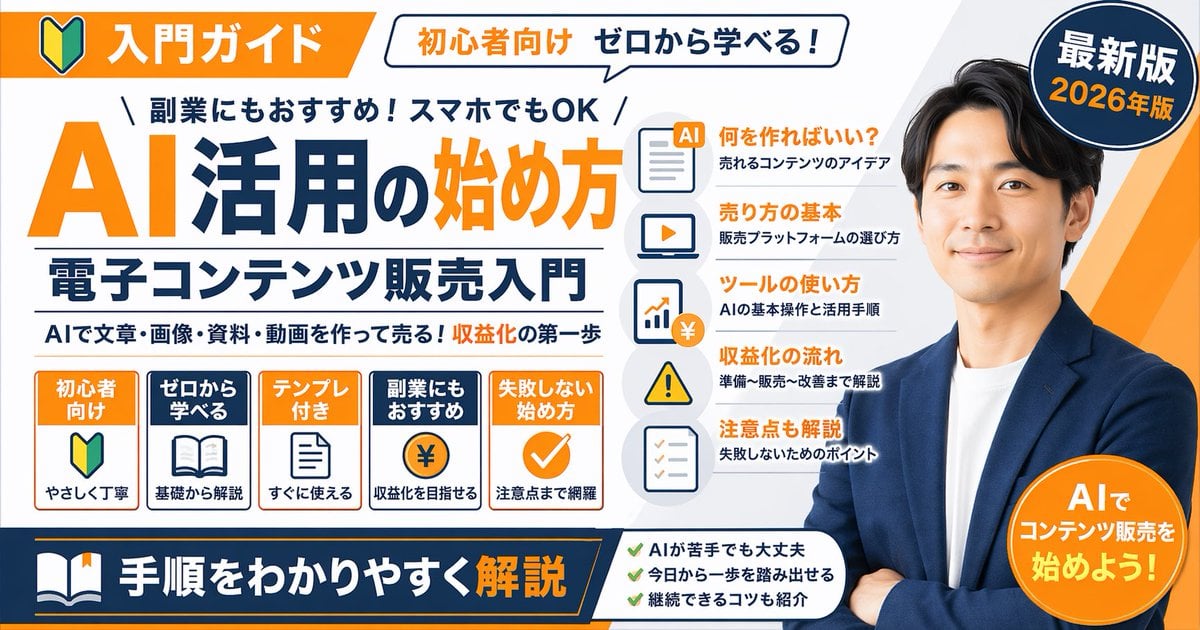
- Prompt included
- Model and format preset
- Free template
The prompt behind this image
Copy the exact prompt behind Japanese Educational Promo Banner, or open it in the studio and make it yours.
- Type
- promotional banner infographic
- Style
- clean, professional, flat design, corporate educational graphic, white background with orange and dark blue accents
- Subject
- {argument name="spokesperson" default="smiling Asian man in a blue blazer and white t-shirt, arms crossed"}
- Layout › Top Section › Left Badge
- Orange banner with beginner mark icon and text '入門ガイド'
- Layout › Top Section › Speech Bubble
- White bubble with text '初心者向け ゼロから学べる!'
- Layout › Top Section › Right Badge
- Dark blue circle with text '最新版' and '{argument name="year edition" default="2026年版"}'
- Layout › Main Title Section › Top Small Text
- \ 副業にもおすすめ!スマホでもOK /
- Layout › Main Title Section › Large Title
- {argument name="main title" default="AI活用の始め方"}
- Layout › Main Title Section › Subtitle
- {argument name="subtitle" default="電子コンテンツ販売入門"}
- Layout › Main Title Section › Bottom Small Text
- AIで文章・画像・資料・動画を作って売る!収益化の第一歩
- Layout › Middle Sections › 0 › Position
- middle-left
- Layout › Middle Sections › 0 › Type
- feature boxes
- Layout › Middle Sections › 0 › Count
- 5
- Layout › Middle Sections › 0 › Items
- Orange box: '初心者向け', beginner mark icon, 'やさしく丁寧', Blue box: 'ゼロから学べる', open book icon, '基礎から解説', Orange box: 'テンプレ付き', document icon, 'すぐに使える', Blue box: '副業にもおすすめ', coin with ¥ icon, '収益化を目指せる', Orange box: '失敗しない始め方', checkmark icon, '注意点まで網羅'
- Layout › Middle Sections › 1 › Position
- middle-center
- Layout › Middle Sections › 1 › Type
- list items with icons
- Layout › Middle Sections › 1 › Count
- 5
- Layout › Middle Sections › 1 › Items
- Document icon: '何を作ればいい?' / '売れるコンテンツのアイデア', Laptop icon: '売り方の基本' / '販売プラットフォームの選び方', Chart icon: 'ツールの使い方' / 'AIの基本操作と活用手順', Warning icon: '収益化の流れ' / '準備〜販売〜改善まで解説', Checklist icon: '注意点も解説' / '失敗しないためのポイント'
- Layout › Bottom Section › Left Banner
- Dark blue banner with book icon and text '{argument name="bottom banner text" default="手順をわかりやすく解説"}'
- Layout › Bottom Section › Center Checklist › Count
- 3
- Layout › Bottom Section › Center Checklist › Items
- AIが苦手でも大丈夫, 今日から一歩を踏み出せる, 継続できるコツも紹介
- Layout › Bottom Section › Right Badge
- Orange circle with text 'AIでコンテンツ販売を始めよう!'
Raw JSON
{
  "type": "promotional banner infographic",
  "style": "clean, professional, flat design, corporate educational graphic, white background with orange and dark blue accents",
  "subject": "{argument name=\"spokesperson\" default=\"smiling Asian man in a blue blazer and white t-shirt, arms crossed\"}",
  "layout": {
    "top_section": {
      "left_badge": "Orange banner with beginner mark icon and text '入門ガイド'",
      "speech_bubble": "White bubble with text '初心者向け ゼロから学べる!'",
      "right_badge": "Dark blue circle with text '最新版' and '{argument name=\"year edition\" default=\"2026年版\"}'"
    },
    "main_title_section": {
      "top_small_text": "\\ 副業にもおすすめ!スマホでもOK /",
      "large_title": "{argument name=\"main title\" default=\"AI活用の始め方\"}",
      "subtitle": "{argument name=\"subtitle\" default=\"電子コンテンツ販売入門\"}",
      "bottom_small_text": "AIで文章・画像・資料・動画を作って売る!収益化の第一歩"
    },
    "middle_sections": [
      {
        "position": "middle-left",
        "type": "feature boxes",
        "count": 5,
        "items": [
          "Orange box: '初心者向け', beginner mark icon, 'やさしく丁寧'",
          "Blue box: 'ゼロから学べる', open book icon, '基礎から解説'",
          "Orange box: 'テンプレ付き', document icon, 'すぐに使える'",
          "Blue box: '副業にもおすすめ', coin with ¥ icon, '収益化を目指せる'",
          "Orange box: '失敗しない始め方', checkmark icon, '注意点まで網羅'"
        ]
      },
      {
        "position": "middle-center",
        "type": "list items with icons",
        "count": 5,
        "items": [
          "Document icon: '何を作ればいい?' / '売れるコンテンツのアイデア'",
          "Laptop icon: '売り方の基本' / '販売プラットフォームの選び方'",
          "Chart icon: 'ツールの使い方' / 'AIの基本操作と活用手順'",
          "Warning icon: '収益化の流れ' / '準備〜販売〜改善まで解説'",
          "Checklist icon: '注意点も解説' / '失敗しないためのポイント'"
        ]
      }
    ],
    "bottom_section": {
      "left_banner": "Dark blue banner with book icon and text '{argument name=\"bottom banner text\" default=\"手順をわかりやすく解説\"}'",
      "center_checklist": {
        "count": 3,
        "items": [
          "AIが苦手でも大丈夫",
          "今日から一歩を踏み出せる",
          "継続できるコツも紹介"
        ]
      },
      "right_badge": "Orange circle with text 'AIでコンテンツ販売を始めよう!'"
    }
  }
}How to use Japanese Educational Promo Banner in 3 steps
- 1Upload ImagePNG, JPG or paste
Add your photo
Upload the photo the template builds on. The prompt, model and format are already set.
- 2…a portrait of your subject in softgolden-hour light, 85mm…
Personalize
Edit the subject and creative details for your destination.
- 3Generate
Generate
Press Generate — your image is created in PicX Studio, so you can compare it with the original and refine one variable at a time.
More like this
Templates with the same subject, style or setup. Open one to see its prompt.
Neon Japanese AI Prompt Promo Banner

Minecraft Japanese Research Lab Exploration
Excel VBA Community Promo Banner

Japanese Architectural Concrete Studio Fashion Campaign

Japanese Minimalist Concrete Studio Fashion Editorial

Blue Backdrop Luxury Fashion Portrait Campaign

Isometric Process Educational Diorama
Japanese Inventory App Promo Poster
Japanese app onboarding promo mockup
Japanese Pro Plan App Promo
Japanese Delivery Referral Banner
Japanese Women's Gym Hero Banner
Make it yours
Japanese Educational Promo Banner works as-is. These are the safest ways to change it without losing the look.
Change one field
Copy a single group, rewrite it, and generate again so you can see what that field is doing.
Keep the frame, change the subject
Hold the composition and light of Japanese Educational Promo Banner, then swap wardrobe, props or the person for a new take.
| If the result… | Why | Fix |
|---|---|---|
| The result drifts from the preview | Too many fields changed at once. | Reuse Japanese Educational Promo Banner as-is first, then change one group — subject, light, or setting. |
| GPT Image 2 ignores part of the JSON | Some models flatten or skip nested keys. | Keep the same values and paste them as a short paragraph instead. |
More GPT Image 2 templates
Other prompts made for GPT Image 2.

Six VTuber Japanese Logo Sheet

Realistic Portrait of Woman and Deer

The Vista Modular Condo Poster

AI Model Routing Comparison Infographic

2.5D Anime Art Board

Isometric Productivity Desk Scene

New York Double Exposure Poster

Four-Panel AI Landscape Comparison

Japanese Tatami Lifestyle Magazine Cover

NESCAFÉ Coffee Map Poster
More image prompts
Fresh picks from across the catalog.
Child Three-View Clothing Reference
Dinosaur Jungle Adventure Collage
Split-Screen Cinematic Batman Blueprint
Zen Tea Ceremony Robot
Culinary Poster with Split Photo/Illustration Design
Strawberry Onesie Mirror Selfie with ControlNet
Crayon Style Image Transformation

Black and White Fine-Art Portrait Prompt with Cinematic Contrast

Intimate Bohemian Portrait Prompt (Jenna Ortega & Emma Myers)

Iridescent Bubble Object Generation
Browse template categories
Japanese Educational Promo Banner questions
How do I use the Japanese Educational Promo Banner template?
Add your photo if the template asks for one, edit the prompt if you like — the template's model and format are already selected — and press Generate. Your version opens in PicX Studio.
Can I customize the Japanese Educational Promo Banner template?
Yes. You can change the subject, setting, lighting, mood, format, and available model controls before creating your image.
Is the Japanese Educational Promo Banner template free?
Opening and editing this template is free. Generating uses credits, shown on the Generate button when you are signed in.
Which AI model should I use?
Start with GPT Image 2, which is the model associated with this template. You can compare another compatible model for a different finish.
Looking for something else? Browse all templates.

Your photo, any look
Thousands of ready templates for every top image and video model, from one credit balance.