How do I use the Low-Angle Japanese Street Portrait template?
Choose the primary action to open PicX Studio with the available template settings. Review the model and format, personalize the creative direction, and generate when ready.
Generates a photorealistic vertical candid-style street portrait of an anonymized woman crouching close to the camera in a Japanese urban setting. Change the subject, setting, or lighting one variable at a time.
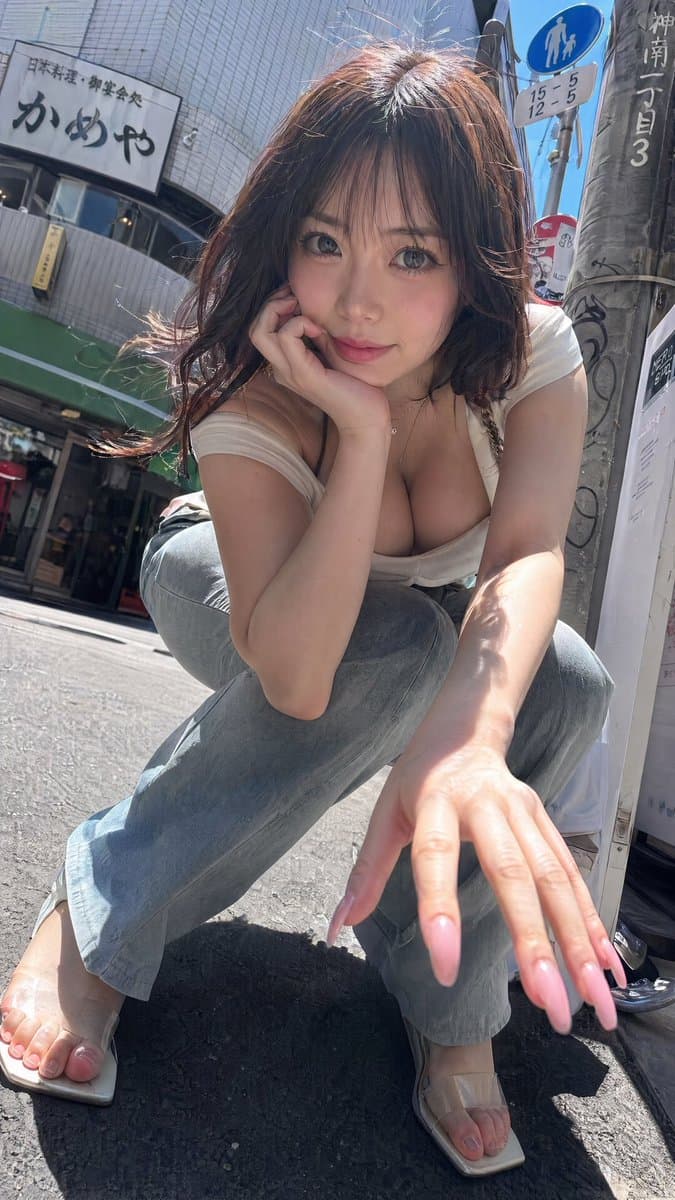
Create a photorealistic vertical smartphone street snapshot of an {argument name="subject" default="adult woman with shoulder-length wavy dark brown hair"} crouching very close to a wide-angle camera on a sunny Japanese city sidewalk. She is posed in a low squat, leaning forward with one elbow on her knee and one hand extended toward the lens, making the hand and long glossy pale-pink manicured nails appear large in the foreground. Her face is completely covered by a centered opaque square blur in a muted brown-pink tone, as if anonymized. She wears a tight low-cut {argument name="top color" default="white"} short-sleeve top, light faded blue jeans, and beige transparent-strap square-toe sandals. Use harsh midday sunlight, strong shadows on asphalt, realistic skin highlights, wind-tossed hair, candid paparazzi-like framing, slightly tilted composition, ultra-real phone-camera texture, shallow perspective distortion, and high detail. The background is a Japanese urban street corner with a tiled building facade, a green awning, a vertical utility pole with stickers and handwritten Japanese markings, a blue pedestrian road sign, and a restaurant sign reading {argument name="restaurant sign text" default="かめや"}; include additional small Japanese signage and street clutter for authenticity. Shot from a very low angle near ground level, close crop, 9:16 vertical aspect ratio, realistic documentary style, no illustration or anime look.
Choose the primary action to open PicX Studio with the available template settings. Review the model and format, personalize the creative direction, and generate when ready.
Yes. You can change the subject, setting, lighting, mood, format, and available model controls before creating your image.
This template is free to open and customize. Generation usage is shown in PicX Studio before you create.
Start with GPT Image 2, which is the model associated with this template. You can compare another compatible model for a different finish.
© 2026 PicX Studio. All rights reserved.

Follow a topic to a crawlable collection of related PicX Studio templates.
43,474 public templates available. Verified via the PicX Studio public templates API; refreshed hourly.











![Minimalist Flat Vector Travel Poster — Premium minimalist flat-vector travel poster for {argument name="city name" default="[CITY_NAME]"}, 3:4 vertical format.](https://cms-assets.youmind.com/media/1787917359711_3ug846_HQX205cbMAA6F6S-300x400.jpg)