How do I use the 108 Chibi Fantasy Mandala template?
Choose the primary action to open PicX Studio with the available template settings. Review the model and format, personalize the creative direction, and generate when ready.
A highly detailed wide fantasy poster showing exactly 108 unique chibi mythical creatures arranged in concentric mandala rings, ideal for decorative key art or showcase illustrations. Change the subject, setting, or lighting one variable at a time.
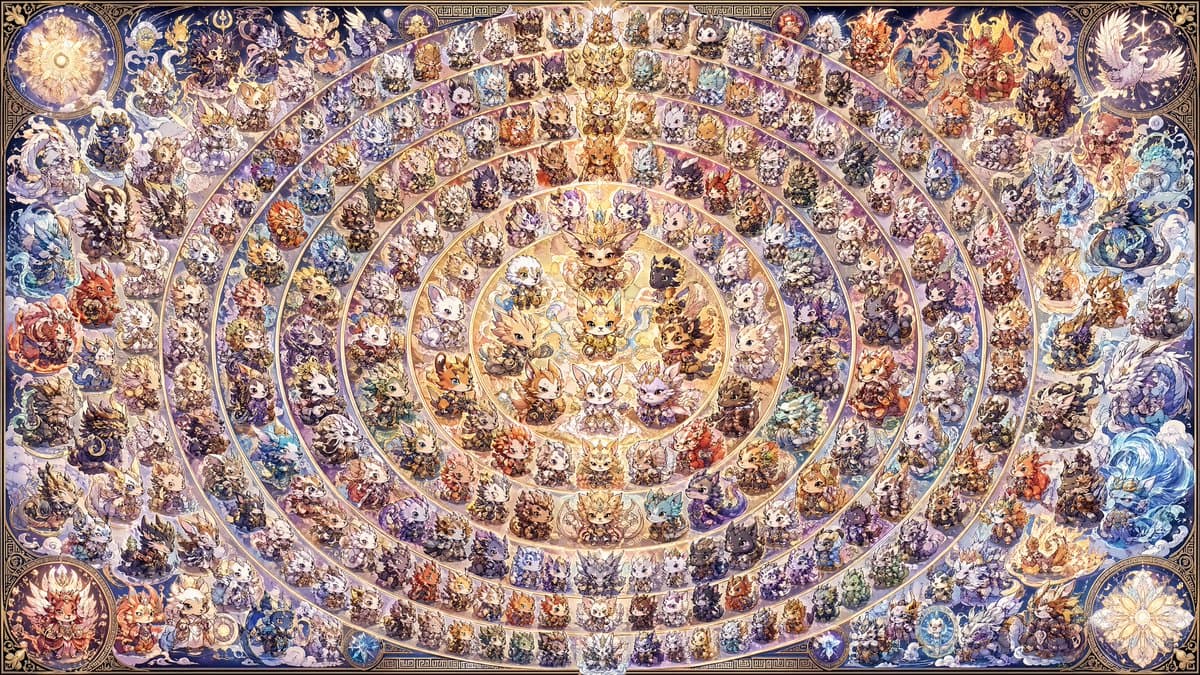
A gigantic ultra-detailed fantasy mandala poster featuring exactly 108 distinct chibi characters arranged in concentric circular rings around a radiant central emblem. The composition is perfectly symmetrical overall and fills a wide horizontal canvas like an ornate collectible mural. In the center, place a glowing golden core with 9 chibi animal-fantasy mascots clustered in a circular medallion, each with oversized heads, tiny bodies, expressive eyes, and luxurious costume details. Surround this center with multiple evenly spaced concentric rings containing the remaining 99 characters, each character occupying its own wedge-like segment and designed as a unique elemental or mythical variation. Include fox-like, rabbit-like, cat-like, wolf-like, lion-like, bird-like, dragon-like, deer-like, and hybrid beast characters, all rendered in a cute super-deformed style but with epic high-fantasy armor, robes, crowns, feathers, horns, gems, capes, staffs, and magical accessories. Make every character visually distinct through color, silhouette, species traits, and elemental theme, while preserving a unified painterly anime-fantasy aesthetic. Use a rich palette dominated by luminous gold, ivory, cream, violet, indigo, sapphire, and soft amber, with accents of crimson, icy cyan, emerald, and sunset orange. Give the image the feel of a sacred celestial chart or zodiac wheel, with each circular band separated by elegant gilded borders and arc dividers. Add glowing magical energy, sparkles, halos, swirling fire, mist, snow, clouds, water splashes, lightning curls, floral motifs, and celestial particles around many of the characters. Around the outer perimeter, place several larger decorative guardian illustrations integrated into the border: a bright sun medallion at the upper left, a white phoenix-like bird in a circular panel at the upper right, a floral or starburst medallion at the lower right, and a fiery character cluster in a circular panel at the lower left, plus additional large elemental beast figures embedded along the left and right edges. Frame the entire artwork with an elaborate antique ornamental border inspired by illuminated manuscripts and fantasy tarot designs, using filigree, corner medallions, geometric trim, and arcane motifs. The rendering should be extremely dense and crisp, like a 4k fantasy illustration meant for a poster print, with tiny readable character silhouettes across the whole image, intricate linework, soft watercolor-textured shading, glowing highlights, and a polished collectible-card-game concept art finish. Emphasize abundance, harmony, and radial order: exactly 108 chibi figures total, arranged as a majestic mandala of mythical elemental mascots.
Choose the primary action to open PicX Studio with the available template settings. Review the model and format, personalize the creative direction, and generate when ready.
Yes. You can change the subject, setting, lighting, mood, format, and available model controls before creating your image.
This template is free to open and customize. Generation usage is shown in PicX Studio before you create.
Start with GPT Image 2, which is the model associated with this template. You can compare another compatible model for a different finish.
© 2026 PicX Studio. All rights reserved.

Follow a topic to a crawlable collection of related PicX Studio templates.
43,474 public templates available. Verified via the PicX Studio public templates API; refreshed hourly.













![Minimalist Flat Vector Travel Poster — Premium minimalist flat-vector travel poster for {argument name="city name" default="[CITY_NAME]"}, 3:4 vertical format.](https://cms-assets.youmind.com/media/1787917359711_3ug846_HQX205cbMAA6F6S-300x400.jpg)