How do I use the Curry Chef AI Restart Comic template?
Choose the primary action to open PicX Studio with the available template settings. Review the model and format, personalize the creative direction, and generate when ready.
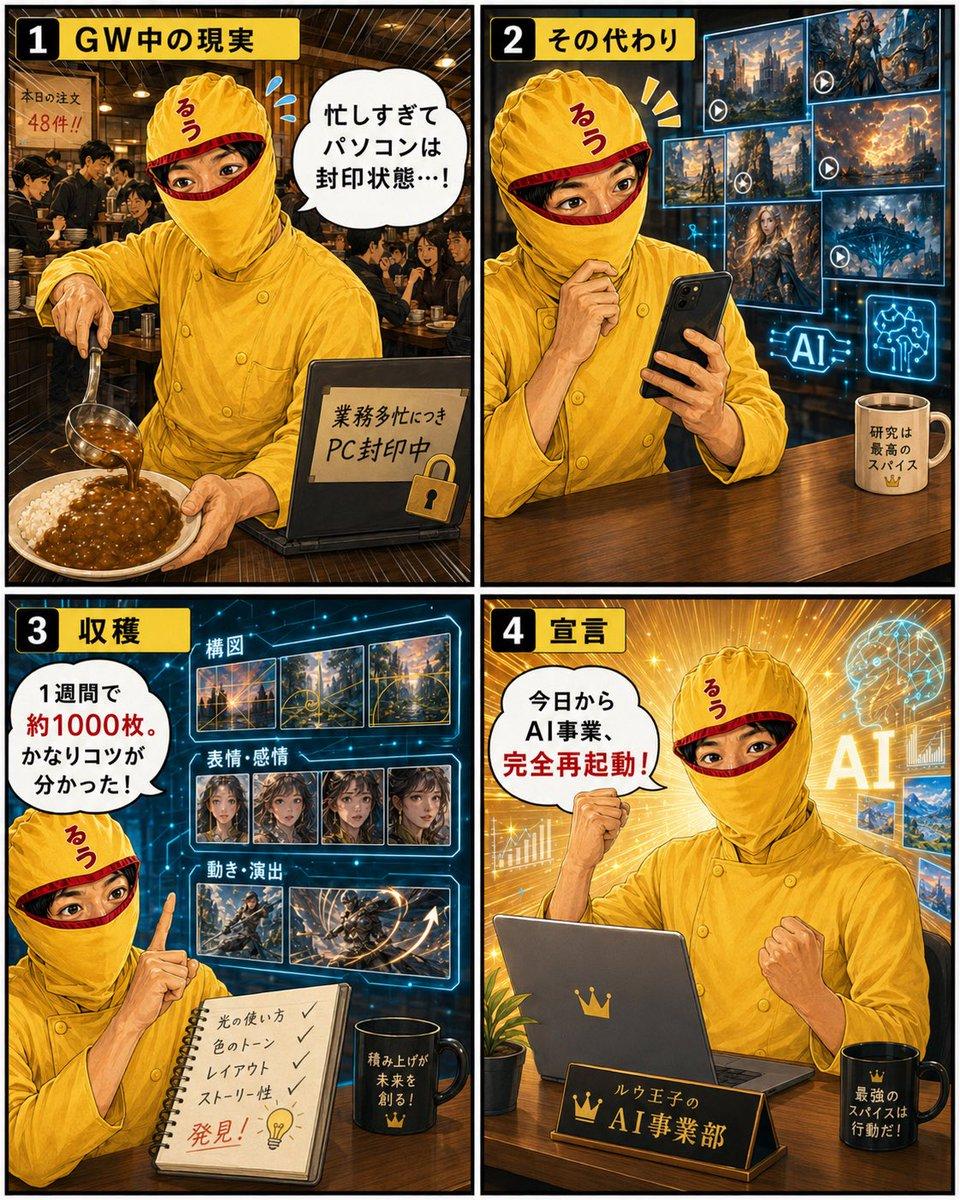
Generates a four-panel Japanese manga-style social media comic about a curry chef using spare time to study AI image generation and relaunch an AI business. (free to use) — Free AI image template on PicX Studio.
{"type":"four-panel promotional manga-style infographic poster","format":"vertical 2x2 grid comic with thick black borders, high contrast, detailed semi-realistic anime illustration, warm curry restaurant atmosphere mixed with futuristic AI UI effects","main_character":{"name":"{argument name=\"character name\" default=\"Curry Prince\"}","appearance":"adult restaurant owner/AI researcher, face intentionally obscured by a square mosaic blur, wearing a bright yellow curry-themed chef uniform and matching turban-like chef hat with a small red Japanese character on it","outfit_color":"{argument name=\"uniform color\" default=\"golden yellow\"}","recurring_props":"smartphone, laptop, curry plate, notebook, coffee mug, AI holograms"},"layout":{"panel_count":4,"grid":"two columns by two rows","panels":[{"number":"1","title":"GW中の現実","position":"top left","scene":"busy curry restaurant packed with customers, wooden interior, warm pendant lights, the chef pours curry sauce from a ladle onto rice in the foreground while a closed laptop sits on the counter with a lock icon","visible_text_count":3,"visible_text":["本日の注文 48件!!","忙しすぎてパソコンは封印状態…!","業務多忙につき PC封印中"],"mood":"chaotic but hardworking Golden Week rush"},{"number":"2","title":"その代わり","position":"top right","scene":"the same yellow-uniformed character sits at a wooden counter using a smartphone during a break, behind him are glowing blue floating screens showing AI-generated fantasy images and video thumbnails with play icons","visible_text_count":2,"visible_text":["AI","研究は最高のスパイス"],"mood":"focused mobile AI research in spare time"},{"number":"3","title":"収穫","position":"bottom left","scene":"futuristic blue analysis board full of generated image thumbnails, the character points upward beside an open notebook and black mug","thumbnail_groups_count":3,"thumbnail_groups":[{"label":"構図","count":4,"description":"four landscape composition thumbnails"},{"label":"表情・感情","count":4,"description":"four portrait/expression thumbnails with small mosaic faces"},{"label":"動き・演出","count":3,"description":"three action and motion direction thumbnails"}],"visible_text_count":6,"visible_text":["1週間で約1000枚。かなりコツが分かった!","構図","表情・感情","動き・演出","光の使い方 / 色のトーン / レイアウト / ストーリー性","発見!"],"mood":"research harvest, discovery, learning through volume"},{"number":"4","title":"宣言","position":"bottom right","scene":"golden dramatic office scene with radiant light beams, AI holographic brain, charts, and image screens behind the character; he sits at a desk with a laptop bearing a crown emblem, fist raised confidently, nameplate on desk","visible_text_count":4,"visible_text":["今日からAI事業、完全再起動!","AI","ルウ王子の AI事業部","最強のスパイスは行動だ!"],"mood":"powerful restart declaration and business motivation"}]},"typography":{"style":"bold Japanese manga headline lettering, black text on yellow title tabs, white speech bubbles with red emphasis words","panel_number_style":"large white numerals inside black rounded squares"},"color_palette":"golden yellow chef clothing and curry tones, dark restaurant browns, electric cyan AI screens, final panel filled with glowing gold light","rendering_instructions":"make it look like a polished social media comic poster, sharp linework, cinematic lighting, rich details, expressive hands and body language, readable Japanese text, no real celebrity likeness, keep the face covered by a square mosaic blur in every panel","custom_message":"{argument name=\"main message\" default=\"Curry and AI, both built seriously through action\"}"}
Use Curry Chef AI Restart Comic to plan an AI image around gpt-image-2 generation, themes such as en and gpt-image-2. Match the preview's composition first, then personalize the subject, setting, and mood for your own project.
Use the primary action to load the template settings in PicX Studio.
Adjust the subject and creative details for your destination.
Create the image, compare the result with the preview, and refine one variable at a time.
A continuous mix — similar concepts first, woven with same-model prompts and fresh picks from the catalog.
Choose the primary action to open PicX Studio with the available template settings. Review the model and format, personalize the creative direction, and generate when ready.
Yes. You can change the subject, setting, lighting, mood, format, and available model controls before creating your image.
This template is free to open and customize. Generation usage is shown in PicX Studio before you create.
Start with gpt-image-2, which is the model associated with this template. You can compare another compatible model for a different finish.
A continuous mix — similar concepts first, woven with same-model prompts and fresh picks from the catalog.
Follow a topic to a crawlable collection of related PicX Studio templates.
36,410 public templates available. Verified via the PicX Studio public templates API; refreshed hourly.