How do I use the Italian Summer Afternoon Portrait template?
Choose the primary action to open PicX Studio with the available template settings. Review the model and format, personalize the creative direction, and generate when ready.
A highly detailed prompt for creating a photorealistic portrait of a woman at a luxury Italian cafe, featuring warm afternoon light and a cottagecore aesthetic. Change the subject, setting, or lighting one variable at a time.
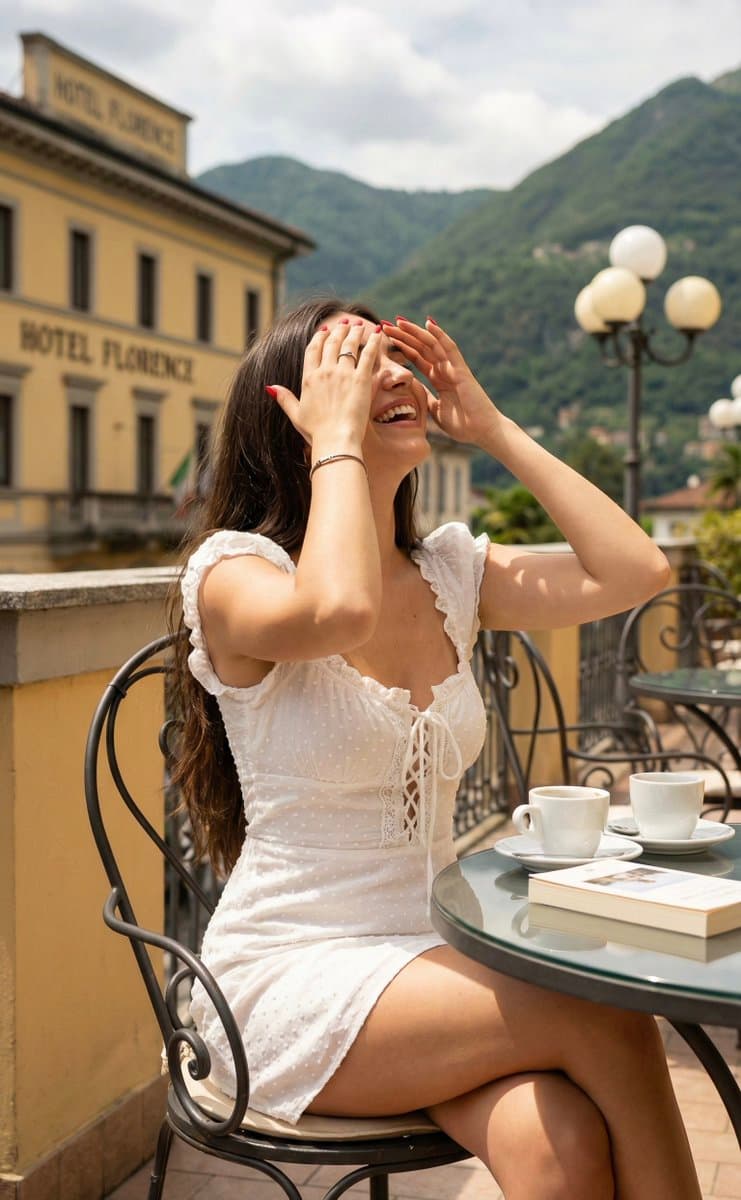
Ultra photorealistic portrait of a young woman with {argument name="hair style" default="long straight dark brown hair"}, sun-kissed glowing skin, seated at an outdoor cafe table. She's wearing a {argument name="clothing" default="white vintage Swiss dot corset mini dress"} with a sweetheart neckline, ruffled cap sleeves, front lace-up ribbon detailing, fitted bodice, and slightly sheer ruffled hem. Hands raised playfully covering her eyes, head tilted back laughing, red manicured nails, thin bracelet and ring on left hand. Setting: {argument name="location" default="luxury outdoor hotel terrace at Hotel Florence"}, historic yellow building with "HOTEL FLORENCE" signage, lush green mountains in the background, cloudy blue sky, vintage globe street lamps, round glass-top table with two white ceramic coffee cups and a paperback book. Coquette cottagecore soft feminine luxury aesthetic. Natural bright afternoon sunlight, high contrast, sharp shadows on the table, backlighting creates a hair halo effect, warm vibrant color grading. DSLR 85mm portrait lens, f/2.8 shallow depth of field, 1/500s shutter, ISO 100, 8k RAW photo.
Choose the primary action to open PicX Studio with the available template settings. Review the model and format, personalize the creative direction, and generate when ready.
Yes. You can change the subject, setting, lighting, mood, format, and available model controls before creating your image.
This template is free to open and customize. Generation usage is shown in PicX Studio before you create.
Start with GPT Image 2, which is the model associated with this template. You can compare another compatible model for a different finish.
© 2026 PicX Studio. All rights reserved.

Follow a topic to a crawlable collection of related PicX Studio templates.
43,474 public templates available. Verified via the PicX Studio public templates API; refreshed hourly.





![118-google-nano-banana-pro-skincare-product- — A professional skincare shot of a [product container] with [cap/lid], labeled [brand, product, descriptor, volume](/_next/image?url=https%3A%2F%2Fcdn.picxstudio.com%2Fuploads%2Fpost118_img0_332898b8-29ea-42a9-87ab-9ed746a3f944.jpg&w=828&q=100)



![69-untitled — FORMAT: 15s / 145 BPM / 14 SHOTS
SUBJECT: @[image1]
WARDROBE: Clean modern outfit
ENVIRONMENT: Street / indoor transitions
MOOD: Discovery → contr](/_next/image?url=https%3A%2F%2Fcdn.picxstudio.com%2Fuploads%2Fpost69_img0_d45faecf-38c3-4bcb-81a4-f6eb1cf42bb2.jpg&w=828&q=100)












![Minimalist Flat Vector Travel Poster — Premium minimalist flat-vector travel poster for {argument name="city name" default="[CITY_NAME]"}, 3:4 vertical format.](https://cms-assets.youmind.com/media/1787917359711_3ug846_HQX205cbMAA6F6S-300x400.jpg)



















![Cute Amigurumi Wizard Plush — {argument name="animal" default="[animal]"} {argument name="color" default="[color]"} very cute amig…](https://pbs.twimg.com/media/HE_oVh6WEAAxjwc.jpg)