How do I use the Anime Creative Team Studio Poster template?
Choose the primary action to open PicX Studio with the available template settings. Review the model and format, personalize the creative direction, and generate when ready.
This prompt generates a polished anime-style studio recruitment or team-introduction poster with three professional women, editorial text panels, and a bright modern office setting. Change the subject, setting, or lighting one variable at a time.
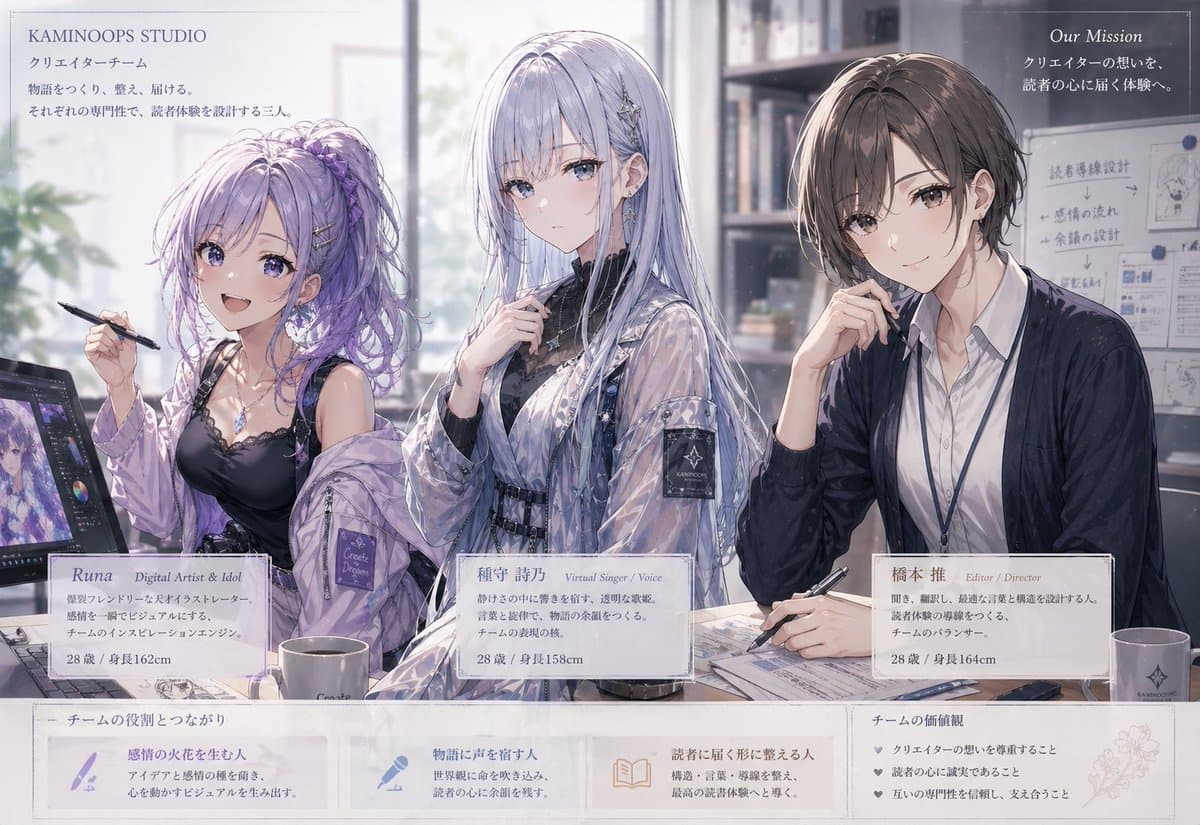
A polished anime-style corporate team illustration in a bright modern creative studio, featuring exactly 3 seated women shown from the waist up behind a worktable, arranged left to right as a team introduction poster. The overall mood is elegant, professional, soft, and slightly dreamy, with delicate linework, painterly shading, airy window light, muted pastel colors, and refined visual-novel/key-art rendering. On the left, a stylish digital artist named {argument name="character name" default="Runa"} with voluminous wavy lavender hair in a high ponytail with braided accents and loose strands, wearing a black camisole with lace trim, layered necklaces, and an oversized translucent lavender jacket slipping off the shoulders, holds a stylus in one hand beside a pen-display tablet showing a purple-toned anime illustration. In the center, a virtual singer character named {argument name="character name" default="種守 詩乃"} with very long straight silver-lilac hair, cool pale skin, and a calm expression, wears a black inner top under a glossy translucent jacket with belts and straps, plus delicate star-like hair accessories, posed with one hand near the collar. On the right, an editor/director named {argument name="character name" default="橋本 推"} with short ash-brown hair and a neat side part, wearing a white button-up shirt, dark cardigan, and lanyard, sits thoughtfully with one hand at the chin and the other holding a pen over documents. The office background includes tall bookshelves, binders, a softly glowing large window, a wall planning board with diagrams and notes, stacks of papers, notebooks, mugs, and desk clutter that feels actively used but organized. Add printed branding and editorial layout text integrated into the image like a recruitment or mission poster: top left header "KAMINOOPS STUDIO", below it "クリエイターチーム" and a short Japanese mission paragraph; top right header "Our Mission" with Japanese supporting text; 3 name-card panels aligned below the characters, one for each person, each including the role line, a short Japanese profile paragraph, and age and height details; and a bottom horizontal information band split into exactly 4 boxed sections, including a left title area about team connection, exactly 3 icon-based explanatory boxes in the middle, and a right box titled about team values with exactly 3 bullet points. Use a clean editorial composition with subtle borders and semi-transparent white panels for text, realistic desk perspective, high detail in fabric sheen and hair strands, and a premium Japanese studio brochure aesthetic.
Choose the primary action to open PicX Studio with the available template settings. Review the model and format, personalize the creative direction, and generate when ready.
Yes. You can change the subject, setting, lighting, mood, format, and available model controls before creating your image.
This template is free to open and customize. Generation usage is shown in PicX Studio before you create.
Start with GPT Image 2, which is the model associated with this template. You can compare another compatible model for a different finish.
© 2026 PicX Studio. All rights reserved.

Follow a topic to a crawlable collection of related PicX Studio templates.
43,474 public templates available. Verified via the PicX Studio public templates API; refreshed hourly.







![Japan Travel Brochure Poster — Create a vertical vintage travel-brochure infographic poster titled “[COUNTRY/DESTINATION]: [TAGLINE]”, using a warm parchment-pa](/_next/image?url=https%3A%2F%2Fcdn.picxstudio.com%2Fuploads%2Fp0_982bf820-bb34-4c43-8a6d-42d799d7282b.jpg&w=828&q=100)





![Minimalist Flat Vector Travel Poster — Premium minimalist flat-vector travel poster for {argument name="city name" default="[CITY_NAME]"}, 3:4 vertical format.](https://cms-assets.youmind.com/media/1787917359711_3ug846_HQX205cbMAA6F6S-300x400.jpg)