How do I use the Vintage Confidential Case File template?
Choose the primary action to open PicX Studio with the available template settings. Review the model and format, personalize the creative direction, and generate when ready.
This prompt generates a realistic top-down noir-style confidential dossier page, ideal for storytelling, detective worldbuilding, and cinematic prop imagery. Change the subject, setting, or lighting one variable at a time.
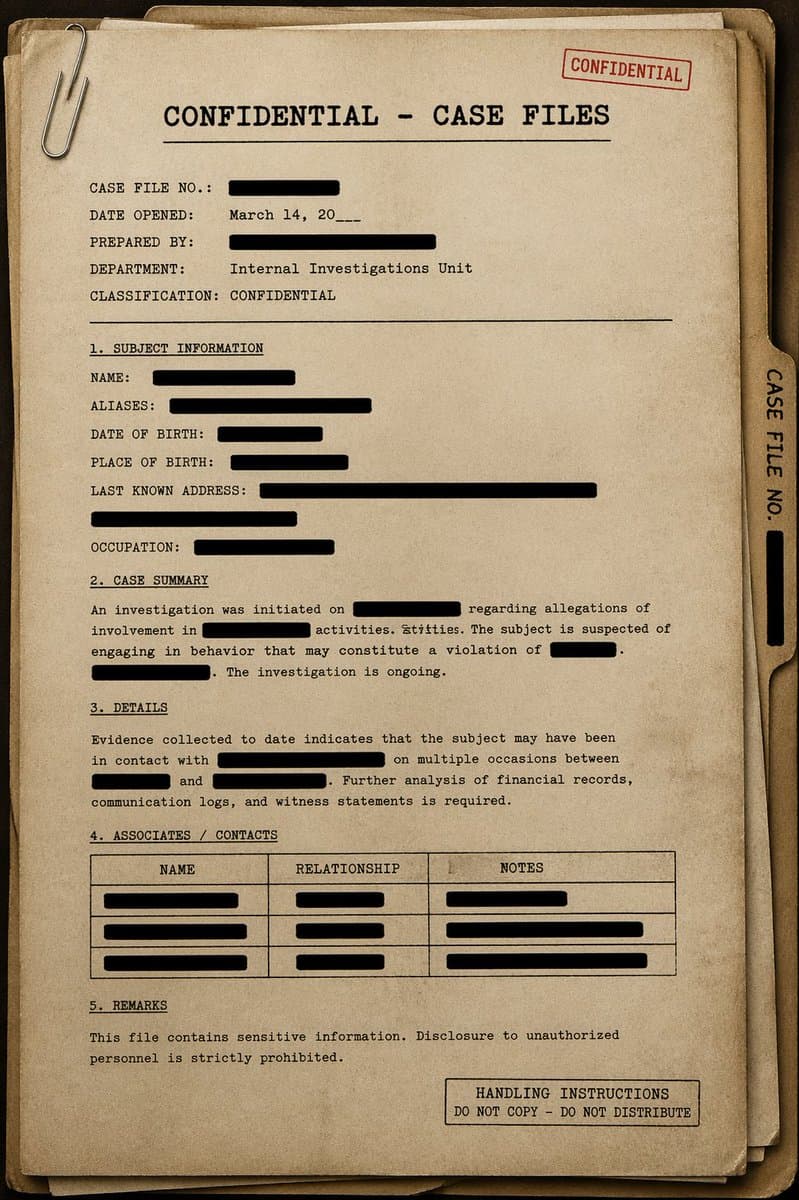
A top-down cinematic still life of a vintage classified investigation dossier on a dark wooden desk, centered and filling most of the frame. Show a stack of 3 worn manila folders with aged beige paper, frayed corners, subtle stains, and realistic paper texture. The top folder is the main focus and is clipped at the upper left with 1 oversized silver paper clip. Across the top center, typewritten in bold black monospaced letters, the headline reads {argument name="headline text" default="CONFIDENTIAL – CASE FILES"}, with a thin horizontal rule beneath it. Add 2 red rubber-stamp marks: one near the top right that says "CONFIDENTIAL" at a slight angle, and one boxed stamp at the bottom right that says "HANDLING INSTRUCTIONS DO NOT COPY – DO NOT DISTRIBUTE". On the right edge of the folder stack, show 1 tabbed side label reading "CASE FILE NO." with a thick black redaction bar below it. The page is formatted like an old typewritten government document with crisp black ink, slightly uneven typewriter alignment, and many thick black redaction bars obscuring key details. Include 5 numbered sections exactly: "1. SUBJECT INFORMATION", "2. CASE SUMMARY", "3. DETAILS", "4. ASSOCIATES / CONTACTS", and "5. REMARKS". In the header area, include the fields "CASE FILE NO.:" with a black redaction bar, "DATE OPENED:" with {argument name="date opened" default="March 14, 20___"}, "PREPARED BY:" with a black redaction bar, "DEPARTMENT:" with {argument name="department" default="Internal Investigations Unit"}, and "CLASSIFICATION:" with {argument name="classification" default="CONFIDENTIAL"}. In section 1, include 6 fields: "NAME:", "ALIASES:", "DATE OF BIRTH:", "PLACE OF BIRTH:", "LAST KNOWN ADDRESS:", and "OCCUPATION:", each followed by black redaction bars of varying lengths. In section 2, add a short paragraph of typewritten case-summary text with 5 separate black redaction bars embedded in the sentence flow. In section 3, add a second paragraph of details text with 4 separate black redaction bars embedded in the paragraph. In section 4, include a 3-column table labeled "NAME", "RELATIONSHIP", and "NOTES", with 3 filled rows, each cell content covered by black redaction bars. In section 5, add a short warning sentence about sensitive information and unauthorized disclosure. Use warm sepia lighting, soft shadows around the folder edges, subtle vignetting, and a moody noir archival atmosphere. The image should feel realistic, tactile, secretive, and slightly dusty, like a confidential detective case file photographed for a crime thriller or worldbuilding prop.
Choose the primary action to open PicX Studio with the available template settings. Review the model and format, personalize the creative direction, and generate when ready.
Yes. You can change the subject, setting, lighting, mood, format, and available model controls before creating your image.
This template is free to open and customize. Generation usage is shown in PicX Studio before you create.
Start with GPT Image 2, which is the model associated with this template. You can compare another compatible model for a different finish.
© 2026 PicX Studio. All rights reserved.

Follow a topic to a crawlable collection of related PicX Studio templates.
43,474 public templates available. Verified via the PicX Studio public templates API; refreshed hourly.









![Minimalist Flat Vector Travel Poster — Premium minimalist flat-vector travel poster for {argument name="city name" default="[CITY_NAME]"}, 3:4 vertical format.](https://cms-assets.youmind.com/media/1787917359711_3ug846_HQX205cbMAA6F6S-300x400.jpg)





























![Nano Banana 2 Prompt for Character Collaboration Menu — 【キャラ設定】
- キャラ名:[{argument name="キャラクター名" default=""}] ← ここだけ埋めればOK。以下は任意
- 色・見た目の特徴:[{argument name=…](https://pbs.twimg.com/media/HEFSSXEaQAAq8T8.jpg)

