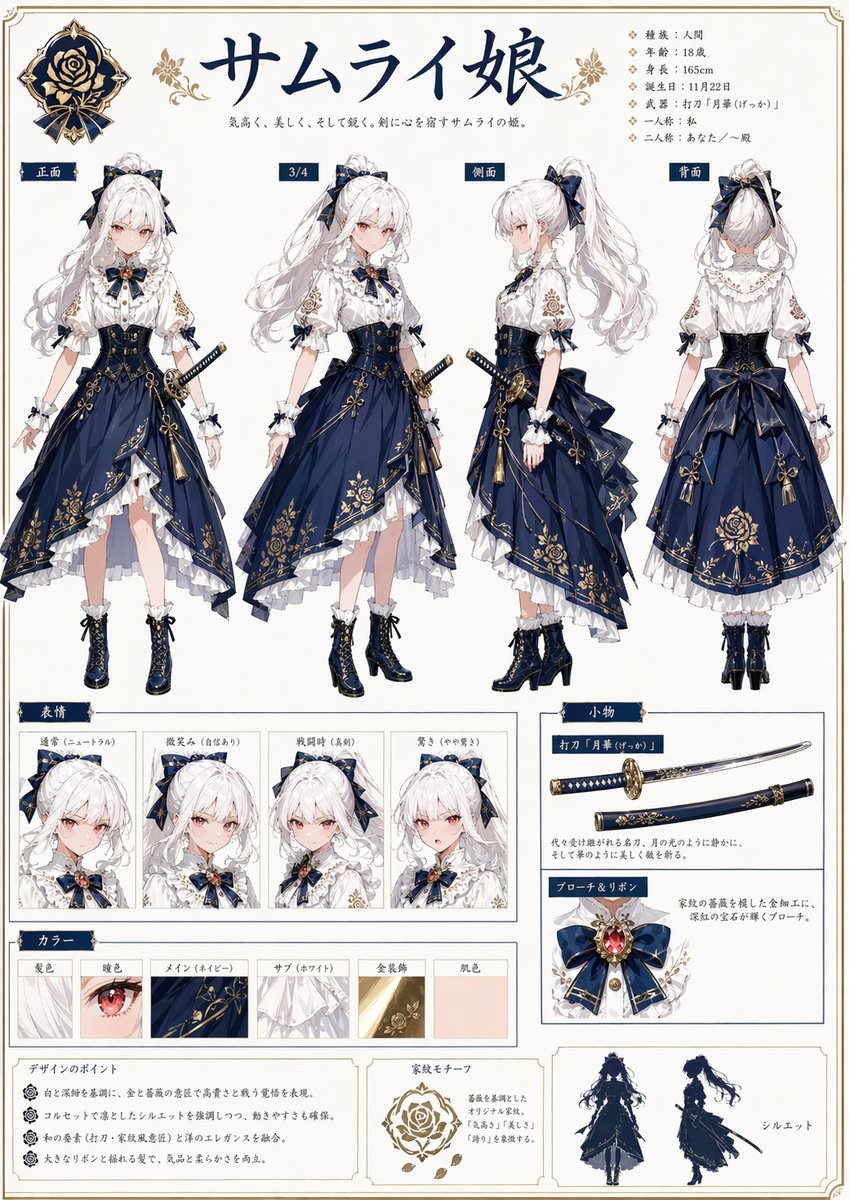
Samurai Princess Character Sheet
{"type":"anime character setting sheet","style":"ornate Japanese character design bible page, elegant fantasy samurai aesthetic, clean white background with thin decorative gold border, navy and gold headings, highly polished full-color illustration, refined print-layout composition","subject":{"role":"samurai princess","title":"サムライ姫","tagline":"気高く、美しく、そして強く。剣に心を宿すサムライの姫。","character":{"gender":"female","age":"18","build":"slender and graceful","skin":"fair porcelain","hair":{"color":"{argument name=\"hair color\" default=\"white\"}","style":"very long wavy high ponytail tied with a large navy bow, soft bangs, loose side strands"},"eyes":{"color":"soft crimson pink","shape":"large delicate anime eyes"},"expression":"calm, noble, slightly reserved"},"outfit":{"theme":"Japanese-western fusion formal combat dress","primary colors":["deep navy blue","white","antique gold"],"pieces":["white high-neck ruffled blouse with puff sleeves and gold floral embroidery on the upper arms","large navy ribbon brooch at the collar with a red gem centerpiece and gold ornament","dark navy corset-style waist cincher with gold filigree details and front lacing","asymmetrical layered navy skirt with heavy gold floral and crest-like embroidery","white underskirt with multiple ruffled layers visible at the hem","large structured back bow at the waist","frilled wrist cuffs with small navy ribbon accents","dark navy lace-up ankle boots with gold trim and block heels"],"accessories":["katana worn at the left hip in a navy scabbard with gold fittings","multiple small ribbon bows on sleeves and hair","ornamental tassels hanging from the skirt"]},"crest":{"count":2,"description":"rose-family emblem in navy and gold, one large badge at top left and one motif sample near the bottom center"},"layout":{"sections":[{"title":"main views","position":"upper half","count":4,"labels":["正面","3/4","側面","背面"],"description":"four full-body turnaround views of the same character: front, three-quarter, side, and back"},{"title":"表情","position":"lower left","count":4,"labels":["通常","微笑み","真剣時","驚き"],"description":"four close-up facial expression panels showing neutral, gentle smile, serious battle face, and surprised"},{"title":"カラー","position":"lower middle-left","count":6,"labels":["髪色","瞳色","メイン(ネイビー)","サブ(ホワイト)","金装飾","肌色"],"description":"six rectangular color/material swatches for hair, eye, main fabric, secondary fabric, gold ornament, and skin tone"},{"title":"小物","position":"lower right","count":2,"labels":["打刀『月華』","ブローチとリボン"],"description":"one weapon panel showing the katana horizontally and one accessory panel showing the brooch and ribbon close-up"},{"title":"bottom notes","position":"bottom row","count":3,"labels":["デザインのポイント","家紋モチーフ","シルエット"],"description":"three boxed panels containing design notes text, rose crest explanation, and two navy silhouette figures"}],"sidebar":{"position":"upper right","count":7,"labels":["種類:人間","年齢:18歳","身長:165cm","誕生日:11月22日","武器:打刀『月華(げっか)』","一人称:私","二人称:あなた/〜殿"],"description":"compact vertical profile list in Japanese with diamond bullets"}},"text_language":"Japanese","rendering":"high-detail anime illustration, crisp line art, soft shading, luxurious textile rendering, intricate gold ornamentation, reference-sheet graphic design, balanced spacing, no background scenery"}













![Minimalist Flat Vector Travel Poster — Premium minimalist flat-vector travel poster for {argument name="city name" default="[CITY_NAME]"}, 3:4 vertical format.](https://cms-assets.youmind.com/media/1787917359711_3ug846_HQX205cbMAA6F6S-300x400.jpg)