How do I use the Gothic Blonde Wine Portrait template?
Choose the primary action to open PicX Studio with the available template settings. Review the model and format, personalize the creative direction, and generate when ready.
Generates a glamorous vertical anime portrait of a gothic blonde woman holding red wine in a luxurious black-and-gold setting. Change the subject, setting, or lighting one variable at a time.
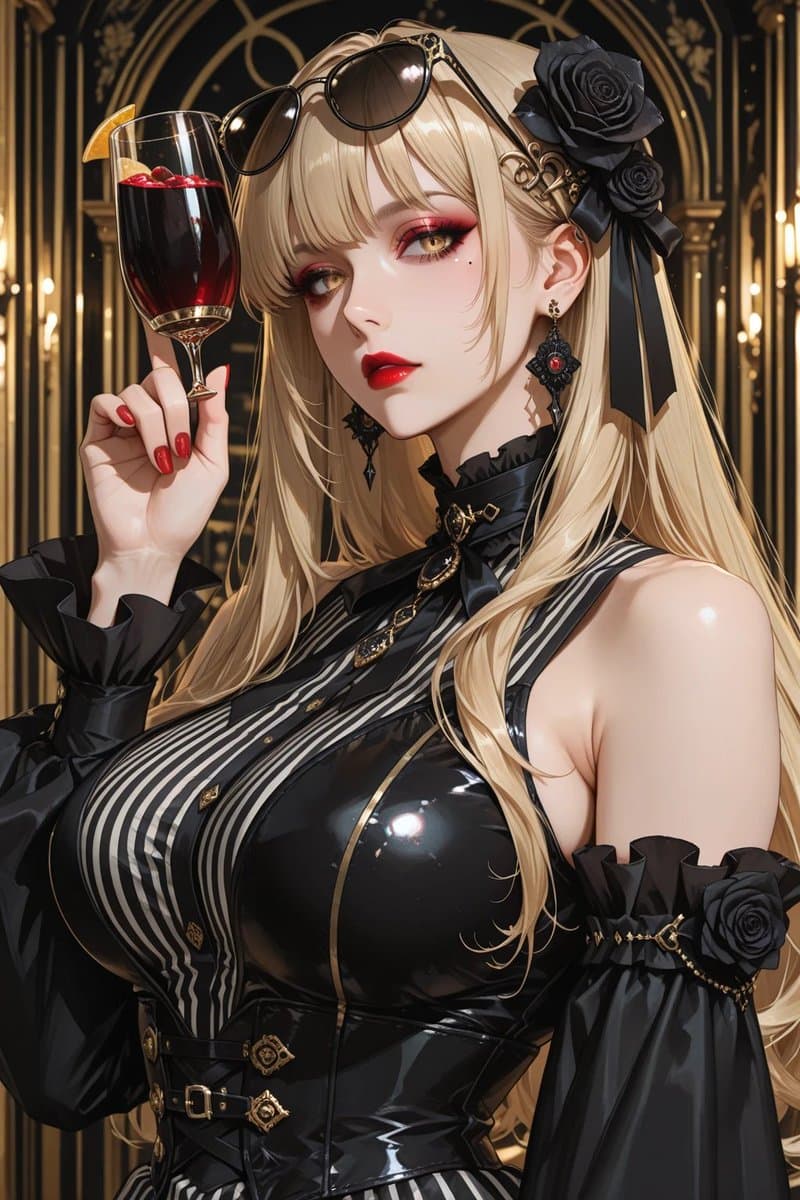
Create a highly detailed vertical anime-style luxury portrait of an elegant gothic blonde woman in an opulent art-deco bar or cathedral-like lounge with black-and-gold arches and warm candlelike lights in the background. She has very long flowing {argument name="hair color" default="platinum blonde"} hair, black sunglasses resting on top of her head, an ornate black rose hair accessory with ribbons on the right side, and dangling black-and-red gemstone earrings. Her face is intentionally covered by a large centered opaque square censor block in muted taupe beige. She raises a tall wine glass filled with deep red sangria or red wine, garnished with an orange slice and small red berries, held delicately with glossy red manicured nails. Dress her in a dramatic glossy black latex gothic outfit: sleeveless fitted corset bodice with high shine reflections, vertical black-and-white striped front panel, gold trim, small gold buttons, belts and ornate clasps at the waist, a black ribbon choker with gold pendant, and separate puffed black off-shoulder sleeves with ruffled cuffs, gold chain accents, and black rose decorations. Emphasize a glamorous mature feminine silhouette, polished skin highlights, intricate accessories, dark romantic fashion, rich gold detailing, cinematic lighting, shallow depth of field, crisp linework, high contrast, luxurious atmosphere, and ultra-detailed anime illustration quality. Use a portrait composition, close upper-body framing, with the wine glass near the upper left and the character turned slightly to the side.
Choose the primary action to open PicX Studio with the available template settings. Review the model and format, personalize the creative direction, and generate when ready.
Yes. You can change the subject, setting, lighting, mood, format, and available model controls before creating your image.
This template is free to open and customize. Generation usage is shown in PicX Studio before you create.
Start with GPT Image 2, which is the model associated with this template. You can compare another compatible model for a different finish.
© 2026 PicX Studio. All rights reserved.

Follow a topic to a crawlable collection of related PicX Studio templates.
43,474 public templates available. Verified via the PicX Studio public templates API; refreshed hourly.


![69-untitled — FORMAT: 15s / 145 BPM / 14 SHOTS
SUBJECT: @[image1]
WARDROBE: Clean modern outfit
ENVIRONMENT: Street / indoor transitions
MOOD: Discovery → contr](/_next/image?url=https%3A%2F%2Fcdn.picxstudio.com%2Fuploads%2Fpost69_img0_d45faecf-38c3-4bcb-81a4-f6eb1cf42bb2.jpg&w=828&q=100)
















![118-google-nano-banana-pro-skincare-product- — A professional skincare shot of a [product container] with [cap/lid], labeled [brand, product, descriptor, volume](/_next/image?url=https%3A%2F%2Fcdn.picxstudio.com%2Fuploads%2Fpost118_img0_332898b8-29ea-42a9-87ab-9ed746a3f944.jpg&w=828&q=100)





![Minimalist Flat Vector Travel Poster — Premium minimalist flat-vector travel poster for {argument name="city name" default="[CITY_NAME]"}, 3:4 vertical format.](https://cms-assets.youmind.com/media/1787917359711_3ug846_HQX205cbMAA6F6S-300x400.jpg)




















![Tactical Simulation RPG Scene Prompt — 戦術シミュレーションRPG風
────────────────
キャラクター名指定:[{argument name="キャラクター名" default="(★任意)"}]
表示テキスト指定:[{argument name="表示テキスト" d](https://cms-assets.youmind.com/media/1779182073687_7kuw5q_HIpf3ejbUAAP0Z5.jpg)





![Ugly Christmas Sweater Prompt Template — {
"theme": "ugly_christmas_sweater",
"prompt": "{argument name="image reference" default="[IMAGE REFERENCE]"} weari](https://pbs.twimg.com/media/G7kVIOGWgAAuhn2.jpg)