How do I use the Harajuku Sweet Lolita and Wa-Gothic Café template?
Choose the primary action to open PicX Studio with the available template settings. Review the model and format, personalize the creative direction, and generate when ready.
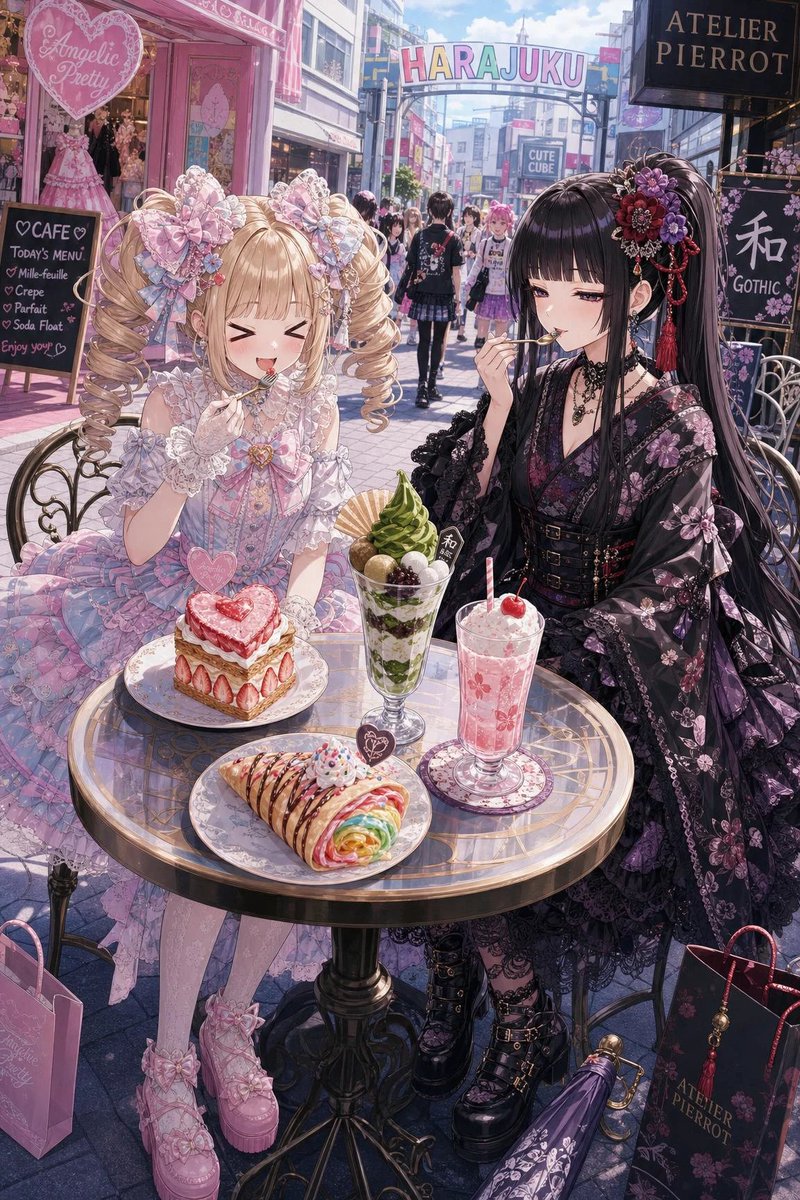
A detailed anime-style Harajuku café scene featuring two anonymized lolita fashion girls with elaborate outfits, desserts, and boutique signage. (free to use) — Free AI image template on PicX Studio.
Create a highly detailed vertical anime illustration set on a sunny Harajuku fashion street, in front of pastel boutique storefronts and gothic fashion shops. Show exactly two young women seated at a small round glass café table: on the left, a sweet lolita girl with {argument name="left character hair color" default="blonde"} twin-drill pigtails, oversized pastel lace bows, a frilly pink-and-lavender Angelic Pretty style dress, lace gloves, pink platform shoes, and pastel shopping bags; on the right, a wa-gothic girl with {argument name="right character hair color" default="long black hair with purple highlights"}, an ornate floral kanzashi hairpiece with red tassels, a black kimono-inspired gothic lolita dress with purple floral patterns, sheer lace sleeves, corset belts, layered necklaces, black platform boots, and a dark Atelier Pierrot shopping bag. Both faces should be obscured by soft square blur blocks, as if anonymized in a street snapshot. The table must contain exactly four visible desserts/drinks: 1) a heart-topped strawberry shortcake on a plate, 2) a tall matcha parfait with green soft serve, mochi and red bean, 3) a pink cream soda or strawberry float with a cherry and straw, and 4) a folded rainbow crepe drizzled with chocolate and sprinkles. Include exactly five prominent readable background signs: 1) a pink heart shop sign reading “Angelic Pretty,” 2) a street arch reading “HARAJUKU,” 3) a black shop sign reading “ATELIER PIERROT,” 4) a chalkboard café menu sign with hearts and dessert items, and 5) a black wa-gothic sign with the large Japanese character “和” and the word “GOTHIC.” Use a dreamy GPT-image-2 anime aesthetic with intricate lace, ribbons, jewelry, glass reflections, sunlight, pastel pink storefronts, crowded pedestrian street depth, blue sky, and high-fashion magazine composition. Camera angle is slightly above table height, vertical 2:3 framing, characters filling the foreground, detailed desserts centered, Harajuku street receding into the background. Style should be polished, luminous, hyper-detailed, cute yet elegant, with no watermark and no extra characters seated at the table.
Use Harajuku Sweet Lolita and Wa-Gothic Café to plan an AI image around gpt-image-2 generation, themes such as en and gpt-image-2. Match the preview's composition first, then personalize the subject, setting, and mood for your own project.
Use the primary action to load the template settings in PicX Studio.
Adjust the subject and creative details for your destination.
Create the image, compare the result with the preview, and refine one variable at a time.
A continuous mix — similar concepts first, woven with same-model prompts and fresh picks from the catalog.
Choose the primary action to open PicX Studio with the available template settings. Review the model and format, personalize the creative direction, and generate when ready.
Yes. You can change the subject, setting, lighting, mood, format, and available model controls before creating your image.
This template is free to open and customize. Generation usage is shown in PicX Studio before you create.
Start with gpt-image-2, which is the model associated with this template. You can compare another compatible model for a different finish.
A continuous mix — similar concepts first, woven with same-model prompts and fresh picks from the catalog.
Follow a topic to a crawlable collection of related PicX Studio templates.
28,404 public templates available. Verified via the PicX Studio public templates API; refreshed hourly.