How do I use the Summer Cat-Girl Idol Festival template?
Choose the primary action to open PicX Studio with the available template settings. Review the model and format, personalize the creative direction, and generate when ready.
Generates a colorful vertical anime poster of a cat-girl idol performing at a lively summer outdoor concert festival.
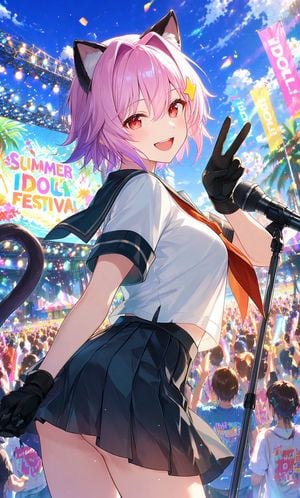
Create a vibrant vertical anime illustration of one cheerful cat-girl idol on an outdoor summer festival stage, viewed from a low-angle three-quarter perspective as she turns back toward the viewer and smiles. The main subject is {argument name="character name" default="a pink-haired cat-girl idol"} with short fluffy {argument name="hair color" default="pink"} hair, bright red eyes, two black cat ears with pale inner fur, a small yellow star hair clip, and one dark curved cat tail visible behind her. She wears a Japanese sailor-style school idol outfit: fitted white short-sleeve blouse with dark navy collar and sleeve trim, orange necktie, dark pleated mini skirt, and black fingerless gloves. Her right hand is raised beside her face making a V-sign peace pose, while her other hand rests lower near her skirt. Place exactly one black microphone on a stand at the right foreground, angled toward her. The background is a packed outdoor concert crowd with colorful glow sticks, stage truss lighting on the left, tropical palm trees, confetti in the sky, and a huge colorful stage screen reading {argument name="festival sign text" default="SUMMER IDOL FESTIVAL"}. Include exactly three tall vertical festival banners in the distance on the right, each with bold idol-themed lettering, in pink, teal, and yellow. Use a brilliant sunny blue sky with fluffy white clouds, lens flare, sparkling particles, saturated summer colors, dynamic lighting, glossy anime rendering, high detail, energetic idol-concert atmosphere, shallow depth of field for the crowd, and a polished gpt-image-2 anime poster look. Use a vertical 9:16 composition, with the idol filling most of the frame and the festival crowd extending far below her.
Choose the primary action to open PicX Studio with the available template settings. Review the model and format, personalize the creative direction, and generate when ready.
Yes. You can change the subject, setting, lighting, mood, format, and available model controls before creating your image.
This template is free to open and customize. Generation usage is shown in PicX Studio before you create.
Start with GPT Image 2, which is the model associated with this template. You can compare another compatible model for a different finish.
Follow a topic to a crawlable collection of related PicX Studio templates.