
Japanese Office LINE Sticker Sheet
A 3x3 sample sheet of cute Japanese LINE-style stickers featuring a businessman and yellow chick mascot for office communication and approval workflow messaging.
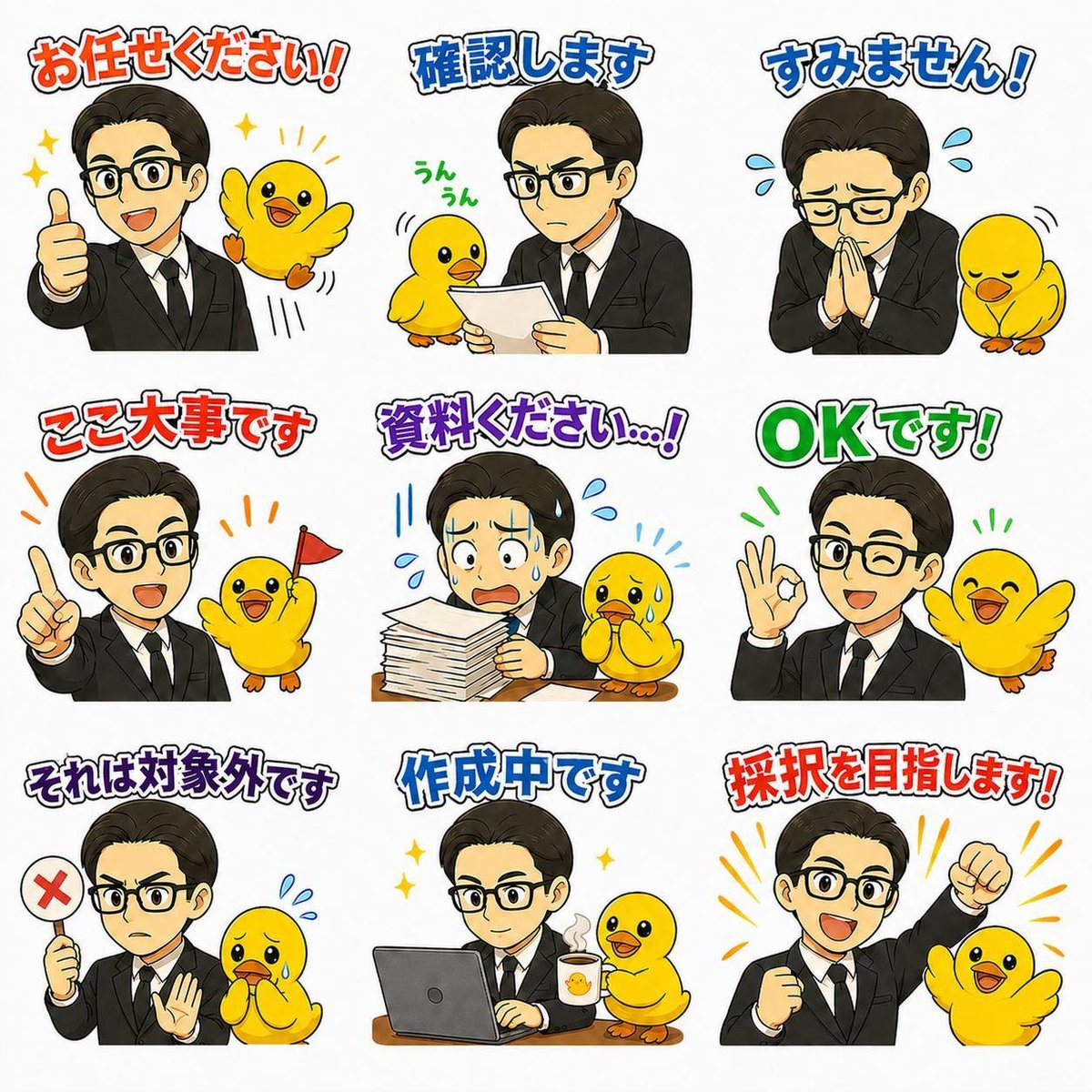
- Prompt included
- Model and format preset
- Free template
The prompt behind this image
Copy the exact prompt behind Japanese Office LINE Sticker Sheet, or open it in the studio and make it yours.
- Type
- LINE sticker sample sheet
- Style
- cute Japanese messaging sticker illustration, clean white background, soft anime-cartoon rendering, bold colorful outlined Japanese text above each sticker, expressive office-worker mascot set
- Format
- 3x3 grid
- Subjects › Main Character › Description
- young Japanese businessman in a black suit, white dress shirt, black tie, neat dark slicked-back hair, shown from the waist up in each sticker, friendly and professional
- Subjects › Main Character › Face Visibility
- generic face area, simple approachable features or anonymized face
- Subjects › Main Character › Pose Variation Count
- 9
- Subjects › Sidekick › Description
- small bright yellow chick mascot with orange beak and feet, very expressive, often reacting beside the businessman
- Subjects › Sidekick › Appearance Consistency
- same chick character across all 9 stickers
- Layout › Background
- plain white
- Layout › Grid › Rows
- 3
- Layout › Grid › Columns
- 3
- Layout › Grid › Count
- 9
- Layout › Sections › 0 › Position
- top-left
- Layout › Sections › 0 › Title
- お任せください!
- Layout › Sections › 0 › Count
- 2
- Layout › Sections › 0 › Elements
- businessman giving thumbs up, happy chick flapping with sparkles
- Layout › Sections › 1 › Position
- top-center
- Layout › Sections › 1 › Title
- 確認します
- Layout › Sections › 1 › Count
- 3
- Layout › Sections › 1 › Elements
- businessman holding and reading a sheet of paper, chick beside document, green handwritten text うんうん near chick
- Layout › Sections › 2 › Position
- top-right
- Layout › Sections › 2 › Title
- すみません!
- Layout › Sections › 2 › Count
- 3
- Layout › Sections › 2 › Elements
- businessman bowing with hands together apologetically, blue sweat drops around head, sad chick bowing
Raw JSON
{"type":"LINE sticker sample sheet","style":"cute Japanese messaging sticker illustration, clean white background, soft anime-cartoon rendering, bold colorful outlined Japanese text above each sticker, expressive office-worker mascot set","format":"3x3 grid","subjects":{"main_character":{"description":"young Japanese businessman in a black suit, white dress shirt, black tie, neat dark slicked-back hair, shown from the waist up in each sticker, friendly and professional","face_visibility":"generic face area, simple approachable features or anonymized face","pose_variation_count":9},"sidekick":{"description":"small bright yellow chick mascot with orange beak and feet, very expressive, often reacting beside the businessman","appearance_consistency":"same chick character across all 9 stickers"}},"layout":{"background":"plain white","grid":{"rows":3,"columns":3,"count":9},"sections":[{"position":"top-left","title":"お任せください!","count":2,"elements":["businessman giving thumbs up","happy chick flapping with sparkles"]},{"position":"top-center","title":"確認します","count":3,"elements":["businessman holding and reading a sheet of paper","chick beside document","green handwritten text うんうん near chick"]},{"position":"top-right","title":"すみません!","count":3,"elements":["businessman bowing with hands together apologetically","blue sweat drops around head","sad chick bowing"]},{"position":"middle-left","title":"ここ大事です","count":3,"elements":["businessman raising one index finger","happy chick","small red flag held by chick"]},{"position":"middle-center","title":"資料ください…!","count":4,"elements":["businessman leaning over a tall stack of documents on desk","worried posture","anxious chick with teary eyes","blue stress marks and sweat drops"]},{"position":"middle-right","title":"OKです!","count":3,"elements":["businessman making an OK hand sign","smiling chick with wings spread","green emphasis lines"]},{"position":"bottom-left","title":"それは対象外です","count":4,"elements":["businessman holding a round sign with a red X","other hand raised in stopping gesture","worried chick","small blue sweat drops"]},{"position":"bottom-center","title":"作成中です","count":4,"elements":["businessman working on a laptop at a desk","coffee mug beside laptop","chick standing next to mug","small sparkles indicating active progress"]},{"position":"bottom-right","title":"採択を目指します!","count":3,"elements":["businessman with clenched fist raised in determination","cheering chick beside him","orange burst lines behind them"]}]},"text_style":{"placement":"above each sticker","font":"thick hand-drawn Japanese display lettering","outline":"dark outline with light inner border","colors":["red-orange","blue","red","purple","green"]},"composition":"each sticker is isolated with generous spacing, balanced mascot pairing, consistent proportions and visual identity across the full sheet","quality":"polished sample image for original LINE stickers, cute, readable, commercial mockup feel"}How to use Japanese Office LINE Sticker Sheet in 3 steps
- 1Upload ImagePNG, JPG or paste
Add your photo
Upload the photo the template builds on. The prompt, model and format are already set.
- 2…a portrait of your subject in softgolden-hour light, 85mm…
Personalize
Edit the subject and creative details for your destination.
- 3Generate
Generate
Press Generate — your image is created in PicX Studio, so you can compare it with the original and refine one variable at a time.
More like this
Templates with the same subject, style or setup. Open one to see its prompt.
Cute Japanese LINE Sticker Sheet

Brand Sticker Sheet Monoline Vector
Chibi Japanese Schoolgirl Sticker Sheet
Chef Cat LINE Sticker Sheet
Japanese Office Lady Character Sheet

Chibi Anime Ninja Sticker Sheet

Six VTuber Japanese Logo Sheet

Minecraft Japanese Research Lab Exploration

A trendy, high-end Sticker Sheet set
Gray Kitten Sticker Pack Sheet
Cat-Eared Maid Emote Sticker Sheet
Puffy Chibi Sticker Sheet
Make it yours
Japanese Office LINE Sticker Sheet works as-is. These are the safest ways to change it without losing the look.
Swap the setting
Keep the rest of the prompt and replace the location block. The current setting is “plain white”.
Change one field
Copy a single group, rewrite it, and generate again so you can see what that field is doing.
Keep the frame, change the subject
Hold the composition and light of Japanese Office LINE Sticker Sheet, then swap wardrobe, props or the person for a new take.
| If the result… | Why | Fix |
|---|---|---|
| The result drifts from the preview | Too many fields changed at once. | Reuse Japanese Office LINE Sticker Sheet as-is first, then change one group — subject, light, or setting. |
| GPT Image 2 ignores part of the JSON | Some models flatten or skip nested keys. | Keep the same values and paste them as a short paragraph instead. |
More GPT Image 2 templates
Other prompts made for GPT Image 2.

Realistic Portrait of Woman and Deer

The Vista Modular Condo Poster

AI Model Routing Comparison Infographic

2.5D Anime Art Board

Isometric Productivity Desk Scene

New York Double Exposure Poster

Four-Panel AI Landscape Comparison

Japanese Tatami Lifestyle Magazine Cover

NESCAFÉ Coffee Map Poster

Brutalist Cogito Chinese Typography Poster
More image prompts
Fresh picks from across the catalog.
Cinematic Brand City Takeover Poster

Gen Z/Y2K Flash Portrait in Poster-Covered Bedroom

First-Person Alien Tree Beings

Nighttime Lifestyle Portrait Prompt

East Asian Woman Cinematic Portrait
2x2 Social Media Course Banner Ads
Exploded View Taco Visualization and Commercial Food Photography Prompt

Make laptop look owned by AI safety person

Cinematic Portrait on a Bustling City Street at Twilight

Luxury Hospitality Slipper Ad
Browse template categories
Japanese Office LINE Sticker Sheet questions
How do I use the Japanese Office LINE Sticker Sheet template?
Add your photo if the template asks for one, edit the prompt if you like — the template's model and format are already selected — and press Generate. Your version opens in PicX Studio.
Can I customize the Japanese Office LINE Sticker Sheet template?
Yes. You can change the subject, setting, lighting, mood, format, and available model controls before creating your image.
Is the Japanese Office LINE Sticker Sheet template free?
Opening and editing this template is free. Generating uses credits, shown on the Generate button when you are signed in.
Which AI model should I use?
Start with GPT Image 2, which is the model associated with this template. You can compare another compatible model for a different finish.
Looking for something else? Browse all templates.

Your photo, any look
Thousands of ready templates for every top image and video model, from one credit balance.