How do I use the Minimalist Blue Perfume Advertisement template?
Choose the primary action to open PicX Studio with the available template settings. Review the model and format, personalize the creative direction, and generate when ready.
A professional minimalist product advertisement prompt for a sky-blue perfume bottle with a shell-shaped cap, featuring elegant distortions and a floral backdro
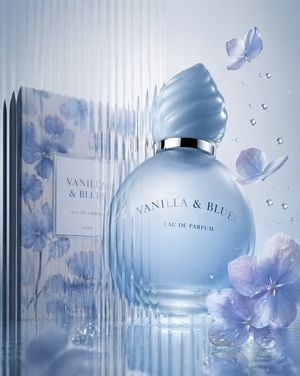
Minimalist product advertisement featuring [{argument name="product" default="the Vanilla & Blues Eau de Parfum 100ml — a round frosted sky-blue glass bottle filled with pale blue liquid, topped with a twisted seashell-shaped cap in matching light blue and a slim silver collar band, "Vanilla & Blues Eau De Parfum" printed on the rounded face"}] shot from a low upward angle so the bottle looms large and slightly tilted, with its matching blue-and-white floral watercolor box positioned softly out of focus behind it, seen through a vertical corrugated glass panel, with [{argument name="backdrop" default="a pale icy-white studio backdrop with a faint cool blue gradient wash"}] visible behind the object. Use [a palette of powder blue, frosted ice-white, silver, and soft hydrangea lavender-blue], soft directional lighting with a gentle silver rim-light along the cap and glass edge, semi-obscured contours through the corrugated distortion, elongated vertical distortion lines, elegant editorial mood, asymmetrical off-center composition, subtle depth, smooth gradients, polished commercial styling, delicate blue hydrangea petals and fine water droplets suspended mid-air beside the bottle to evoke its [{argument name="scent notes" default="sweet vanilla, soft floral bouquet, and clean powdery musk"}] notes, and the title "[VANILLA & BLUES]" in refined serif typography arched gently above the bottle's shoulder, vertical 4:5.
Choose the primary action to open PicX Studio with the available template settings. Review the model and format, personalize the creative direction, and generate when ready.
Yes. You can change the subject, setting, lighting, mood, format, and available model controls before creating your image.
This template is free to open and customize. Generation usage is shown in PicX Studio before you create.
Start with GPT Image 2, which is the model associated with this template. You can compare another compatible model for a different finish.
Follow a topic to a crawlable collection of related PicX Studio templates.