How do I use the High-Contrast Cyberpunk Studio Portrait template?
Choose the primary action to open PicX Studio with the available template settings. Review the model and format, personalize the creative direction, and generate when ready.
A cinematic profile portrait with high-contrast teal and yellow rim lighting, featuring a leather jacket and a graphic yellow disk background.
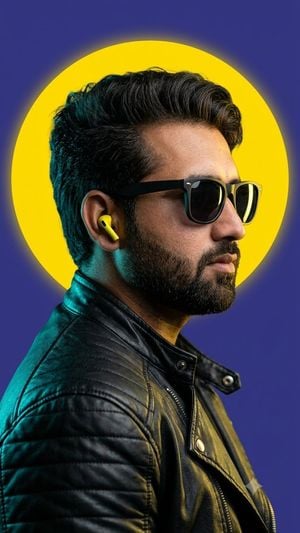
Using uploaded face as reference. hyper-realistic, 8k, medium shot, profile portrait of a person looking towards the right side of the frame, captured with a 50mm lens equivalent, emphasizing sharp detail and depth. The subject has an uploaded face as reference, with {argument name="hair style" default="dark, medium-length textured hair styled back"} and a well-groomed dark beard. They are wearing black Ray-Ban Wayfarer-style sunglasses and a single, {argument name="earbud color" default="bright yellow"} wireless earbud in their right ear. The subject is dressed in a highly detailed black leather motorcycle jacket, featuring subtle quilted patterns on the shoulders and a visible zipper. The lighting is cinematic and high-contrast, characterized by strong cool teal-cyan rim lighting from the left, illuminating the contours of the jacket, the beard, and the side of the face, while warmer yellow highlights catch the hair and the opposite side of the face. Behind the subject's head, slightly off-center, is a large, graphic, perfectly circular, vibrant yellow disk, creating a distinct halo effect. This stylized element is set against a solid, deep purple-blue background, enhancing the dramatic color contrast and modern studio aesthetic
Choose the primary action to open PicX Studio with the available template settings. Review the model and format, personalize the creative direction, and generate when ready.
Yes. You can change the subject, setting, lighting, mood, format, and available model controls before creating your image.
This template is free to open and customize. Generation usage is shown in PicX Studio before you create.
Start with GPT Image 2, which is the model associated with this template. You can compare another compatible model for a different finish.
Follow a topic to a crawlable collection of related PicX Studio templates.