How do I use the Realistic Beige Pakistani Couple Portrait template?
Edit the prompt in the box under the preview — the template's model and format are already selected — and press Generate. Your version appears right on this page.
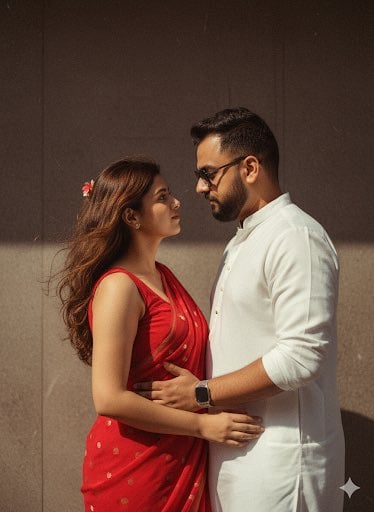
Generates a polished indoor wedding-style portrait of a young couple in matching beige traditional Pakistani outfits.

This template uses your photo — add one with the + button.
Create a highly realistic vertical indoor studio portrait of a young {argument name="ethnicity" default="Pakistani"} couple wearing coordinated beige traditional formal outfits. The woman stands in front, slightly left of center, with long straight glossy black hair parted near the middle, wearing an elegant beige saree covered with intricate gold embroidery, beadwork, sequins, a heavily embellished border, a delicate necklace, bangles, and natural bridal-style styling. The man stands close behind her on the right, slightly taller, wearing a cream-beige embroidered sherwani with a high collar and subtle patterned texture; his arms wrap gently around her waist with both hands visible over the saree. Both face the camera with calm romantic expressions. Use a plain light gray wall background, soft diffused indoor lighting, natural shadows, realistic skin tones, shallow depth of field, premium wedding portrait photography, full upper-body to mid-leg framing, vertical 2:3 composition, no text, no watermark, no extra people. The overall mood is intimate, elegant, and polished, with matching neutral beige and gold tones.
Create a highly realistic vertical indoor studio portrait of a young {argument name="ethnicity" default="Pakistani"} couple wearing coordinated beige traditional formal outfits. The woman stands in front, slightly left of center, with long straight glossy black hair parted near the middle, wearing an elegant beige saree covered with intricate gold embroidery, beadwork, sequins, a heavily embellished border, a delicate necklace, bangles, and natural bridal-style styling. The man stands close behind her on the right, slightly taller, wearing a cream-beige embroidered sherwani with a high collar and subtle patterned texture; his arms wrap gently around her waist with both hands visible over the saree. Both face the camera with calm romantic expressions. Use a plain light gray wall background, soft diffused indoor lighting, natural shadows, realistic skin tones, shallow depth of field, premium wedding portrait photography, full upper-body to mid-leg framing, vertical 2:3 composition, no text, no watermark, no extra people. The overall mood is intimate, elegant, and polished, with matching neutral beige and gold tones.
Edit the prompt in the box under the preview — the template's model and format are already selected — and press Generate. Your version appears right on this page.
Yes. You can change the subject, setting, lighting, mood, format, and available model controls before creating your image.
Opening and editing this template is free. Generating uses credits, shown on the Generate button when you are signed in.
Start with GPT Image 2, which is the model associated with this template. You can compare another compatible model for a different finish.
Follow a topic to a crawlable collection of related PicX Studio templates.