Submarine Cutaway Encyclopedia Poster
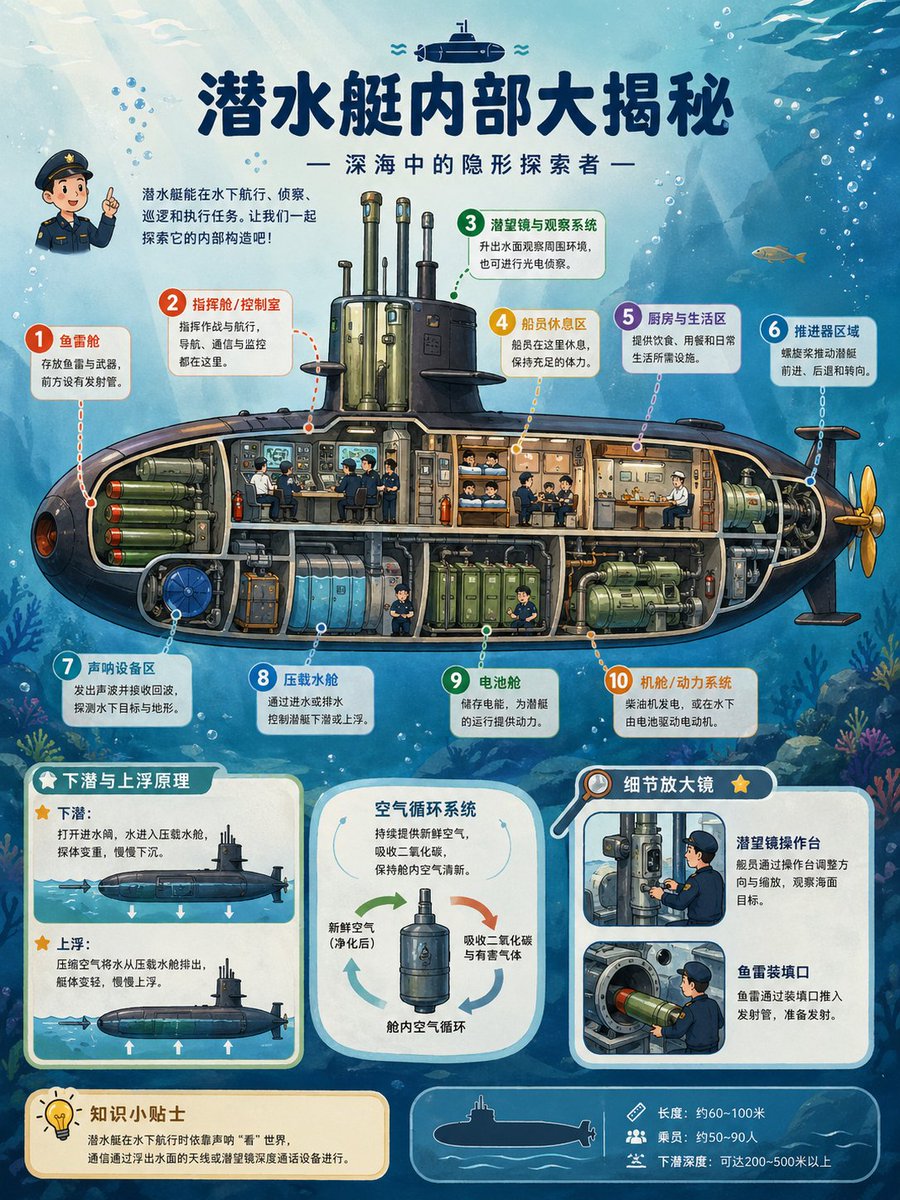
{"type":"publication-quality educational cutaway science encyclopedia poster","topic":"{argument name=\"poster topic\" default=\"submarine internal structure\"}","language":"Simplified Chinese visible text","aspect_ratio":"3:4 vertical poster","style":"richly colored semi-realistic illustrated infographic for children, detailed cross-section engineering diagram, clean vector-like labels mixed with painterly underwater background, high-resolution print design","main_title":"{argument name=\"headline text\" default=\"潜水艇内部大揭秘\"}","subtitle":"— 深海中的隐形探索者 —","scene":{"background":"blue underwater ocean with sunbeams from the upper left, bubbles, fish silhouettes, seaweed and coral near the bottom, a small submarine icon above the title","main_subject":"large side-view submarine cutaway spanning the center, dark navy outer hull, golden propeller at the right, transparent interior compartments with pipes, tanks, crew members, machinery, bunks, control panels, and torpedoes visible","character":"small cute naval officer mascot at upper left pointing upward beside an introductory paragraph"},"layout":{"top_intro":"short paragraph in Chinese explaining that submarines can travel underwater, spy, avoid attacks, and explore the ocean","central_cutaway":{"position":"middle","description":"one full submarine cross-section with ten numbered annotation callouts connected by dotted leader lines","callout_count":10,"callouts":[{"number":1,"label":"鱼雷舱","color":"red","description":"front torpedo storage and launch tubes"},{"number":2,"label":"指挥舱 / 控制室","color":"orange-red","description":"operators, navigation, communication and monitoring equipment"},{"number":3,"label":"潜望镜与观察系统","color":"green","description":"periscopes and optical observation masts above the conning tower"},{"number":4,"label":"船员休息区","color":"yellow","description":"bunks and compact sleeping quarters"},{"number":5,"label":"厨房与生活区","color":"purple","description":"galley and living space for food and daily needs"},{"number":6,"label":"推进器区域","color":"blue","description":"rear propulsion shaft, engine drive and steering fins"},{"number":7,"label":"声呐设备区","color":"teal","description":"sonar equipment for detecting underwater targets and terrain"},{"number":8,"label":"压载水舱","color":"light blue","description":"ballast tanks that fill and release water to control diving and floating"},{"number":9,"label":"电池舱","color":"green","description":"battery compartment supplying submarine power"},{"number":10,"label":"机舱 / 动力系统","color":"orange","description":"engine room, electric motor and power machinery"}]},"bottom_sections":{"section_count":5,"sections":[{"title":"下潜与上浮原理","position":"bottom left","count":2,"items":["下潜:打开进水阀,水进入压载水舱,使艇下沉。","上浮:压缩空气将水从压载水舱排出,艇体变轻,慢慢上浮。"],"visuals":"two small side-view submarine diagrams with arrows showing descent and ascent"},{"title":"空气循环系统","position":"bottom center","count":3,"items":["新鲜空气(净化后)","吸收二氧化碳与有害气体","舱内空气循环"],"visuals":"rounded card with central cylindrical air purifier and circular arrows"},{"title":"细节放大镜","position":"bottom right","count":2,"items":["潜望镜操作台","鱼雷装填口"],"visuals":"two inset close-up panels, one showing a sailor operating a periscope console and one showing torpedo loading"},{"title":"知识小贴士","position":"bottom left below diagrams","count":1,"items":["潜水艇在水下航行时依靠声呐‘看’世界,通信通过浮出水面的天线或浮缆装置与海面设备进行。"],"visuals":"cream note box with lightbulb icon"},{"title":"specification strip","position":"bottom right footer","count":3,"items":["长度:约60~100米","乘员:约50~90人","下潜深度:可达200~500米以上"],"visuals":"thin rounded blue footer with white submarine silhouette and three small icons"}]},"design_details":{"typography":"large bold dark navy Chinese title, rounded sans-serif annotation labels, white rounded callout cards with colored number circles","palette":"deep ocean blues, teal, cream cards, orange and green engineering accents, dark hull with warm interior lighting","quality":"crisp readable infographic, balanced spacing, accurate leader lines, detailed but friendly educational illustration, suitable for a children’s science book or classroom poster"},"customization":{"submarine_name":"{argument name=\"submarine name\" default=\"深海探索者\"}","audience":"{argument name=\"target audience\" default=\"children’s science encyclopedia readers\"}","color_mood":"{argument name=\"color mood\" default=\"bright blue underwater educational palette\"}"}}





















![Naive doodle-style subject illustration — A doodle-style {argument name="subject" default="[subject]"}, naive lines, humorous shape exaggeration](https://pbs.twimg.com/media/G6Wl2YxbsAARB2b.jpg)












![Retro-Futuristic Product Photography Prompt — Highly detailed retro-futurism {argument name="object name" default="[OBJECT NAME]"}, inspired by 1950s–1960s spac](https://pbs.twimg.com/media/HBB3TJ8WAAArAhz.jpg)