
Brutalist Technical System Slide
A monochrome futuristic presentation slide for product, AI, or engineering decks that showcases architecture, principles, and design-system foundations.
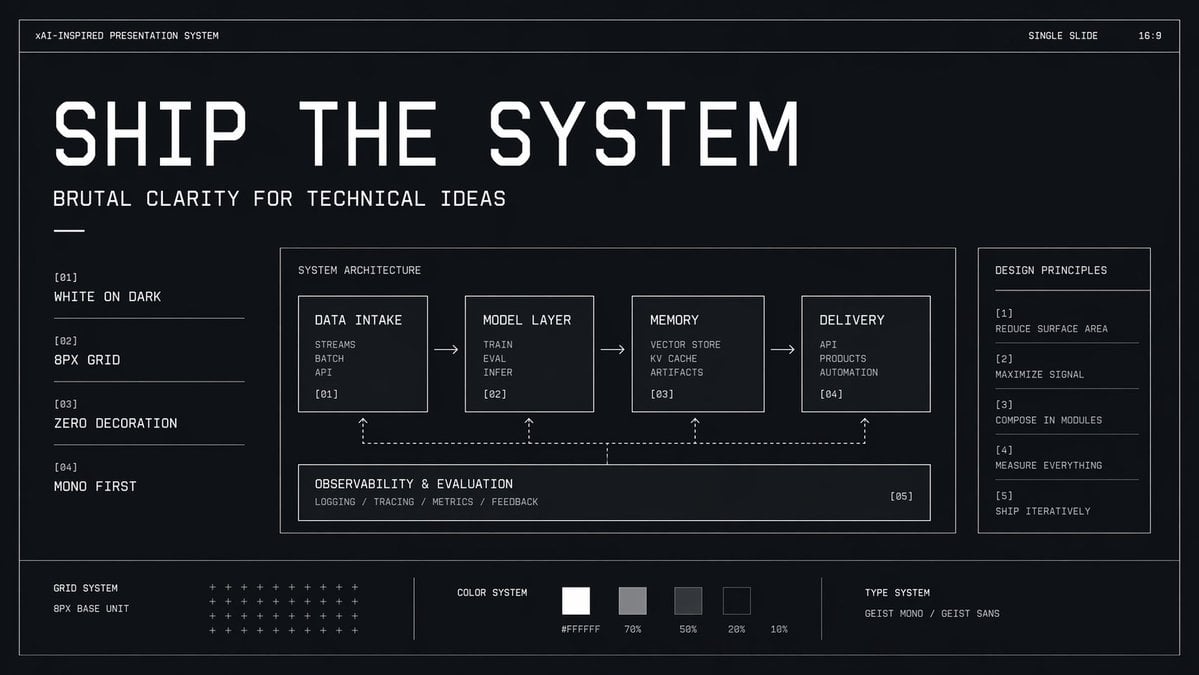
- Prompt included
- Model and format preset
- Free template
The prompt behind this image
Copy the exact prompt behind Brutalist Technical System Slide, or open it in the studio and make it yours.
- Type
- minimal monochrome presentation slide
- Style
- high-contrast brutalist technical design, black background with subtle navy tint, thin white wireframe borders, zero decoration, strict grid, mono-first typography, futuristic industrial UI aesthetic
- Canvas › Aspect Ratio
- 16:9
- Canvas › Background
- near-black with faint blue undertone and slight vignette
- Headline › Text
- {argument name="headline text" default="SHIP THE SYSTEM"}
- Headline › Position
- upper left
- Headline › Style
- very large condensed geometric techno sans in white, all caps, widely tracked, dominant hero title
- Subheadline › Text
- {argument name="subheadline text" default="BRUTAL CLARITY FOR TECHNICAL IDEAS"}
- Subheadline › Position
- below headline
- Subheadline › Style
- medium white monospace or mono-inspired sans, all caps
- Top Bar › Count
- 3
- Top Bar › Items › 0 › Text
- xAI-INSPIRED PRESENTATION SYSTEM
- Top Bar › Items › 0 › Position
- top left
- Top Bar › Items › 1 › Text
- SINGLE SLIDE
- Top Bar › Items › 1 › Position
- top right
- Top Bar › Items › 2 › Text
- 16:9
- Top Bar › Items › 2 › Position
- far top right
- Layout › Outer Frame
- true
- Layout › Sections › 0 › Title
- left principles list
- Layout › Sections › 0 › Position
- left column
- Layout › Sections › 0 › Count
- 4
- Layout › Sections › 0 › Labels
- [01] WHITE ON DARK, [02] 8PX GRID, [03] ZERO DECORATION, [04] MONO FIRST
- Layout › Sections › 1 › Title
- SYSTEM ARCHITECTURE
- Layout › Sections › 1 › Position
- center large panel
Raw JSON
{"type":"minimal monochrome presentation slide","style":"high-contrast brutalist technical design, black background with subtle navy tint, thin white wireframe borders, zero decoration, strict grid, mono-first typography, futuristic industrial UI aesthetic","canvas":{"aspect_ratio":"16:9","background":"near-black with faint blue undertone and slight vignette"},"headline":{"text":"{argument name=\"headline text\" default=\"SHIP THE SYSTEM\"}","position":"upper left","style":"very large condensed geometric techno sans in white, all caps, widely tracked, dominant hero title"},"subheadline":{"text":"{argument name=\"subheadline text\" default=\"BRUTAL CLARITY FOR TECHNICAL IDEAS\"}","position":"below headline","style":"medium white monospace or mono-inspired sans, all caps"},"top_bar":{"count":3,"items":[{"text":"xAI-INSPIRED PRESENTATION SYSTEM","position":"top left"},{"text":"SINGLE SLIDE","position":"top right"},{"text":"16:9","position":"far top right"}]},"layout":{"outer_frame":true,"sections":[{"title":"left principles list","position":"left column","count":4,"labels":["[01] WHITE ON DARK","[02] 8PX GRID","[03] ZERO DECORATION","[04] MONO FIRST"]},{"title":"SYSTEM ARCHITECTURE","position":"center large panel","count":5,"labels":["DATA INTAKE","MODEL LAYER","MEMORY","DELIVERY","OBSERVABILITY & EVALUATION"]},{"title":"DESIGN PRINCIPLES","position":"right sidebar panel","count":5,"labels":["[1] REDUCE SURFACE AREA","[2] MAXIMIZE SIGNAL","[3] COMPOSE IN MODULES","[4] MEASURE EVERYTHING","[5] SHIP ITERATIVELY"]},{"title":"bottom system strip","position":"bottom full width","count":3,"labels":["GRID SYSTEM","COLOR SYSTEM","TYPE SYSTEM"]}]},"center_panel":{"bordered":true,"title":"SYSTEM ARCHITECTURE","flow":{"count":4,"boxes":[{"title":"DATA INTAKE","index":"[01]","lines":["STREAMS","BATCH","API"]},{"title":"MODEL LAYER","index":"[02]","lines":["TRAIN","EVAL","INFER"]},{"title":"MEMORY","index":"[03]","lines":["VECTOR STORE","KV CACHE","ARTIFACTS"]},{"title":"DELIVERY","index":"[04]","lines":["API","PRODUCTS","AUTOMATION"]}],"connectors":"3 right-pointing arrows between the 4 top boxes"},"bottom_module":{"title":"OBSERVABILITY & EVALUATION","index":"[05]","lines":["LOGGING / TRACING / METRICS / FEEDBACK"],"connectors":"dashed feedback line spanning beneath the 4 boxes with 4 upward dotted arrows linking back into each top box"}},"bottom_strip":{"left_block":{"title":"GRID SYSTEM","subtitle":"8PX BASE UNIT","visual":"dense matrix of small white plus signs arranged in rows"},"middle_block":{"title":"COLOR SYSTEM","swatch_count":5,"swatches":["#FFFFFF","70%","50%","20%","10%"],"visual":"five grayscale square swatches from white to very dark gray"},"right_block":{"title":"TYPE SYSTEM","text":"{argument name=\"type label\" default=\"GEIST MONO / GEIST SANS\"}"}},"composition":"clean generous spacing, all elements aligned to an 8px grid, mostly left-aligned text, thin divider lines, no photos, no gradients except extremely subtle background depth, technical pitch-deck cover slide look","rendering":"crisp vector presentation mockup, ultra-sharp typography, polished design system board"}How to use Brutalist Technical System Slide in 3 steps
- 1Upload ImagePNG, JPG or paste
Add your photo
Upload the photo the template builds on. The prompt, model and format are already set.
- 2…a portrait of your subject in softgolden-hour light, 85mm…
Personalize
Edit the subject and creative details for your destination.
- 3Generate
Generate
Press Generate — your image is created in PicX Studio, so you can compare it with the original and refine one variable at a time.
More like this
Templates with the same subject, style or setup. Open one to see its prompt.

Isometric Vehicle Teardown Infographic Template
Brutalist Monolithic Architecture Portraits
Surreal Brutalist Editorial Portrait
Driftplane Exposure System Prompt

Premium 4 3 presentation cover slide introducing Chronicle
E g, Kinetic, Organic, Brutalist, Ethereal
Brutalist Sci-Fi Operative
Japanese Corporate Price Index Slide
Japanese Golden Egg Design Slide

Brutalist Cogito Chinese Typography Poster

Z-Seven AI Product Matrix Slide
Extreme Weather TV Reporter System
Make it yours
Brutalist Technical System Slide works as-is. These are the safest ways to change it without losing the look.
Swap the setting
Keep the rest of the prompt and replace the location block. The current setting is “near-black with faint blue undertone and slight vignette”.
Change one field
Copy a single group, rewrite it, and generate again so you can see what that field is doing.
Keep the frame, change the subject
Hold the composition and light of Brutalist Technical System Slide, then swap wardrobe, props or the person for a new take.
| If the result… | Why | Fix |
|---|---|---|
| The result drifts from the preview | Too many fields changed at once. | Reuse Brutalist Technical System Slide as-is first, then change one group — subject, light, or setting. |
| GPT Image 2 ignores part of the JSON | Some models flatten or skip nested keys. | Keep the same values and paste them as a short paragraph instead. |
More GPT Image 2 templates
Other prompts made for GPT Image 2.

Six VTuber Japanese Logo Sheet

Realistic Portrait of Woman and Deer

The Vista Modular Condo Poster

AI Model Routing Comparison Infographic

2.5D Anime Art Board

Isometric Productivity Desk Scene

New York Double Exposure Poster

Four-Panel AI Landscape Comparison

Japanese Tatami Lifestyle Magazine Cover

NESCAFÉ Coffee Map Poster
More image prompts
Fresh picks from across the catalog.

Expressive Cartoon Anime Style
Hand-drawn Kindergarten Newspaper

Indian Miniature Painting from Photo Reference
Nano-kun's Daily Life: Melting Ice Comic Strip Prompt

Clay Baba Yaga With Chicken-Leg Hut

Hyper-realistic Cinematic Tarmac Photo
Cinematic Low-Angle Otaku Bedroom Portrait

Cozy Cabin Interior Lifestyle Photography Prompt

Kawaii Animal Sticker Sheet Generator

Coquette Mirror Selfie with Pink Flowers and Identity Lock
Browse template categories
Brutalist Technical System Slide questions
How do I use the Brutalist Technical System Slide template?
Add your photo if the template asks for one, edit the prompt if you like — the template's model and format are already selected — and press Generate. Your version opens in PicX Studio.
Can I customize the Brutalist Technical System Slide template?
Yes. You can change the subject, setting, lighting, mood, format, and available model controls before creating your image.
Is the Brutalist Technical System Slide template free?
Opening and editing this template is free. Generating uses credits, shown on the Generate button when you are signed in.
Which AI model should I use?
Start with GPT Image 2, which is the model associated with this template. You can compare another compatible model for a different finish.
Looking for something else? Browse all templates.

Your photo, any look
Thousands of ready templates for every top image and video model, from one credit balance.