
Laundry Balcony Vocabulary Journal
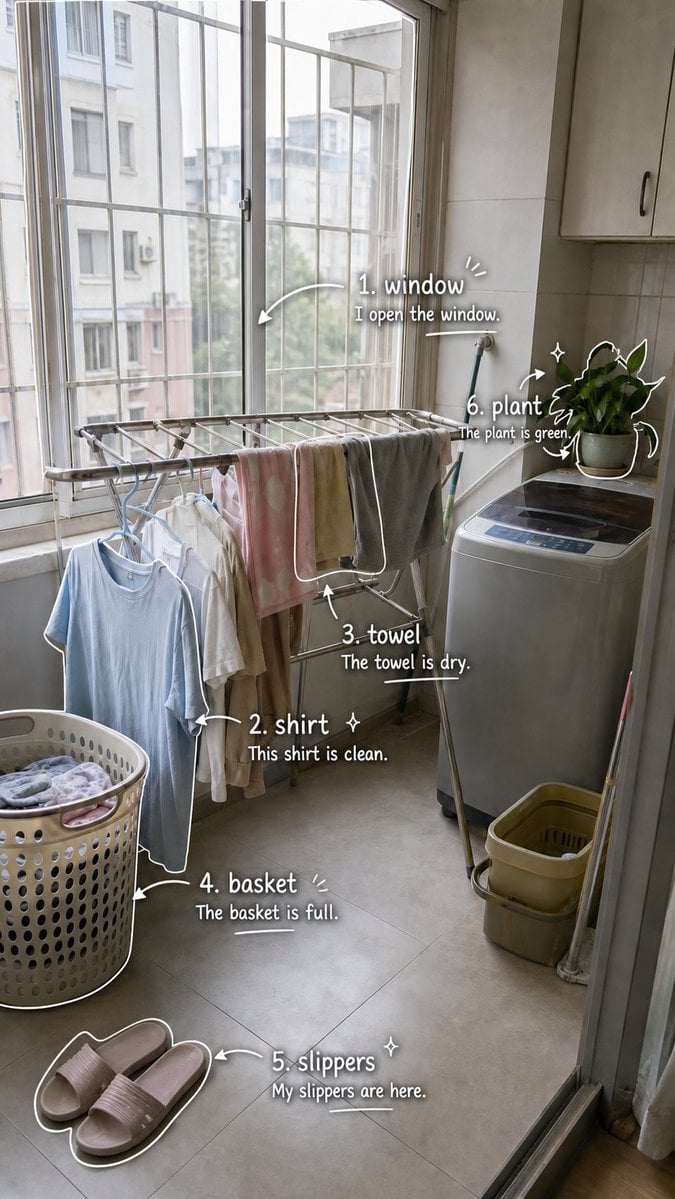
Generates a realistic laundry balcony photo annotated with six handwritten English vocabulary labels and example sentences for visual language learning.
- Prompt included
- Model and format preset
- Free template
The prompt behind this image
Copy the exact prompt behind Laundry Balcony Vocabulary Journal, or open it in the studio and make it yours.
- Type
- photo-based visual English vocabulary journal page
- Source Scene
- a realistic vertical smartphone photo of a small apartment laundry balcony in soft daylight, seen from the doorway, with tall barred windows on the left, neighboring buildings visible outside, a metal drying rack with hanging clothes in the middle, a washing machine on the right with a potted green plant on top, a full perforated laundry basket at lower left, pink house slippers on the floor near the bottom, and gray tiled floor and beige wall cabinets
- Style
- keep the original photo realistic and natural, then overlay cute handwritten study notes in white ink, with hand-drawn arrows, outlines, sparkles, curved brackets, and underline doodles; casual scrapbook / language-learning diary aesthetic; clean readable typography with subtle shadow for contrast
- Format › Orientation
- vertical 9:16 smartphone poster
- Format › Composition
- overlay labels directly beside the corresponding objects without blocking the scene; use white marker-like text and doodles
- Vocabulary Overlay › Headline
- no main headline, only numbered vocabulary labels placed around the image
- Vocabulary Overlay › Count
- 6
- Vocabulary Overlay › Items › 0 › Number
- 1
- Vocabulary Overlay › Items › 0 › Word
- {argument name="word 1" default="window"}
- Vocabulary Overlay › Items › 0 › Example Sentence
- {argument name="sentence 1" default="I open the window."}
- Vocabulary Overlay › Items › 0 › Target Object
- large window panes and metal window bars in the upper left and center
- Vocabulary Overlay › Items › 0 › Placement
- upper center-right near the window
- Vocabulary Overlay › Items › 0 › Doodles
- curved arrow pointing left toward the window, small emphasis lines, short underline beneath the sentence
- Vocabulary Overlay › Items › 1 › Number
- 2
- Vocabulary Overlay › Items › 1 › Word
- {argument name="word 2" default="shirt"}
- Vocabulary Overlay › Items › 1 › Example Sentence
- {argument name="sentence 2" default="This shirt is clean."}
- Vocabulary Overlay › Items › 1 › Target Object
- light blue shirt hanging from the drying rack on a hanger
- Vocabulary Overlay › Items › 1 › Placement
- lower left-middle beside the hanging shirt
- Vocabulary Overlay › Items › 1 › Doodles
- white outline tracing the shirt edge, arrow pointing to the shirt, small sparkle
- Vocabulary Overlay › Items › 2 › Number
- 3
- Vocabulary Overlay › Items › 2 › Word
- towel
- Vocabulary Overlay › Items › 2 › Example Sentence
- The towel is dry.
- Vocabulary Overlay › Items › 2 › Target Object
- gray towel draped over the metal drying rack
- Vocabulary Overlay › Items › 2 › Placement
- middle right below the towel
Raw JSON
{
  "type": "photo-based visual English vocabulary journal page",
  "source_scene": "a realistic vertical smartphone photo of a small apartment laundry balcony in soft daylight, seen from the doorway, with tall barred windows on the left, neighboring buildings visible outside, a metal drying rack with hanging clothes in the middle, a washing machine on the right with a potted green plant on top, a full perforated laundry basket at lower left, pink house slippers on the floor near the bottom, and gray tiled floor and beige wall cabinets",
  "style": "keep the original photo realistic and natural, then overlay cute handwritten study notes in white ink, with hand-drawn arrows, outlines, sparkles, curved brackets, and underline doodles; casual scrapbook / language-learning diary aesthetic; clean readable typography with subtle shadow for contrast",
  "format": {
    "orientation": "vertical 9:16 smartphone poster",
    "composition": "overlay labels directly beside the corresponding objects without blocking the scene; use white marker-like text and doodles"
  },
  "vocabulary_overlay": {
    "headline": "no main headline, only numbered vocabulary labels placed around the image",
    "count": 6,
    "items": [
      {
        "number": 1,
        "word": "{argument name=\"word 1\" default=\"window\"}",
        "example_sentence": "{argument name=\"sentence 1\" default=\"I open the window.\"}",
        "target_object": "large window panes and metal window bars in the upper left and center",
        "placement": "upper center-right near the window",
        "doodles": "curved arrow pointing left toward the window, small emphasis lines, short underline beneath the sentence"
      },
      {
        "number": 2,
        "word": "{argument name=\"word 2\" default=\"shirt\"}",
        "example_sentence": "{argument name=\"sentence 2\" default=\"This shirt is clean.\"}",
        "target_object": "light blue shirt hanging from the drying rack on a hanger",
        "placement": "lower left-middle beside the hanging shirt",
        "doodles": "white outline tracing the shirt edge, arrow pointing to the shirt, small sparkle"
      },
      {
        "number": 3,
        "word": "towel",
        "example_sentence": "The towel is dry.",
        "target_object": "gray towel draped over the metal drying rack",
        "placement": "middle right below the towel",
        "doodles": "upward arrow pointing to the towel and a simple underline"
      },
      {
        "number": 4,
        "word": "basket",
        "example_sentence": "The basket is full.",
        "target_object": "round plastic laundry basket filled with clothes at the lower left",
        "placement": "lower left-center beside the basket",
        "doodles": "white outline around the basket rim and side, arrow pointing to the basket, small emphasis strokes, underline"
      },
      {
        "number": 5,
        "word": "slippers",
        "example_sentence": "My slippers are here.",
        "target_object": "pair of pale pink slide slippers on the floor near the bottom",
        "placement": "bottom center-right above the slippers",
        "doodles": "white outline around both slippers, curved arrow pointing to them, small sparkle, underline"
      },
      {
        "number": 6,
        "word": "plant",
        "example_sentence": "The plant is green.",
        "target_object": "green potted plant on top of the washing machine",
        "placement": "upper right beside the plant",
        "doodles": "white outline around leaves and pot, arrows circling the plant, sparkles"
      }
    ]
  },
  "text_rendering": "Use clear white handwritten lettering with bold vocabulary words and smaller example sentences. Number each item exactly as shown from 1 to 6. Add playful notebook-style marks but keep all text legible.",
  "lighting_and_mood": "bright overcast daylight, cozy everyday home atmosphere, candid photo realism combined with charming study-note annotation"
}How to use Laundry Balcony Vocabulary Journal in 3 steps
- 1Upload ImagePNG, JPG or paste
Add your photo
Upload the photo the template builds on. The prompt, model and format are already set.
- 2…a portrait of your subject in softgolden-hour light, 85mm…
Personalize
Edit the subject and creative details for your destination.
- 3Generate
Generate
Press Generate — your image is created in PicX Studio, so you can compare it with the original and refine one variable at a time.
More like this
Templates with the same subject, style or setup. Open one to see its prompt.
Photo Vocabulary Journal Overlay
Cafe English Vocabulary Journal
Nano Banana - Paris Balcony Night Eiffel
Hong Kong Watercolor Travel Journal
English Vocabulary Study Card Template

Preschool Educational Vocabulary Card
Japanese Cafe Memory Journal Design
Coffee Shop Journal Diptych
Photo-to-Sketch Editorial Journal
Hand-Drawn Travel Journal Illustration

Hand-drawn Breakfast Journal Aesthetic Poster
Vintage Travel Journal Collage
Make it yours
Laundry Balcony Vocabulary Journal works as-is. These are the safest ways to change it without losing the look.
Swap the light
One lighting change is enough to compare takes. Current light: “bright overcast daylight, cozy everyday home atmosphere, candid photo realism co”.
Change one field
Copy a single group, rewrite it, and generate again so you can see what that field is doing.
Keep the frame, change the subject
Hold the composition and light of Laundry Balcony Vocabulary Journal, then swap wardrobe, props or the person for a new take.
| If the result… | Why | Fix |
|---|---|---|
| The result drifts from the preview | Too many fields changed at once. | Reuse Laundry Balcony Vocabulary Journal as-is first, then change one group — subject, light, or setting. |
| GPT Image 2 ignores part of the JSON | Some models flatten or skip nested keys. | Keep the same values and paste them as a short paragraph instead. |
More GPT Image 2 templates
Other prompts made for GPT Image 2.

Six VTuber Japanese Logo Sheet

Realistic Portrait of Woman and Deer

The Vista Modular Condo Poster

AI Model Routing Comparison Infographic

2.5D Anime Art Board

Isometric Productivity Desk Scene

New York Double Exposure Poster

Four-Panel AI Landscape Comparison

Japanese Tatami Lifestyle Magazine Cover

NESCAFÉ Coffee Map Poster
More image prompts
Fresh picks from across the catalog.
Edible History Pop-Up Chocolate Book

Giant Pharmaceutical Capsule with White House Miniature

Fashion Editorial Watercolor Portrait
Extreme Wet Close-Up Portrait with Realistic Water Droplets
Comical Portrait of Woman with Winking Cat

Kine-Style Multi-Frame Japanese Night Festival Collage

Minecraft Statue of Musashi

Novel Generation Prompt: Earth Floating in the Sky
Futuristic Neon Tic-Tac-Toe UI

Japanese AI Product Landing Page Hero
Browse template categories
Laundry Balcony Vocabulary Journal questions
How do I use the Laundry Balcony Vocabulary Journal template?
Add your photo if the template asks for one, edit the prompt if you like — the template's model and format are already selected — and press Generate. Your version opens in PicX Studio.
Can I customize the Laundry Balcony Vocabulary Journal template?
Yes. You can change the subject, setting, lighting, mood, format, and available model controls before creating your image.
Is the Laundry Balcony Vocabulary Journal template free?
Opening and editing this template is free. Generating uses credits, shown on the Generate button when you are signed in.
Which AI model should I use?
Start with GPT Image 2, which is the model associated with this template. You can compare another compatible model for a different finish.
Looking for something else? Browse all templates.

Your photo, any look
Thousands of ready templates for every top image and video model, from one credit balance.