How do I use the Minimalist Ink Wash Flower template?
Choose the primary action to open PicX Studio with the available template settings. Review the model and format, personalize the creative direction, and generate when ready.
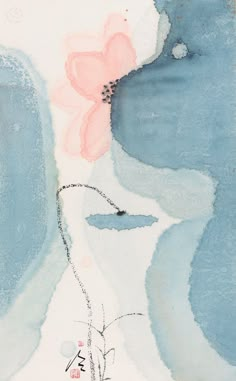
A prompt for generating a serene vertical East Asian watercolor composition with abstract blue forms, a pale pink flower, and delicate ink stems. (free to use) — Free AI image template on PicX Studio.
Create a vertical minimalist watercolor painting on off-white rice paper, inspired by restored ancient East Asian ink-wash aesthetics with cinematic softness and visible paper grain. The composition has exactly two large translucent blue-green abstract rock or lotus-leaf forms: one tall rounded form cropped along the left edge and one larger rounded form cropped at the upper right, with a pale blue wash continuing downward on the right. Place exactly one delicate pale pink flower near the top center, partially tucked behind the right blue form, with five soft translucent petals and a small cluster of dark ink dots at its center. Add exactly one small horizontal blue pond-like brush shape in the middle. Draw exactly three very thin black ink plant stems rising from the bottom center, with sparse tiny leaves and a curved dotted branch arcing left-to-right across the center. At the bottom left, include exactly one small red artist seal and one small black calligraphic signature mark. Use {argument name="color palette" default="misty teal blue, pale pink, off-white, black ink, muted red"}, {argument name="painting style" default="minimalist Chinese watercolor and ink wash on textured rice paper"}, and {argument name="mood" default="quiet, airy, poetic, cinematic"}. Keep the image uncluttered, asymmetrical, softly blurred at the edges, with no frame, no modern objects, and no readable text except the small abstract seal and signature.
Use Minimalist Ink Wash Flower to plan an AI image around gpt-image-2 generation, themes such as en and gpt-image-2. Match the preview's composition first, then personalize the subject, setting, and mood for your own project.
Use the primary action to load the template settings in PicX Studio.
Adjust the subject and creative details for your destination.
Create the image, compare the result with the preview, and refine one variable at a time.
A continuous mix — similar concepts first, woven with same-model prompts and fresh picks from the catalog.
Choose the primary action to open PicX Studio with the available template settings. Review the model and format, personalize the creative direction, and generate when ready.
Yes. You can change the subject, setting, lighting, mood, format, and available model controls before creating your image.
This template is free to open and customize. Generation usage is shown in PicX Studio before you create.
Start with gpt-image-2, which is the model associated with this template. You can compare another compatible model for a different finish.
Follow a topic to a crawlable collection of related PicX Studio templates.
39,157 public templates available. Verified via the PicX Studio public templates API; refreshed hourly.
A continuous mix — similar concepts first, woven with same-model prompts and fresh picks from the catalog.