How do I use the Paris Crosswalk Street Style template?
Choose the primary action to open PicX Studio with the available template settings. Review the model and format, personalize the creative direction, and generate when ready.
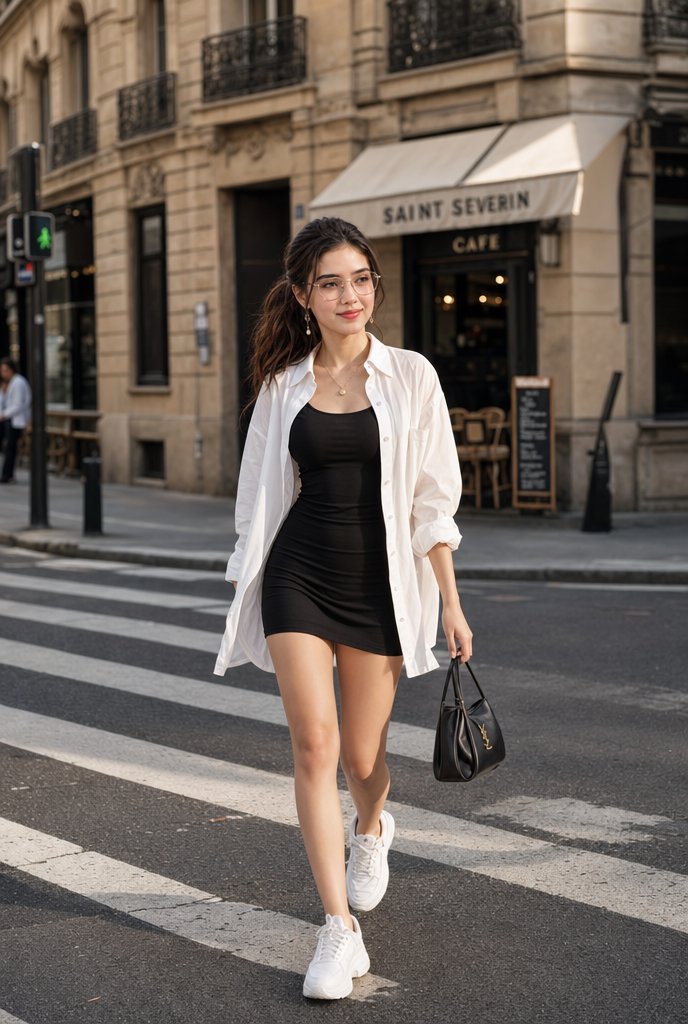
A realistic full-body fashion photo prompt for creating an urban street style scene with a woman walking across a Parisian crosswalk. (free to use) — Free AI image template on PicX Studio.
Create a full-body lifestyle fashion photograph of a stylish young woman confidently walking across a modern European city crosswalk, centered in frame, shot at street level with a natural candid editorial feel. She wears a fitted short {argument name="dress color and style" default="black sleeveless bodycon mini dress"} layered under an oversized open {argument name="shirt color and style" default="white button-down shirt"} with rolled sleeves and fabric flowing naturally as she walks. Add clean white chunky sneakers, a delicate gold necklace, subtle earrings, and a small structured {argument name="handbag" default="black leather top-handle handbag with a gold logo"} held in one hand. Her long dark wavy hair is swept back by movement, posture relaxed and confident, one leg stepping forward. Set the scene in {argument name="city setting" default="Paris-style stone building street with a cafe awning reading SAINT SEVERIN CAFE"}, with zebra crossing stripes in the foreground, classic beige architecture, black iron balconies, cafe chairs, a chalkboard menu, traffic lights, and softly blurred pedestrians in the background. Use warm late-afternoon natural light, realistic shadows, shallow depth of field, high-end street style photography, sharp clothing detail, realistic skin tones, vertical 2:3 composition, no watermark, no extra text besides the cafe sign.
Use Paris Crosswalk Street Style to plan an AI image around gpt-image-2 generation, themes such as en and gpt-image-2. Match the preview's composition first, then personalize the subject, setting, and mood for your own project.
Use the primary action to load the template settings in PicX Studio.
Adjust the subject and creative details for your destination.
Create the image, compare the result with the preview, and refine one variable at a time.
A continuous mix — similar concepts first, woven with same-model prompts and fresh picks from the catalog.
Choose the primary action to open PicX Studio with the available template settings. Review the model and format, personalize the creative direction, and generate when ready.
Yes. You can change the subject, setting, lighting, mood, format, and available model controls before creating your image.
This template is free to open and customize. Generation usage is shown in PicX Studio before you create.
Start with gpt-image-2, which is the model associated with this template. You can compare another compatible model for a different finish.
Follow a topic to a crawlable collection of related PicX Studio templates.
39,157 public templates available. Verified via the PicX Studio public templates API; refreshed hourly.
A continuous mix — similar concepts first, woven with same-model prompts and fresh picks from the catalog.