How do I use the Fiery Takis Action Poster template?
Choose the primary action to open PicX Studio with the available template settings. Review the model and format, personalize the creative direction, and generate when ready.
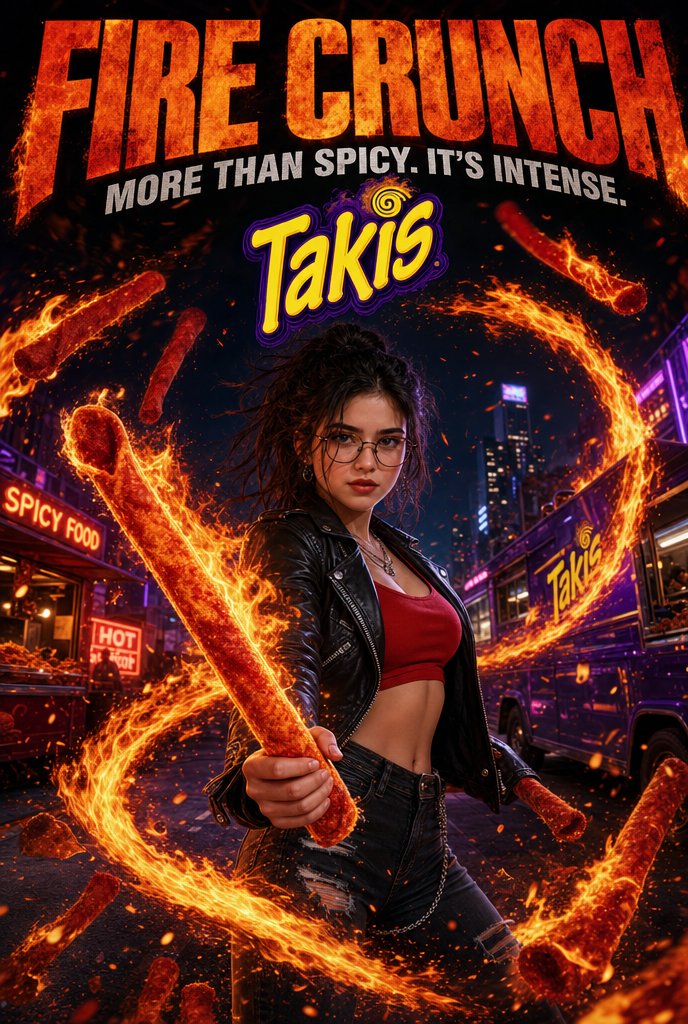
A dramatic neon city snack advertisement featuring a leather-jacketed woman wielding a flaming rolled chip amid fire vortexes and bold headline typography. (free to use) — Free AI image template on PicX Studio.
Create a vertical high-octane snack advertisement poster for {argument name="brand name" default="Takis"}. A young woman with messy dark curly hair and glasses stands centered on a neon city street at night in a powerful action pose, wearing a black leather biker jacket, red crop top, ripped black jeans, belt chain, earrings, and layered necklaces. She thrusts one giant rolled spicy chip forward like a weapon, glowing red-orange and wrapped in flames. Surround her with a huge circular vortex of fire and flying ember sparks, plus exactly 9 visible Takis-style rolled chips: 1 giant chip in her hand, 1 large flaming chip at upper right, 1 small chip at upper left, 1 vertical chip left of the logo, 1 ring-shaped chip at left, 1 small chip near bottom left, 1 small chip near her right hip, 1 large diagonal chip at lower right, and 1 blurred oversized chip cropped in the bottom-right foreground. The background shows a gritty nighttime urban street with skyscrapers, purple neon accents, a food stand on the left with signs reading "SPICY FOOD" and "HOT", and a branded food truck or bus on the right displaying the Takis logo. At the top, add massive distressed fiery orange headline text reading {argument name="headline text" default="FIRE CRUNCH"}, with a bold white angled tagline beneath reading {argument name="tagline" default="MORE THAN SPICY. IT'S INTENSE."}. Place the yellow-and-purple Takis logo large under the tagline, centered above the character. Use extreme contrast, cinematic action-advertising lighting, glossy commercial detail, sparks, smoke, flame trails, saturated reds, oranges, purples, and blacks. Keep the composition dramatic and poster-like, with the character in the lower center and the typography dominating the upper third. Avoid extra logos, watermarks, or unrelated text.
Use Fiery Takis Action Poster to plan an AI image around gpt-image-2 generation, themes such as en and gpt-image-2. Match the preview's composition first, then personalize the subject, setting, and mood for your own project.
Use the primary action to load the template settings in PicX Studio.
Adjust the subject and creative details for your destination.
Create the image, compare the result with the preview, and refine one variable at a time.
A continuous mix — similar concepts first, woven with same-model prompts and fresh picks from the catalog.
Choose the primary action to open PicX Studio with the available template settings. Review the model and format, personalize the creative direction, and generate when ready.
Yes. You can change the subject, setting, lighting, mood, format, and available model controls before creating your image.
This template is free to open and customize. Generation usage is shown in PicX Studio before you create.
Start with gpt-image-2, which is the model associated with this template. You can compare another compatible model for a different finish.
Follow a topic to a crawlable collection of related PicX Studio templates.
39,157 public templates available. Verified via the PicX Studio public templates API; refreshed hourly.
A continuous mix — similar concepts first, woven with same-model prompts and fresh picks from the catalog.