How do I use the Blue Mary Fighting Game Poster template?
Choose the primary action to open PicX Studio with the available template settings. Review the model and format, personalize the creative direction, and generate when ready.
A wide cinematic character splash poster featuring Blue Mary in two dynamic poses with arcade HUD overlays and bold fighting-game typography. Change the subject, setting, or lighting one variable at a time.
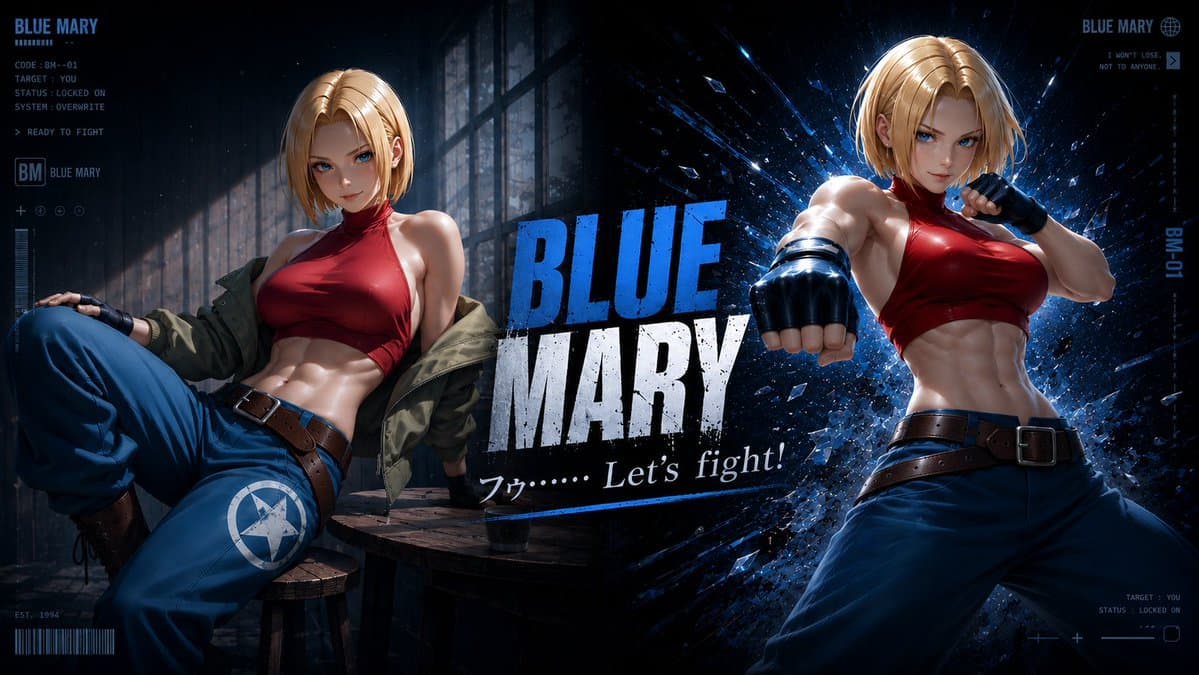
Goal: Create a dramatic cinematic fighting-game character poster for {argument name="character name" default="Blue Mary"}, inspired by a dark cyberpunk arcade character-select splash screen. Canvas: Wide 16:9 horizontal banner, high-detail semi-realistic anime/game key art, dark navy and black palette with electric blue highlights, gritty particles, glass shards, rain-like specks, and strong rim lighting. Layout: Split the composition into 3 major visual zones: left seated character pose, center title typography, and right action character pose. Add thin futuristic HUD interface graphics around the edges. Subject details: Show exactly 2 full/partial depictions of the same athletic blonde female fighter. Depiction 1 on the left: she lounges on a rough wooden bench in a shadowy industrial room beside tall window panes, leaning back casually with one knee raised, wearing a red halter crop top, loose blue pants with a white star-in-circle emblem on the thigh, brown belt, black fingerless gloves, brown boots, and an olive-green jacket slipping off her shoulders. Depiction 2 on the right: she stands in a dynamic forward-punch fighting pose, torso angled toward camera, one gloved fist thrust toward the viewer, wearing the same red halter crop top, loose blue pants, brown belt, and black fingerless gloves, with short blonde bob hair lit by blue rim light. Faces may be covered by soft rectangular blur blocks if a censored/anonymous look is desired. Central typography: Place a huge distressed title reading {argument name="main title text" default="BLUE MARY"} in the middle, with “BLUE” in bright electric blue above “MARY” in weathered white. Under it, add the quote {argument name="subtitle quote" default="フッ…… Let's fight!"} in white italic serif/script styling with a thin blue underline. HUD and text elements: Include exactly 6 visible interface text clusters: 1) top-left cluster with “BLUE MARY”, small bars, “CODE: BM-01”, “TARGET: YOU”, “STATUS: LOCKED ON”, “SYSTEM: OVERWRITE”, and “> READY TO FIGHT”; 2) mid-left ID block with boxed “BM” and “BLUE MARY”; 3) bottom-left small “EST. 1994” plus barcode; 4) top-right cluster with “BLUE MARY”, a globe icon, “I WON'T LOSE.” and “NOT TO ANYONE.”; 5) right-edge vertical label “BM-01”; 6) bottom-right cluster with “TARGET: YOU”, “STATUS: LOCKED ON”, plus minimal crosshair/slider marks. Visual style: High-contrast glossy digital painting, realistic fabric and skin shading, sharp muscular anatomy, dramatic blue explosion and shattered-glass burst behind the right figure, moody warehouse lighting on the left, polished fighting game promotional art, intense cinematic depth and motion. Constraints: Use exactly 2 character depictions, exactly 6 HUD text clusters, no extra characters, no watermark, keep all typography legible, preserve the dark blue combat-interface atmosphere.
Choose the primary action to open PicX Studio with the available template settings. Review the model and format, personalize the creative direction, and generate when ready.
Yes. You can change the subject, setting, lighting, mood, format, and available model controls before creating your image.
This template is free to open and customize. Generation usage is shown in PicX Studio before you create.
Start with GPT Image 2, which is the model associated with this template. You can compare another compatible model for a different finish.
© 2026 PicX Studio. All rights reserved.

Follow a topic to a crawlable collection of related PicX Studio templates.
43,474 public templates available. Verified via the PicX Studio public templates API; refreshed hourly.
![Fighting Game Blueprint Poster — Create a fighting game character sheet poster using the {argument name="subject" default="[tag your mage]"} Maintain and preser](https://cms-assets.youmind.com/media/1779096597989_duqi1x_HIfL38Zb0AA9lIY.jpg)
![Cartoon TV Show Poster Pack — A bold Cartoon Network-style promotional poster for [SHOW], featuring the main characters in a flat 2D illustrated style with thic](/_next/image?url=https%3A%2F%2Fcdn.picxstudio.com%2Fuploads%2Fimg0_107064d3-b797-488a-a32e-d75dea9d3b4c.jpg&w=828&q=100)
![vertical-football-star-campaign-poster — Create a vertical 9:16 high-resolution football star campaign poster.
Player: [Player Name]
Player concept: [football](/_next/image?url=https%3A%2F%2Fcdn.picxstudio.com%2Fuploads%2Fmeigen_996a192156cb_45d1d198-bb81-4272-be3f-df0eda9f0a74.jpg&w=828&q=100)





![Japan Travel Brochure Poster — Create a vertical vintage travel-brochure infographic poster titled “[COUNTRY/DESTINATION]: [TAGLINE]”, using a warm parchment-pa](/_next/image?url=https%3A%2F%2Fcdn.picxstudio.com%2Fuploads%2Fp0_982bf820-bb34-4c43-8a6d-42d799d7282b.jpg&w=828&q=100)












![clean-minimalist-player-editorial-poster — A professional sports graphic design poster of [Player Name], designed in a clean, modern, and minimalist editorial s](/_next/image?url=https%3A%2F%2Fcdn.picxstudio.com%2Fuploads%2Fmeigen_5524a0a10196_94b81982-ef58-45e9-8d49-9b017a7f26cb.jpg&w=828&q=100)
![campaign-smoke-national-symbols-world-cup — A hyper-realistic cinematic campaign poster for [Country]. Thick [Color One] and [Color Two] smoke e…](/_next/image?url=https%3A%2F%2Fcdn.picxstudio.com%2Fuploads%2Fmeigen_ce5bae0e0712_50be07ac-9537-419b-9c47-694fe49ef3d8.jpg&w=828&q=100)



![Minimalist Flat Vector Travel Poster — Premium minimalist flat-vector travel poster for {argument name="city name" default="[CITY_NAME]"}, 3:4 vertical format.](https://cms-assets.youmind.com/media/1787917359711_3ug846_HQX205cbMAA6F6S-300x400.jpg)


























![Fast-Food Lifestyle Commercial — A vibrant, cinematic fast-food lifestyle scene featuring {argument name="subject" default="a young man [Uploaded image]"} sitti](https://cms-assets.youmind.com/media/1777106741012_y1cj1s_HGreBFMbIAAD4CH.jpg)