How do I use the Woman Riding a Giant Cat Commute template?
Choose the primary action to open PicX Studio with the available template settings. Review the model and format, personalize the creative direction, and generate when ready.
A detailed photographic prompt for a surreal urban scene featuring a young woman commuting on the back of a giant cow-patterned cat in a Japanese city street. Change the subject, setting, or lighting one variable at a time.
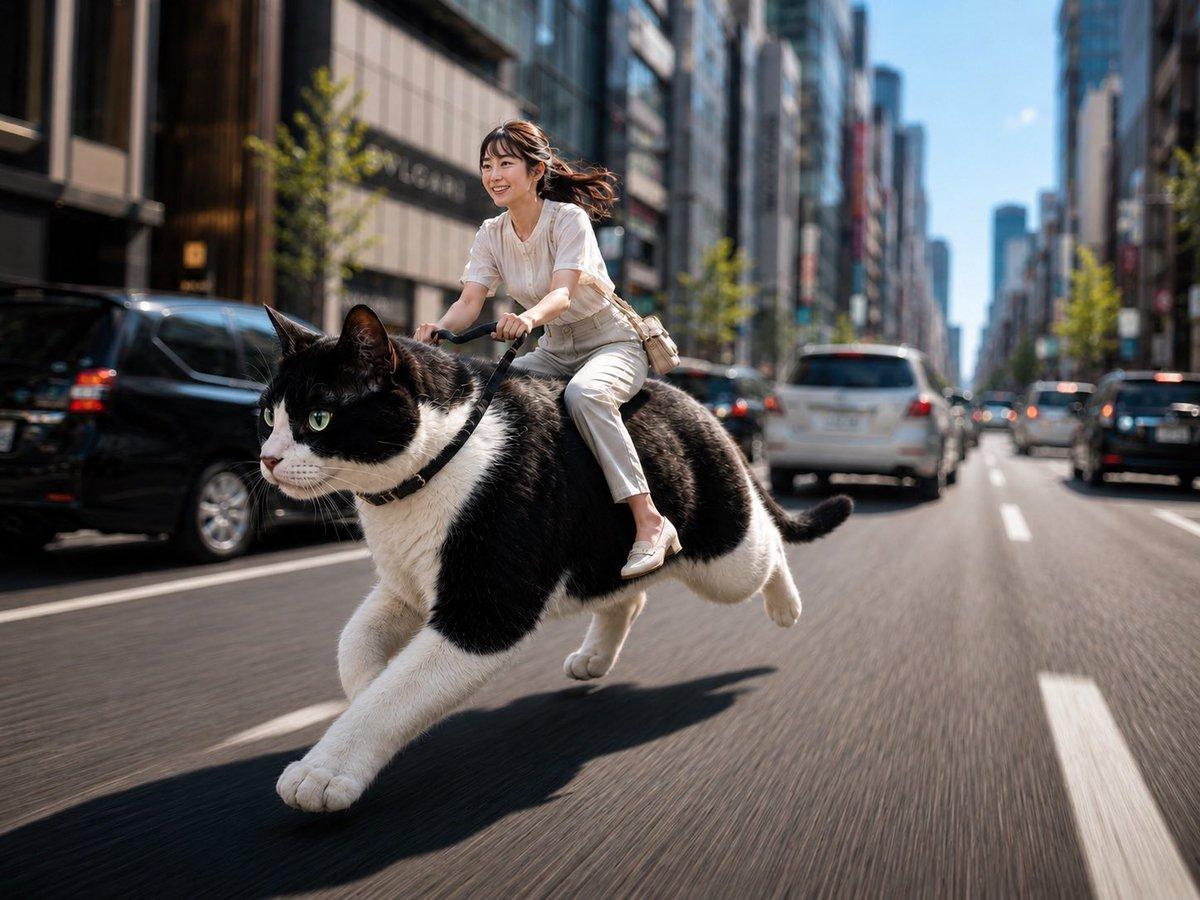
主題: {argument name="主題" default="猫バイクで、おはよう出勤"} 人物・表情: {argument name="人物" default="若い女性"}。やわらかな日系の顔立ち、自然で明るい笑顔。暗めブラウンの髪を、シースルーバングと顔まわりレイヤーを入れた、ふんわりした日系ポニーテールにまとめる。ナチュラルで上品な日系メイク、繊細なアイメイク、淡いピンクチーク、血色感のあるコーラル系リップ、自然なツヤ肌。 服装・ポーズ: 白〜アイボリー系の上品な夏ブラウス、ライトベージュのきれいめパンツ、白いローファー、小さめのベージュショルダーバッグ。{argument name="乗り物" default="巨大な黒白の奶牛猫"}にまたがり、手綱を軽く握りながら前傾気味に乗っている。通勤中のような軽やかさがあり、自然で上品な動き。 背景・光: 朝の都会の大通り。通勤時間帯で車が多く、ビル街の車道を走っている。明るい朝の自然光、澄んだ空気感、爽やかな朝の雰囲気。猫も車も道路の流れに沿って同じ方向へ進んでいる。日本らしい左側通行。背景の街並みや車はやや柔らかくぼけていて、人物と猫がしっかり引き立っている。 構図・カメラ: 横長構図。人物と猫を画面の主役として大きく捉えた、ダイナミックなストリートスナップ。やや低めの視点、35mm〜50mmの自然な画角。人物の顔と猫の顔にしっかりピントを合わせ、背景の建物や車には適度な景深と自然なボケを入れる。道路の奥行きとスピード感が伝わる構図。 質感・スタイル: 高精細、4K品質、リアルな写真風AI画像。ソニーの高性能カメラで撮影したような、透明感のある高清写真の質感。Sony α7シリーズで撮ったようなシャープな解像感、自然なコントラスト、繊細な髪の描写、猫の毛並みの立体感、肌のきめが自然に見える上質な写真人像表現。人物と猫はくっきり、背景は少しだけ柔らかくぼけた、都会的で洗練された仕上がり。 ネガティブ: 低画質、不自然な顔、不自然な手、余分な指、欠けた指、歪んだ指、崩れた顔、左右非対称な目、奇妙な目線、歪んだ体、破綻した服、不自然な猫の体、余分な脚、不自然な毛並み、逆走する車、横断する猫、車道方向の矛盾、背景の不自然な歪位、過度な加工、過度な美肌補正、AI特有の不自然な質感、文字、ロゴ、透かし
Choose the primary action to open PicX Studio with the available template settings. Review the model and format, personalize the creative direction, and generate when ready.
Yes. You can change the subject, setting, lighting, mood, format, and available model controls before creating your image.
This template is free to open and customize. Generation usage is shown in PicX Studio before you create.
Start with GPT Image 2, which is the model associated with this template. You can compare another compatible model for a different finish.
© 2026 PicX Studio. All rights reserved.

Follow a topic to a crawlable collection of related PicX Studio templates.
43,474 public templates available. Verified via the PicX Studio public templates API; refreshed hourly.





![3D Caricature of Celebrity Riding a Cloud — A playful 3D caricature of {argument name="celebrity name" default="[celebrity]"} riding a small puffy cloud like a](https://pbs.twimg.com/media/G7z7SWjbYAA2BxC.jpg)










![Minimalist Flat Vector Travel Poster — Premium minimalist flat-vector travel poster for {argument name="city name" default="[CITY_NAME]"}, 3:4 vertical format.](https://cms-assets.youmind.com/media/1787917359711_3ug846_HQX205cbMAA6F6S-300x400.jpg)




































![Dramatic Low-Key Portrait with Glowing Gemstones — A striking, low-key portrait of a {argument name="reference image" default="[reference image]"} with deep bla](https://pbs.twimg.com/media/G-LpZWUboAA_fNL.jpg)