How do I use the Elegant Anime Girl on a Flower Street template?
Choose the primary action to open PicX Studio with the available template settings. Review the model and format, personalize the creative direction, and generate when ready.
This prompt generates a polished anime-style illustration of a stylish girl in a white frilled dress walking through a bright floral shopping street, ideal for character art and social-media-ready fantasy fashion visuals. Change the subject, setting, or lighting one variable at a time.
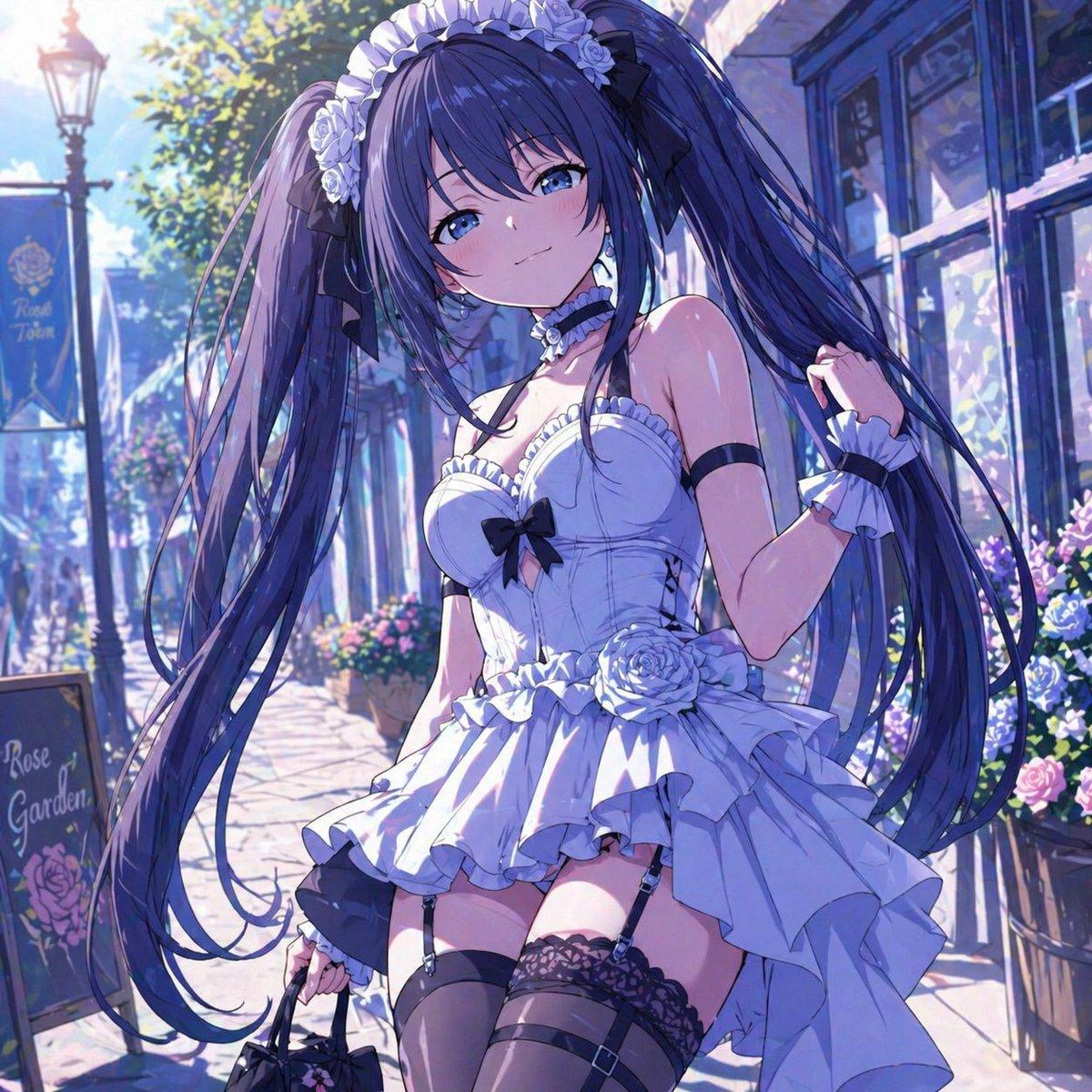
A highly detailed anime illustration of a fashionable young woman on an elegant daytime outing in a European-style flower street, shown in a full-body to three-quarter standing pose. She has {argument name="hair color" default="deep indigo blue"} hair styled in 2 very long twin-tails with soft shine, loose strands, and white rose-and-frill hair accessories tied with black ribbons. She wears a romantic white mini dress with a fitted corset-like bodice, sweetheart neckline, black bow at the chest, layered ruffles, a dramatic asymmetrical overskirt, and white rose decorations at the waist. Her accessories include 1 black choker with a white flower ornament, 1 black armband on the upper arm, 2 white frilled wrist cuffs, 2 black garter straps, 2 sheer black thigh-high stockings with lace tops, and she carries 1 small black handbag. Her expression should feel delicate, elegant, and slightly shy, with one hand lifting a lock of hair and the other holding the bag. Set her in a sunlit cobblestone shopping lane lined with boutique windows, flower planters, and soft pastel architecture, with 2 visible signs reading "Rose Town" and "Rose Garden". Use luminous spring lighting, cool blue-violet shadows, sparkling highlights, abundant floral details, and a polished painterly anime style with a dreamy, refined, high-end illustration finish.
Choose the primary action to open PicX Studio with the available template settings. Review the model and format, personalize the creative direction, and generate when ready.
Yes. You can change the subject, setting, lighting, mood, format, and available model controls before creating your image.
This template is free to open and customize. Generation usage is shown in PicX Studio before you create.
Start with GPT Image 2, which is the model associated with this template. You can compare another compatible model for a different finish.
© 2026 PicX Studio. All rights reserved.

Follow a topic to a crawlable collection of related PicX Studio templates.
43,474 public templates available. Verified via the PicX Studio public templates API; refreshed hourly.
















![Minimalist Flat Vector Travel Poster — Premium minimalist flat-vector travel poster for {argument name="city name" default="[CITY_NAME]"}, 3:4 vertical format.](https://cms-assets.youmind.com/media/1787917359711_3ug846_HQX205cbMAA6F6S-300x400.jpg)



















![Cinematic cross-section food photography prompt — Perfect cinematic cross-section cut through {argument name="dish name" default="[DISH]"}, sliced cle…](https://pbs.twimg.com/media/HB3TlOdW8AAR-hR.jpg)