How do I use the Chibi Catgirl at Yokohama Stadium template?
Choose the primary action to open PicX Studio with the available template settings. Review the model and format, personalize the creative direction, and generate when ready.
This prompt generates a realistic stadium walkway scene with a composited anime chibi catgirl, ideal for playful location-based character art or social media visuals. Change the subject, setting, or lighting one variable at a time.
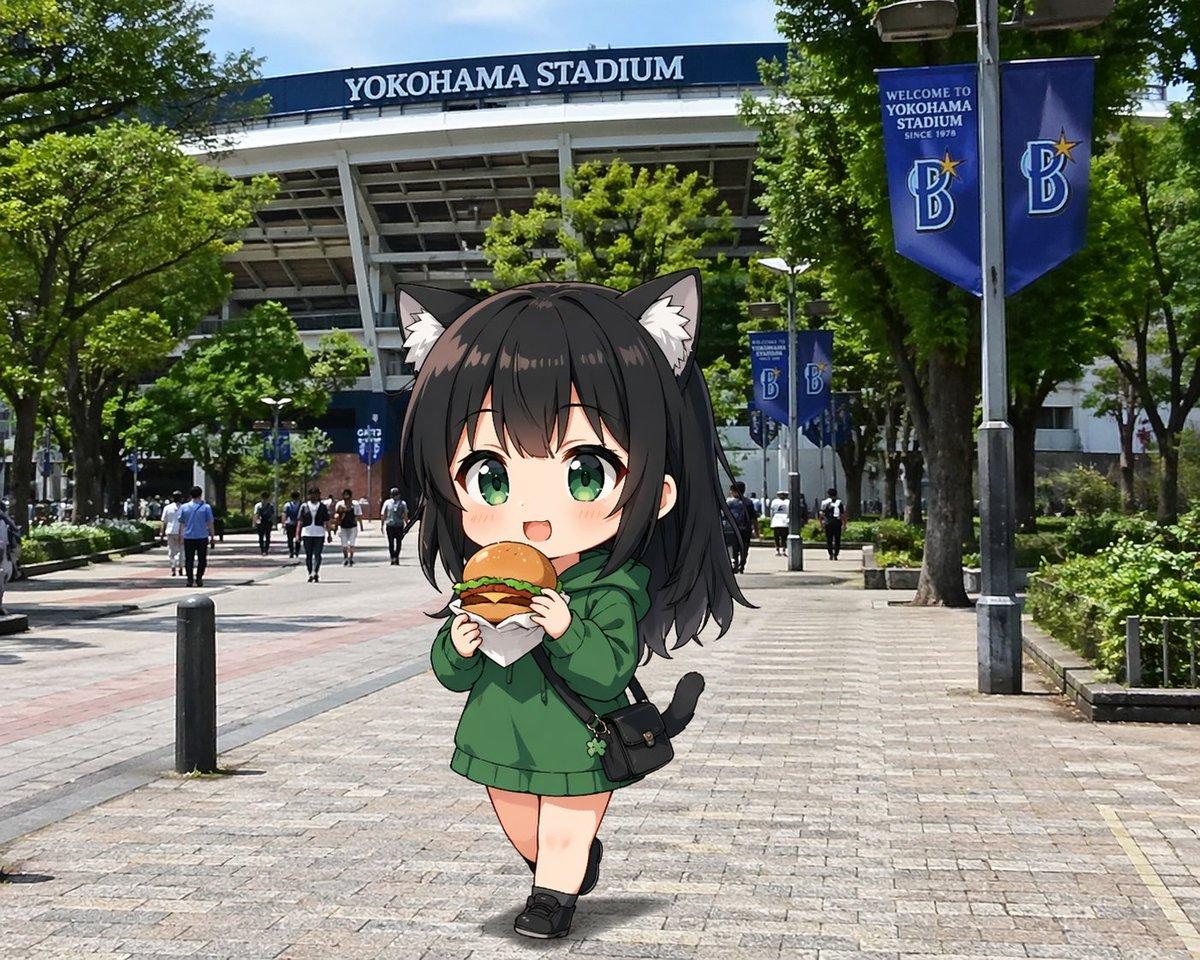
A cute anime chibi girl walking toward the camera on the tree-lined pedestrian approach outside {argument name="stadium name" default="YOKOHAMA STADIUM"}, shown in a realistic modern Japanese city photo background under bright midday sunlight with a blue sky peeking through the trees. The stadium fills the upper background with its large white structural beams and a dark blue sign reading {argument name="stadium name" default="YOKOHAMA STADIUM"}. On the right side, there are 2 tall blue vertical banners on lampposts with a stylized B logo and welcome text for Yokohama Stadium, plus 2 smaller matching blue banners farther down the walkway. The paved plaza is wide and open, with 2 short black bollards visible in the foreground-left area, green hedges and mature trees along both sides, and small pedestrians scattered in the distance for scale. In the center foreground, place 1 super-deformed catgirl character composited naturally into the scene: petite chibi proportions, oversized head, soft anime shading, pale skin, long slightly tousled dark hair with bangs, fluffy cat ears, and a small black cat tail. She wears an oversized {argument name="hoodie color" default="forest green"} hoodie that falls like a short dress, black low-cut shoes, and 1 small black crossbody bag with a flap and tiny charm hanging from it. She is holding 1 wrapped burger or sandwich with both hands near her mouth as if eating while walking. Her pose is slightly pigeon-toed and casual, one leg crossing in front of the other, giving a shy adorable feeling. Use a whimsical contrast between highly realistic street photography and a polished anime sticker-like character with clean outlines and subtle shadowing on the pavement. Keep the face centered but obscured by a large square mosaic blur censor block.
Choose the primary action to open PicX Studio with the available template settings. Review the model and format, personalize the creative direction, and generate when ready.
Yes. You can change the subject, setting, lighting, mood, format, and available model controls before creating your image.
This template is free to open and customize. Generation usage is shown in PicX Studio before you create.
Start with GPT Image 2, which is the model associated with this template. You can compare another compatible model for a different finish.
© 2026 PicX Studio. All rights reserved.

Follow a topic to a crawlable collection of related PicX Studio templates.
43,474 public templates available. Verified via the PicX Studio public templates API; refreshed hourly.
















![Minimalist Flat Vector Travel Poster — Premium minimalist flat-vector travel poster for {argument name="city name" default="[CITY_NAME]"}, 3:4 vertical format.](https://cms-assets.youmind.com/media/1787917359711_3ug846_HQX205cbMAA6F6S-300x400.jpg)
























![Melting Transition Product Photography Prompt — {
"scene": {
"subject": "{argument name="product name" default="[PRODUCT]"}",
"environment": "empty sp](https://pbs.twimg.com/media/G_wgq3Wb0AAaVWh.jpg)




![Encyclopedic 3D Infographic Evolution Chart — 役割と主題: 16:9 比率の巨大で百科事典的な 3D インフォグラフィックポスター。タイトル:「THE EVOLUTION OF {argument name="製品名" default="[製品名]"}」。ビジュアルスタイル](https://pbs.twimg.com/media/G95BJy8bMAAMeUO.jpg)
![Image-to-Beverage Mockup Conversion — [AI指示: 画像→ペットボトル飲料変換]
[入力画像] を分析する。
抽出: [メインモチーフ]、[雰囲気]、[カラーパレット]を読み取る。
ドリンク選択: 画像の色と雰囲気からドリンクを自由に決める({argument name="ドリ](https://pbs.twimg.com/media/G_LW9LPaUAA0Kx2.jpg)