How do I use the Medieval Castle Mock Duel template?
Choose the primary action to open PicX Studio with the available template settings. Review the model and format, personalize the creative direction, and generate when ready.
A cinematic realistic fantasy scene of a sword duel in a castle courtyard, useful for medieval battle or RPG concept art. Change the subject, setting, or lighting one variable at a time.
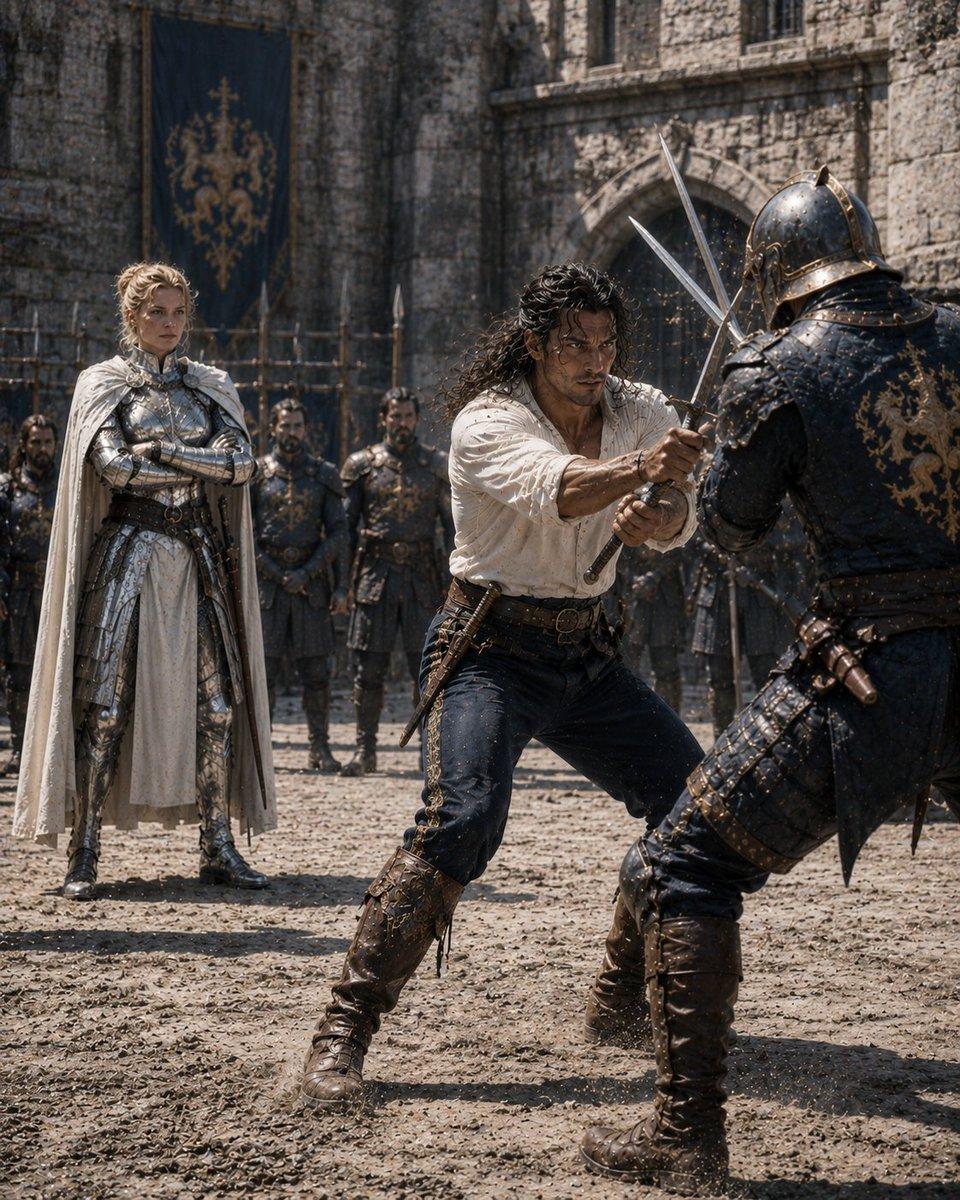
Create a cinematic medieval fantasy mock duel scene in a stone castle courtyard, titled by mood as {argument name="scene theme" default="mock battle"}. Use a vertical 4:5 composition, realistic high-detail photography style, harsh midday sunlight, dusty air, flying grit and tiny sparks where weapons meet. Show exactly 8 visible people: 2 foreground duelists, 1 noble armored observer, and 5 background guards. In the foreground center, a rugged swordsman with {argument name="hero hair" default="long dark curly hair"} wears an off-white loose linen shirt, dark trousers, a leather belt, a side dagger, and tall worn brown boots; he crouches forward with both hands gripping a sword, blocking an attack. On the right foreground, an opponent in dark blue-black plate armor with ornate gold trim, a closed helmet, layered leather straps, and tall boots lunges in with crossed blades, partially back-facing the viewer. On the left midground, a regal knight commander with {argument name="commander armor" default="polished silver plate armor and a white cape"} stands calmly with arms crossed, watching the duel. Behind them, place 5 armored guards standing in a loose line with spears and dark armor, slightly out of focus. The background is an old gray stone fortress wall with an arched gate, narrow windows, wooden palisade details, and a large dark blue hanging banner bearing a gold heraldic lion-like crest. Faces should be anonymized with simple flat brown rectangular face coverings on all clearly visible people, matching the image’s censored look. Emphasize gritty medieval realism, textured armor, scratches, dust, leather, cobblestone ground, dramatic action, shallow depth of field, no modern objects, no text, no watermark.
Choose the primary action to open PicX Studio with the available template settings. Review the model and format, personalize the creative direction, and generate when ready.
Yes. You can change the subject, setting, lighting, mood, format, and available model controls before creating your image.
This template is free to open and customize. Generation usage is shown in PicX Studio before you create.
Start with GPT Image 2, which is the model associated with this template. You can compare another compatible model for a different finish.
© 2026 PicX Studio. All rights reserved.

Follow a topic to a crawlable collection of related PicX Studio templates.
43,474 public templates available. Verified via the PicX Studio public templates API; refreshed hourly.










![Minimalist Flat Vector Travel Poster — Premium minimalist flat-vector travel poster for {argument name="city name" default="[CITY_NAME]"}, 3:4 vertical format.](https://cms-assets.youmind.com/media/1787917359711_3ug846_HQX205cbMAA6F6S-300x400.jpg)
































![33-swat-takedown-seedance-2-0-cinematic — [Shot 1: Frontal Menacing Shot] A medium shot of a SWAT officer in full tactical gear, gas mask, and…](/_next/image?url=https%3A%2F%2Fcdn.picxstudio.com%2Fuploads%2Fpost33_img0_6ce73230-bce9-45e0-861a-a510aaa562aa.jpg&w=828&q=100)