How do I use the Vintage Alpine Train Lounge template?
Choose the primary action to open PicX Studio with the available template settings. Review the model and format, personalize the creative direction, and generate when ready.
Generates a photorealistic ultra-wide winter mountain view from inside a cozy vintage train observation lounge. Change the subject, setting, or lighting one variable at a time.
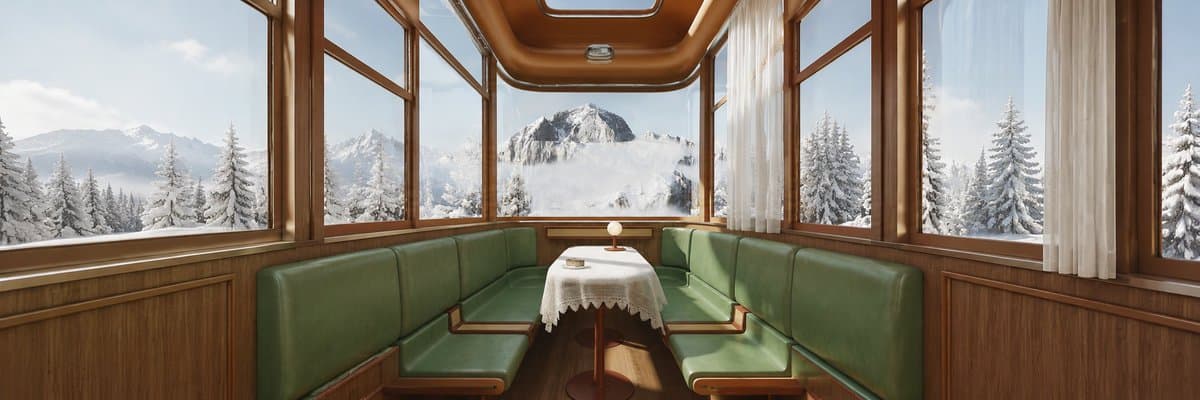
Create a photorealistic ultra-wide 3:1 panoramic interior scene inside a vintage alpine train dining car or observation lounge, with warm polished wood paneling, rounded wooden ceiling trim, large rectangular windows wrapping around both sides and the front, and soft sheer white curtains on the right. The seating consists of two long facing green leather bench sofas forming a cozy booth, with simple wooden armrests and bases. In the center is a small round pedestal table covered by a white lace tablecloth, holding a tiny glowing table lamp and a small book or object. Outside every window is a bright winter mountain landscape: snow-covered pine trees in the foreground, misty snowy peaks in the distance, and a large central mountain framed by the front window under pale blue daylight. Use realistic natural light, crisp snow reflections, subtle interior shadows, nostalgic luxury railcar design, symmetrical centered composition, calm Sunday getaway mood, no people, no text. Emphasize high detail, cinematic realism, clean glass, warm brown wood against cool white snow, and a peaceful panoramic travel atmosphere. Customize the scene as a {argument name="vehicle type" default="vintage alpine train observation lounge"}, with {argument name="seat color" default="deep green leather"}, {argument name="outside landscape" default="snowy alpine mountains and pine forest"}, {argument name="time of day" default="bright winter morning"}, and {argument name="aspect ratio" default="3:1 ultra-wide panorama"}.
Choose the primary action to open PicX Studio with the available template settings. Review the model and format, personalize the creative direction, and generate when ready.
Yes. You can change the subject, setting, lighting, mood, format, and available model controls before creating your image.
This template is free to open and customize. Generation usage is shown in PicX Studio before you create.
Start with GPT Image 2, which is the model associated with this template. You can compare another compatible model for a different finish.
© 2026 PicX Studio. All rights reserved.

Follow a topic to a crawlable collection of related PicX Studio templates.
43,474 public templates available. Verified via the PicX Studio public templates API; refreshed hourly.









![Minimalist Flat Vector Travel Poster — Premium minimalist flat-vector travel poster for {argument name="city name" default="[CITY_NAME]"}, 3:4 vertical format.](https://cms-assets.youmind.com/media/1787917359711_3ug846_HQX205cbMAA6F6S-300x400.jpg)