How do I use the Rainy Dutch Street Vintage BMW template?
Choose the primary action to open PicX Studio with the available template settings. Review the model and format, personalize the creative direction, and generate when ready.
A realistic Kodak-film style photo prompt for creating a classic car parked on a rain-wet Dutch neighborhood street. Change the subject, setting, or lighting one variable at a time.
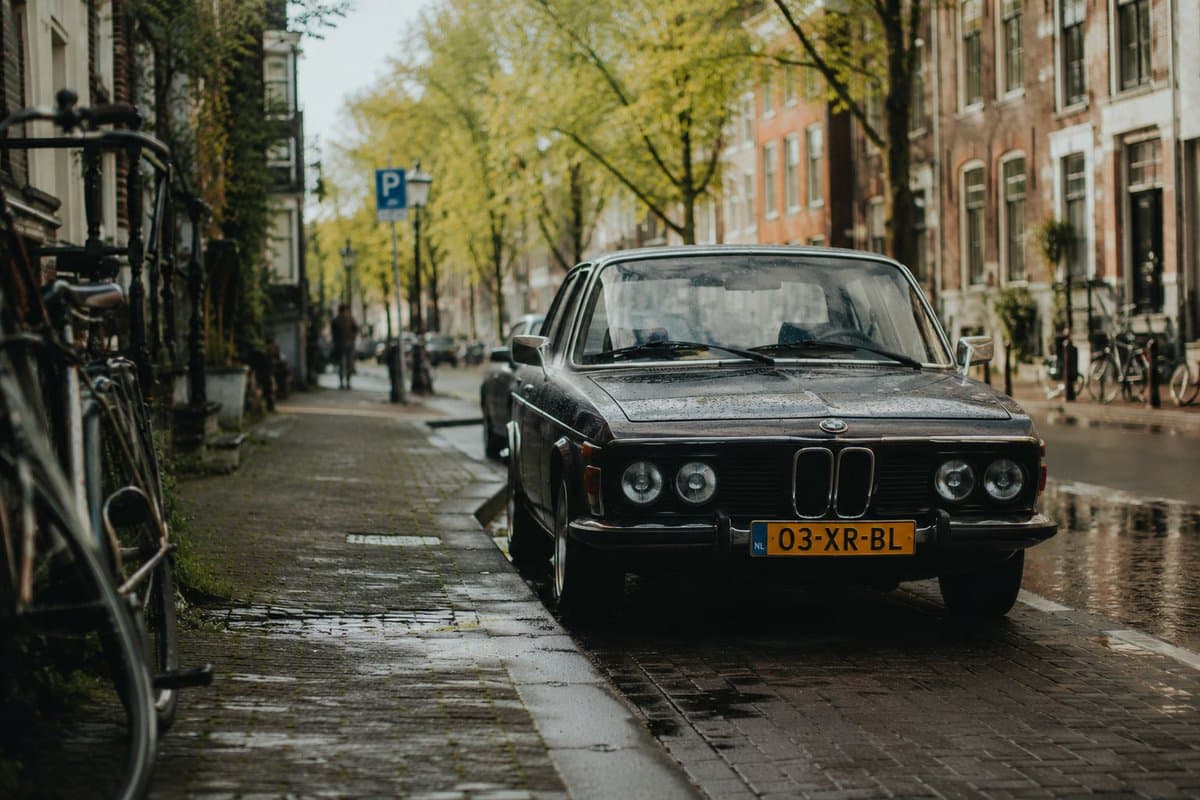
A realistic cinematic street photograph of a {argument name="car model" default="black vintage BMW coupe from the 1970s"} parked at the curb in a quiet Dutch canal-neighborhood street after rainfall. The car is front-facing at a slight angle, centered slightly right, with chrome trim, round headlights, a yellow Dutch license plate reading {argument name="license plate text" default="03-XR-BL"}, and visible raindrops on the hood and windshield. The setting shows recognizable Dutch street features: narrow brick sidewalk and wet brick paving, small puddles reflecting sunlight, tall narrow brick townhouses with large windows on both sides, bicycles parked along railings and facades, a blue parking sign, slim street trees with fresh green leaves lining the road, and a softly blurred row of parked cars in the background. Sunlight breaks through after rain, creating warm highlights on the wet street while the overall mood remains slightly moody and nostalgic. Shoot as if on a vintage Helios 44-2 58mm lens, shallow depth of field, subject sharply focused, swirly/subtle anamorphic bokeh in the background, Kodak color film look, natural grain, muted greens and warm browns, realistic proportions, no people in focus, no modern distractions, no watermark.
Choose the primary action to open PicX Studio with the available template settings. Review the model and format, personalize the creative direction, and generate when ready.
Yes. You can change the subject, setting, lighting, mood, format, and available model controls before creating your image.
This template is free to open and customize. Generation usage is shown in PicX Studio before you create.
Start with GPT Image 2, which is the model associated with this template. You can compare another compatible model for a different finish.
© 2026 PicX Studio. All rights reserved.

Follow a topic to a crawlable collection of related PicX Studio templates.
43,474 public templates available. Verified via the PicX Studio public templates API; refreshed hourly.










![Minimalist Flat Vector Travel Poster — Premium minimalist flat-vector travel poster for {argument name="city name" default="[CITY_NAME]"}, 3:4 vertical format.](https://cms-assets.youmind.com/media/1787917359711_3ug846_HQX205cbMAA6F6S-300x400.jpg)

























![Energy Figure in Motion — A {argument name="character type" default="[CHARACTER / FIGURE]"} entirely built from flowing {argum…](https://pbs.twimg.com/media/G9VE3JxbMAA1yxm.jpg)