How do I use the Vintage Ice Cream Parlor Pinup template?
Choose the primary action to open PicX Studio with the available template settings. Review the model and format, personalize the creative direction, and generate when ready.
A photorealistic retro diner pinup portrait featuring a blonde woman leaning at a marble counter beside a strawberry sundae. Change the subject, setting, or lighting one variable at a time.
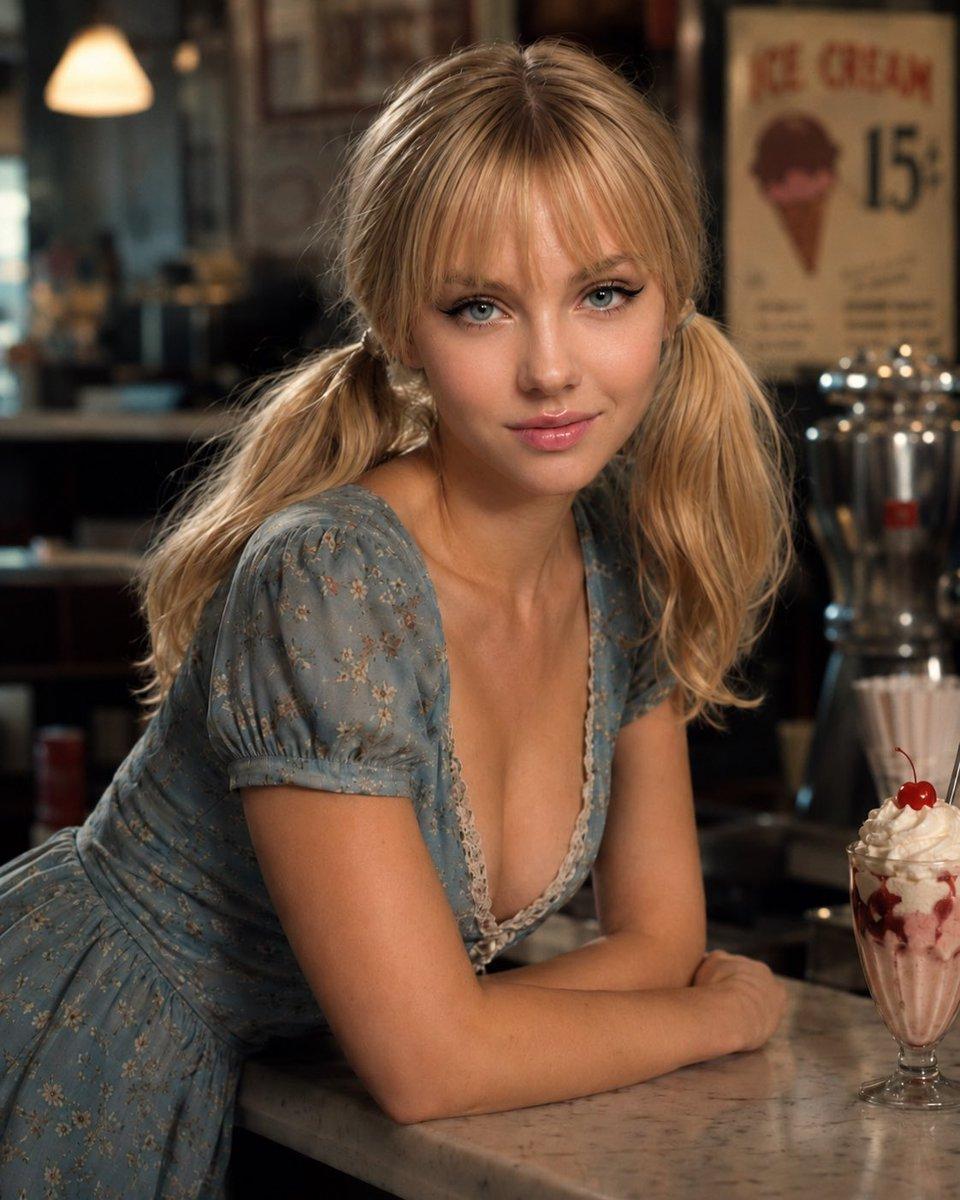
Create a photorealistic 1950s-inspired pinup portrait of {argument name="character name" default="Emily Vetrova"}, a young blonde woman with soft blue eyes, glossy lips, winged eyeliner, straight bangs, and exactly two loose low pigtails tied behind her shoulders. She is leaning forward on her crossed forearms over a polished white marble diner counter, looking directly into the camera with a subtle confident smile. She wears a fitted pale dusty-blue floral dress with short puff sleeves, a deep neckline, and delicate cream lace trim, giving a wholesome vintage soda-fountain glamour look. The scene is a warmly lit retro ice cream parlor with shallow depth of field: blurred pendant lamp glow on the left, dark wood and glass behind her, one vintage wall poster in the background reading “ICE CREAM” with a large “15¢” and an ice cream cone graphic, and shiny chrome soda-fountain equipment on the right. On the counter at the lower right, include exactly one tall glass strawberry sundae with pink ice cream, whipped cream, syrup streaks, and exactly one red cherry on top. Use cinematic natural warm lighting, realistic skin texture, soft bokeh, 3/4 close-up composition, high detail, 4:5 vertical framing, nostalgic Americana atmosphere, no watermark, no extra people, no modern objects.
Choose the primary action to open PicX Studio with the available template settings. Review the model and format, personalize the creative direction, and generate when ready.
Yes. You can change the subject, setting, lighting, mood, format, and available model controls before creating your image.
This template is free to open and customize. Generation usage is shown in PicX Studio before you create.
Start with GPT Image 2, which is the model associated with this template. You can compare another compatible model for a different finish.
© 2026 PicX Studio. All rights reserved.

Follow a topic to a crawlable collection of related PicX Studio templates.
43,474 public templates available. Verified via the PicX Studio public templates API; refreshed hourly.







![Minimalist Flat Vector Travel Poster — Premium minimalist flat-vector travel poster for {argument name="city name" default="[CITY_NAME]"}, 3:4 vertical format.](https://cms-assets.youmind.com/media/1787917359711_3ug846_HQX205cbMAA6F6S-300x400.jpg)