How do I use the Moonlit Koto Player template?
Edit the prompt in the box under the preview — the template's model and format are already selected — and press Generate. Your version appears right on this page.
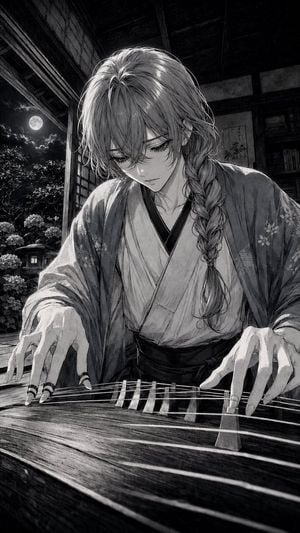
A detailed prompt for creating a sepia anime album-cover scene of a melancholic kimono-clad musician playing koto in a moonlit traditional Japanese room.

This template uses your photo — add one with the + button.
Create a vertical Japanese dark-fantasy anime album-cover illustration of {argument name="character name" default="a solitary androgynous young musician"} seated indoors at night, playing a long wooden koto with many strings and triangular bridges in the foreground. The character has {argument name="hair color" default="pale silver"} long layered hair with loose bangs and one thick side braid, delicate sharp facial features, downcast melancholy eyes, and a calm sorrowful expression, wearing {argument name="outfit" default="a loose patterned kimono robe over darker inner layers"}. Their hands are spread over the strings, one hand plucking near the left side and the other poised over the center, with graceful fingers and subtle tension. Set the scene in an old traditional Japanese room opening onto a moonlit garden: shoji screens, dark wooden beams, an open veranda, hanging willow branches, dense shrubs and flowers outside, and a bright full moon visible in the upper right. Include antique interior details: wooden shelves filled with books and papers on the left, a small glowing lantern, stacked drawers, scattered old manuscripts and books across the floor, and worn tatami or wood floorboards. Use a sepia monochrome ink-wash palette with warm beige highlights and deep black shadows, extremely detailed linework, crosshatching, manga engraving texture, cinematic chiaroscuro, soft moonbeam dust particles, and a quiet haunted atmosphere. Composition should be portrait 2:3, character centered slightly right, koto sweeping diagonally across the lower half, moon framed by dangling branches, high detail throughout, no modern objects, no text, no watermark.
Create a vertical Japanese dark-fantasy anime album-cover illustration of {argument name="character name" default="a solitary androgynous young musician"} seated indoors at night, playing a long wooden koto with many strings and triangular bridges in the foreground. The character has {argument name="hair color" default="pale silver"} long layered hair with loose bangs and one thick side braid, delicate sharp facial features, downcast melancholy eyes, and a calm sorrowful expression, wearing {argument name="outfit" default="a loose patterned kimono robe over darker inner layers"}. Their hands are spread over the strings, one hand plucking near the left side and the other poised over the center, with graceful fingers and subtle tension. Set the scene in an old traditional Japanese room opening onto a moonlit garden: shoji screens, dark wooden beams, an open veranda, hanging willow branches, dense shrubs and flowers outside, and a bright full moon visible in the upper right. Include antique interior details: wooden shelves filled with books and papers on the left, a small glowing lantern, stacked drawers, scattered old manuscripts and books across the floor, and worn tatami or wood floorboards. Use a sepia monochrome ink-wash palette with warm beige highlights and deep black shadows, extremely detailed linework, crosshatching, manga engraving texture, cinematic chiaroscuro, soft moonbeam dust particles, and a quiet haunted atmosphere. Composition should be portrait 2:3, character centered slightly right, koto sweeping diagonally across the lower half, moon framed by dangling branches, high detail throughout, no modern objects, no text, no watermark.
Edit the prompt in the box under the preview — the template's model and format are already selected — and press Generate. Your version appears right on this page.
Yes. You can change the subject, setting, lighting, mood, format, and available model controls before creating your image.
Opening and editing this template is free. Generating uses credits, shown on the Generate button when you are signed in.
Start with GPT Image 2, which is the model associated with this template. You can compare another compatible model for a different finish.
Follow a topic to a crawlable collection of related PicX Studio templates.