How do I use the Moonlit Gothic Prison Warden template?
Choose the primary action to open PicX Studio with the available template settings. Review the model and format, personalize the creative direction, and generate when ready.
A cinematic anime portrait prompt for creating a stern gothic prison warden seated on an ornate sofa in a moonlit cell.
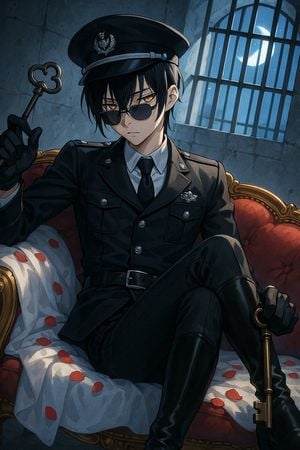
Create a dark, polished anime illustration of a stern young male prison warden or gothic officer, {argument name="character name" default="unnamed warden"}, seated confidently on an ornate red velvet Victorian sofa inside a moonlit stone prison cell. He has pale skin, messy {argument name="hair color" default="black"} hair falling over his face, sharp amber-gold eyes visible behind dark round sunglasses, and a cold, serious expression. Dress him in a fitted black military-style uniform with exactly 8 visible uniform details: peaked officer cap with silver badge, silver cap band, black tie, white shirt collar, shoulder epaulettes, chest badge, two flap chest pockets, and black belt with silver buckle. Add black gloves and tall glossy black boots; pose him with one leg crossed, one hand raised holding an antique skeleton key with a clover-shaped bow, and the other hand resting on a second large brass key near his boot. The sofa should have carved gold trim, deep red tufted upholstery, and a rumpled pale blue-white sheet scattered with red rose petals; show multiple individual petals across the sheet and seat. Background: cracked gray-blue stone wall, tall barred arched window on the upper right, bright crescent moon and small stars visible through the bars, cool blue moonlight streaming in and contrasting with warm gold sofa accents. Composition: vertical portrait, dramatic low-key lighting, three-quarter view from slightly above, character centered and filling most of the frame, cinematic shadows, crisp line art, detailed cel-shaded anime rendering, moody gothic atmosphere, high detail, no text, no watermark.
Choose the primary action to open PicX Studio with the available template settings. Review the model and format, personalize the creative direction, and generate when ready.
Yes. You can change the subject, setting, lighting, mood, format, and available model controls before creating your image.
This template is free to open and customize. Generation usage is shown in PicX Studio before you create.
Start with GPT Image 2, which is the model associated with this template. You can compare another compatible model for a different finish.
Follow a topic to a crawlable collection of related PicX Studio templates.