How do I use the Kimono Guitarist Fashion Illustration template?
Choose the primary action to open PicX Studio with the available template settings. Review the model and format, personalize the creative direction, and generate when ready.
A tall anime-style fashion poster of a modern kimono-clad guitarist with sakura, waves, and geometric Japanese ornamentation.
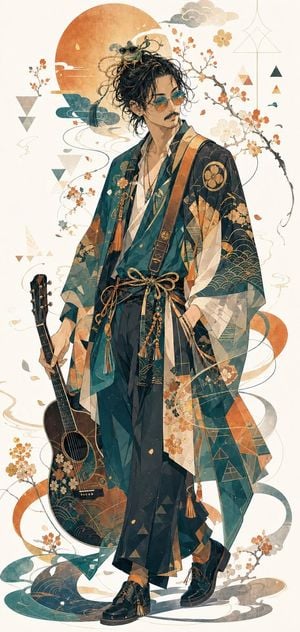
Create a tall vertical full-body anime fashion illustration of a stylish young man in modern Japanese kimono streetwear, standing confidently against an off-white parchment background. The character has messy curly {argument name="hair color" default="black"} hair piled high with loose strands, small round sunglasses resting on top of his head, and a refined slim build; leave the face softly obscured or minimally detailed for a fashion-poster feel. Dress him in layered teal, deep navy, cream, and muted orange kimono robes with translucent geometric panels, floral sakura motifs, fan crests, wave patterns, triangle accents, tassels, cords, and a tied rope obi at the waist, paired with loose dark hakama-style trousers and glossy black lace-up shoes with tassel details. He holds one acoustic guitar in his left hand, dark wood body decorated with matching gold-orange floral and wave ornamentation. Surround him with elegant Japanese-inspired decorative elements: one large orange sun disk behind the upper body, two main flowering cherry blossom branches curling around him, several small falling petals, stylized teal and orange ribbon-like waves, pale cloud shapes, thin gold line art, and scattered geometric triangles. Use an airy ukiyo-e-meets-contemporary-anime style with watercolor texture, delicate ink outlines, muted teal/orange/gold palette, intricate textile patterns, high detail, full body visible from hair to shoes, centered composition, no text, no watermark, clean cream negative space.
Choose the primary action to open PicX Studio with the available template settings. Review the model and format, personalize the creative direction, and generate when ready.
Yes. You can change the subject, setting, lighting, mood, format, and available model controls before creating your image.
This template is free to open and customize. Generation usage is shown in PicX Studio before you create.
Start with GPT Image 2, which is the model associated with this template. You can compare another compatible model for a different finish.
Follow a topic to a crawlable collection of related PicX Studio templates.